



Skip to content
ESBook a demo

Closing software for property sales

From reservation to keys, nothing slips through.

Annexa runs the closing of every sale: deposit contract, transfer tax or VAT and stamp duty, the 3% non-resident withholding, cheques, bank and notary reports and tasks after signing, with documents in Spanish and English.

30-minute demo with a sample sale

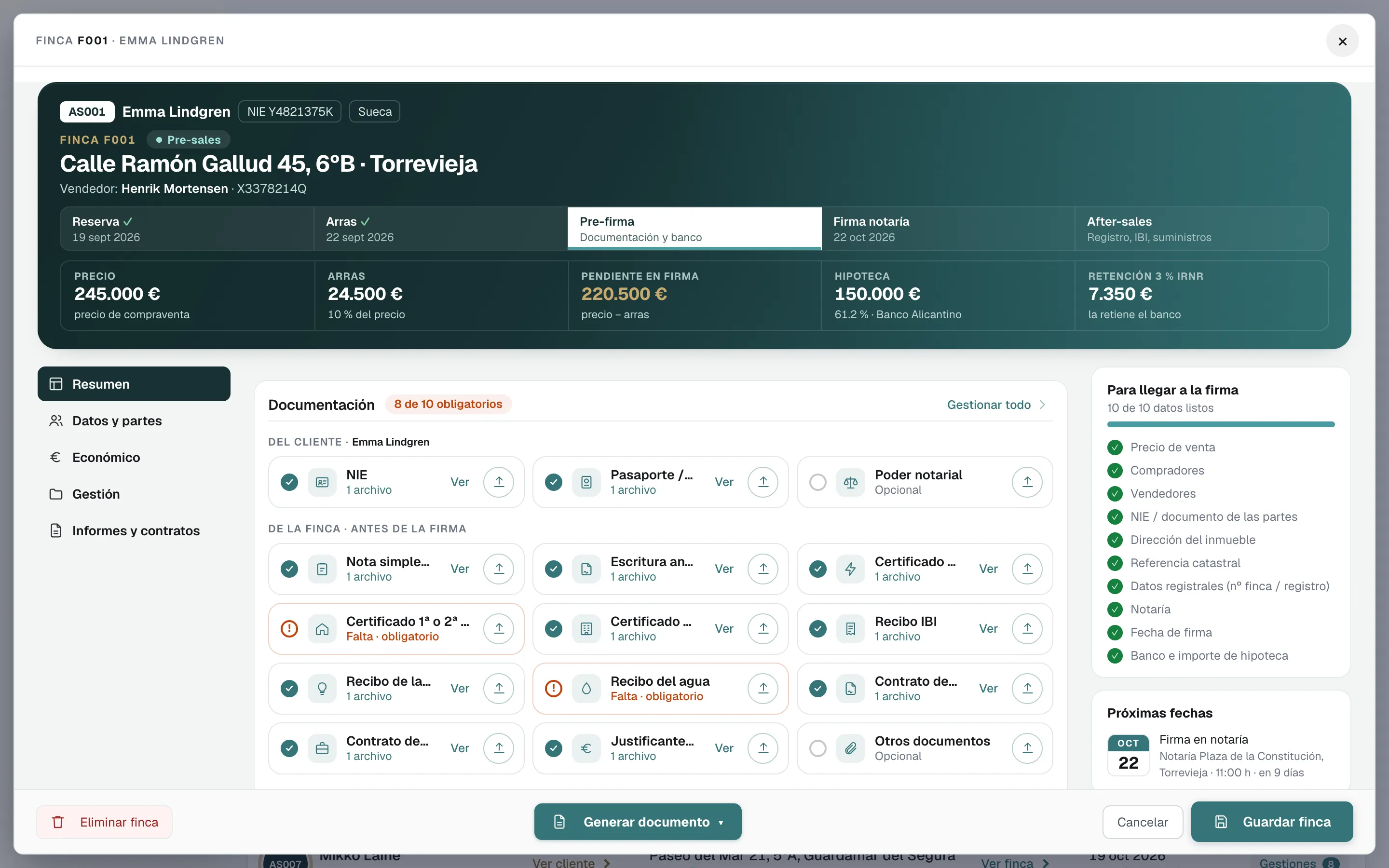
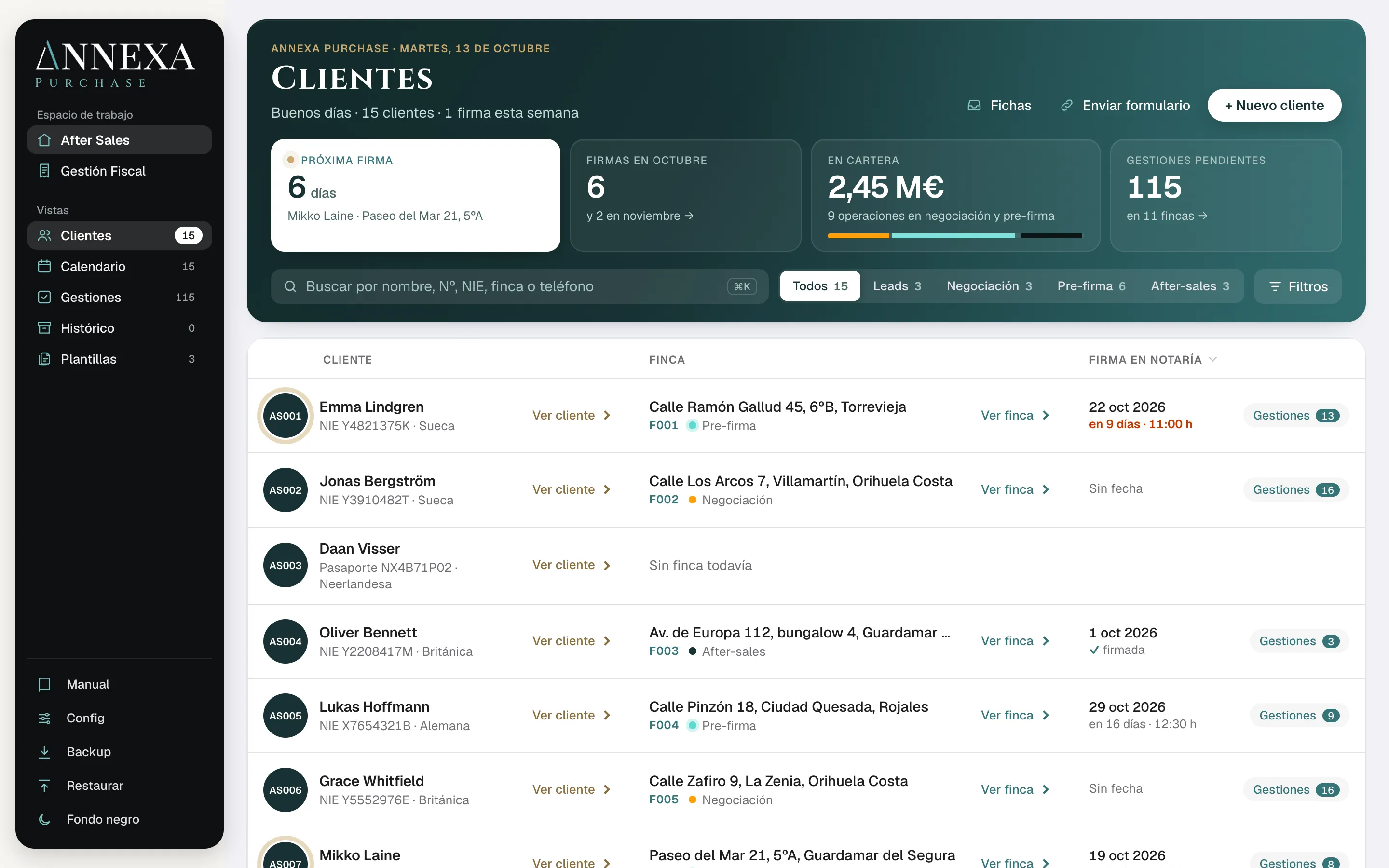
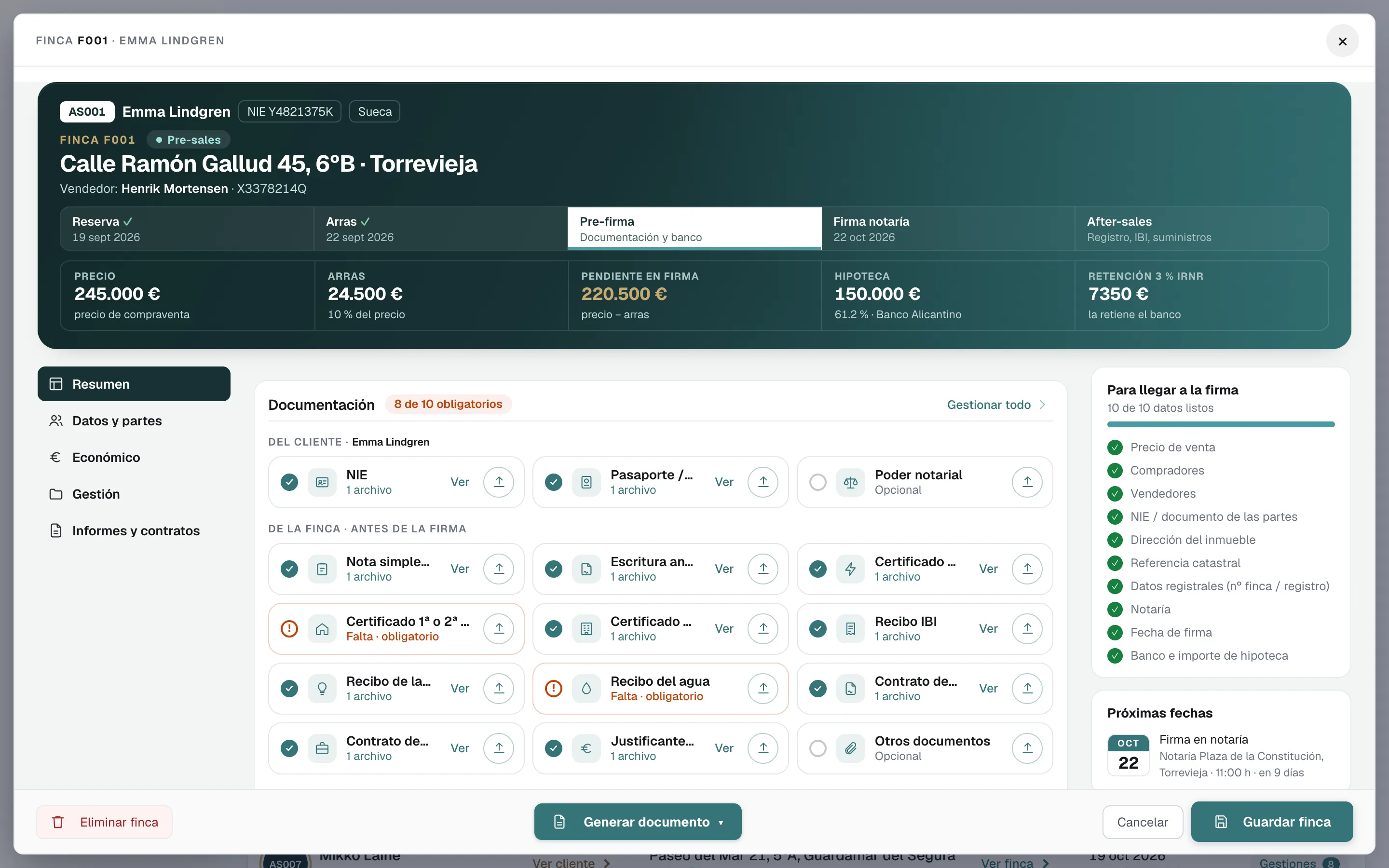
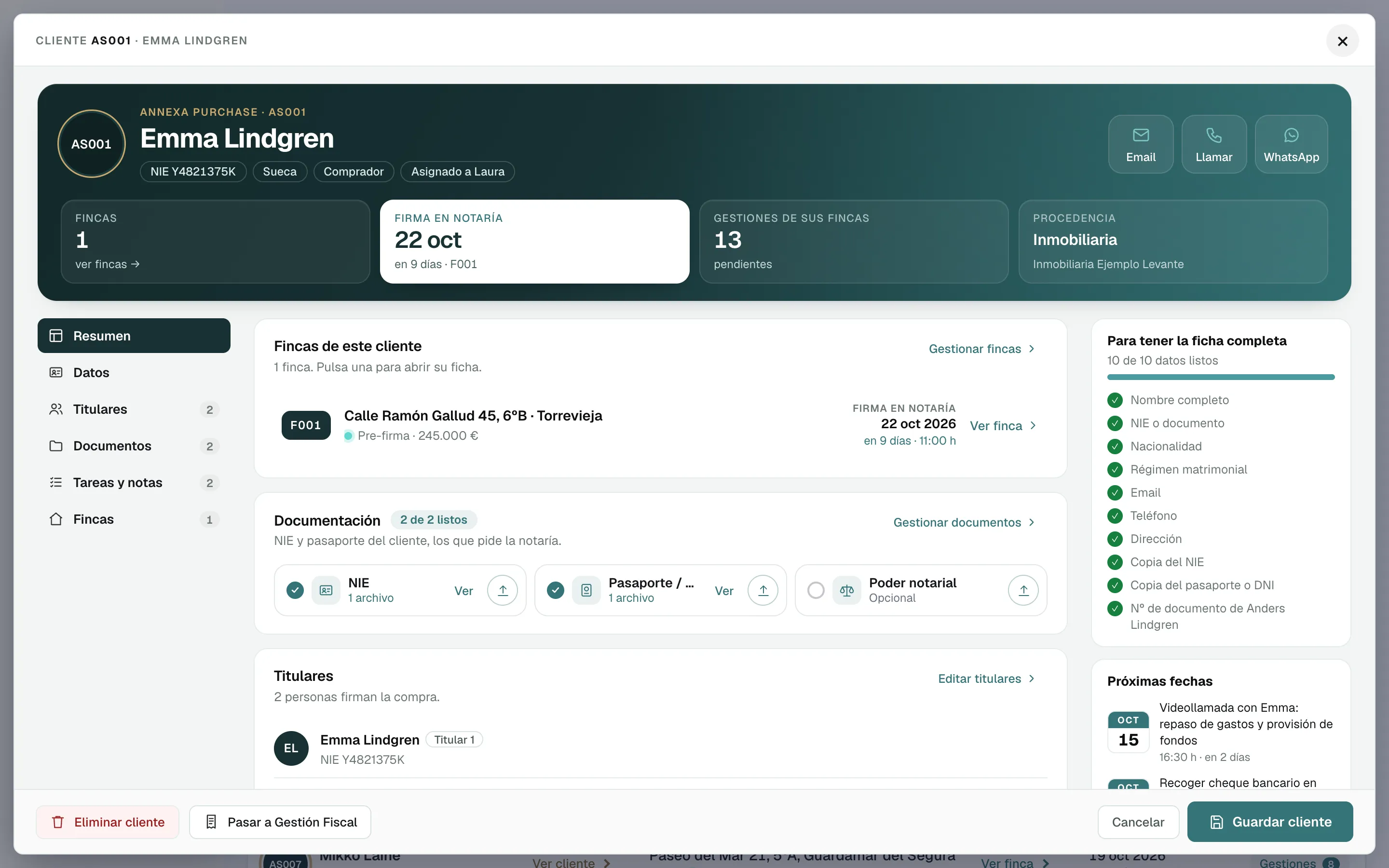
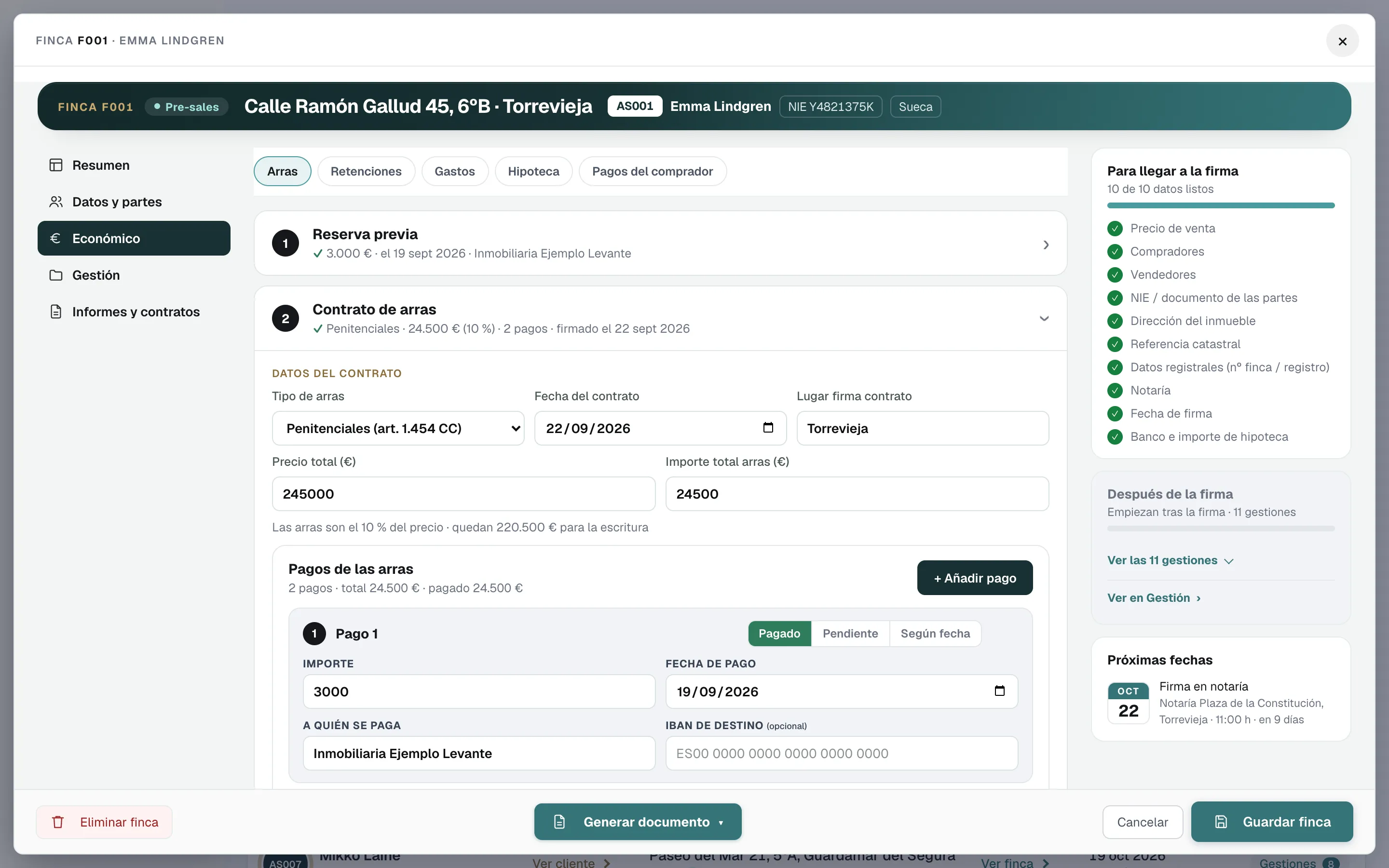
Client file: summary, documents and joint buyers (made-up data)
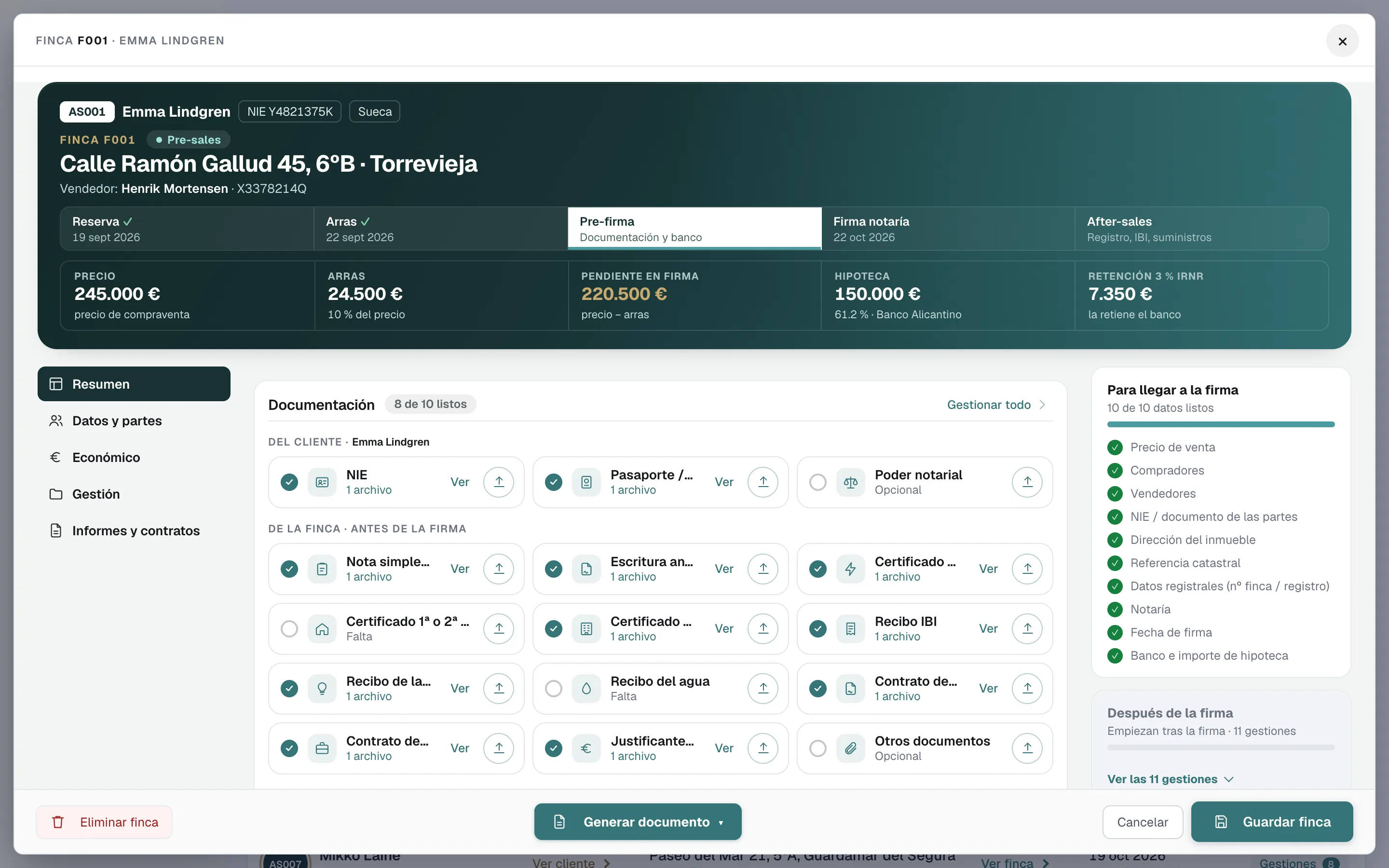
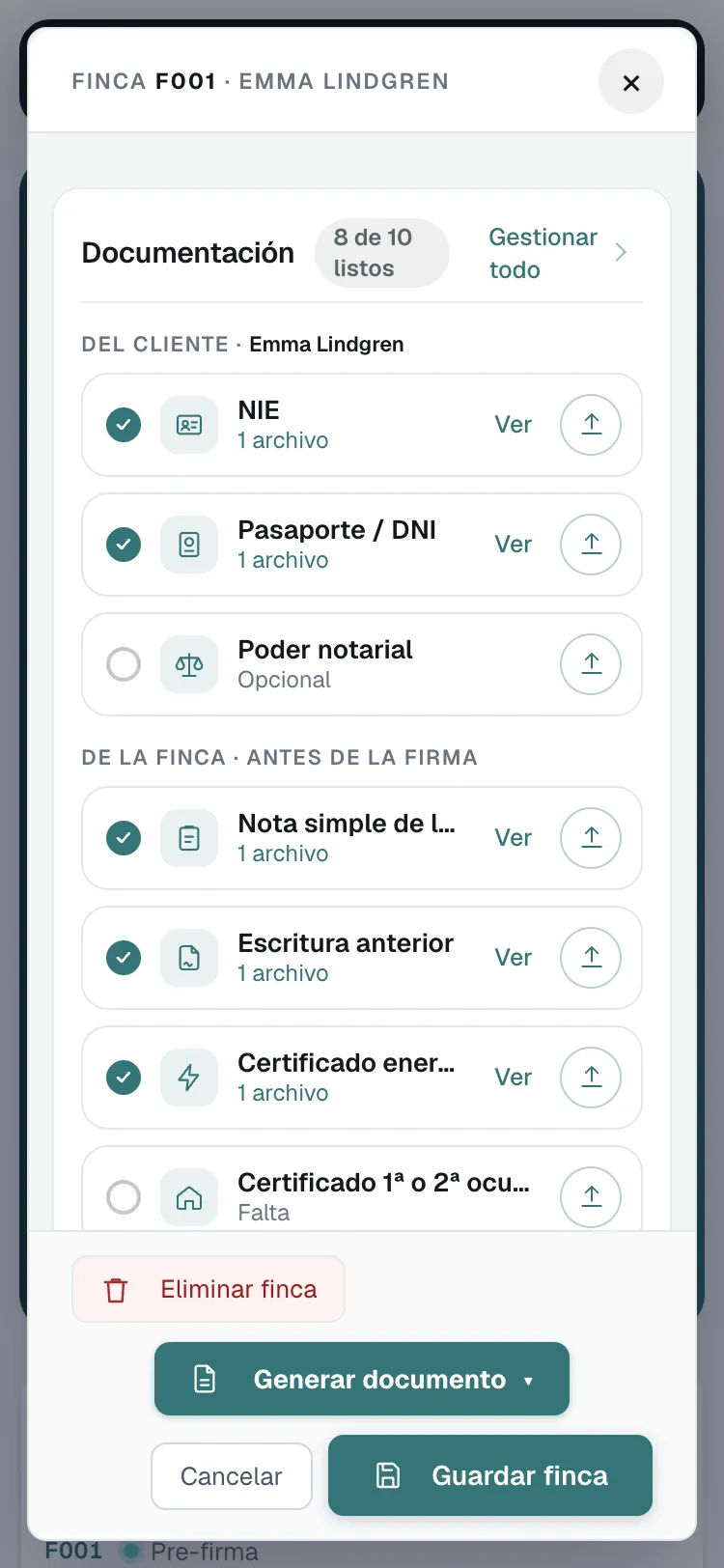
A property file on a phone: documents and what is missing (made-up data)
  • Reservation
  • Deposit contract in Spanish and English
  • Transfer tax, VAT and stamp duty
  • 3% non-resident withholding
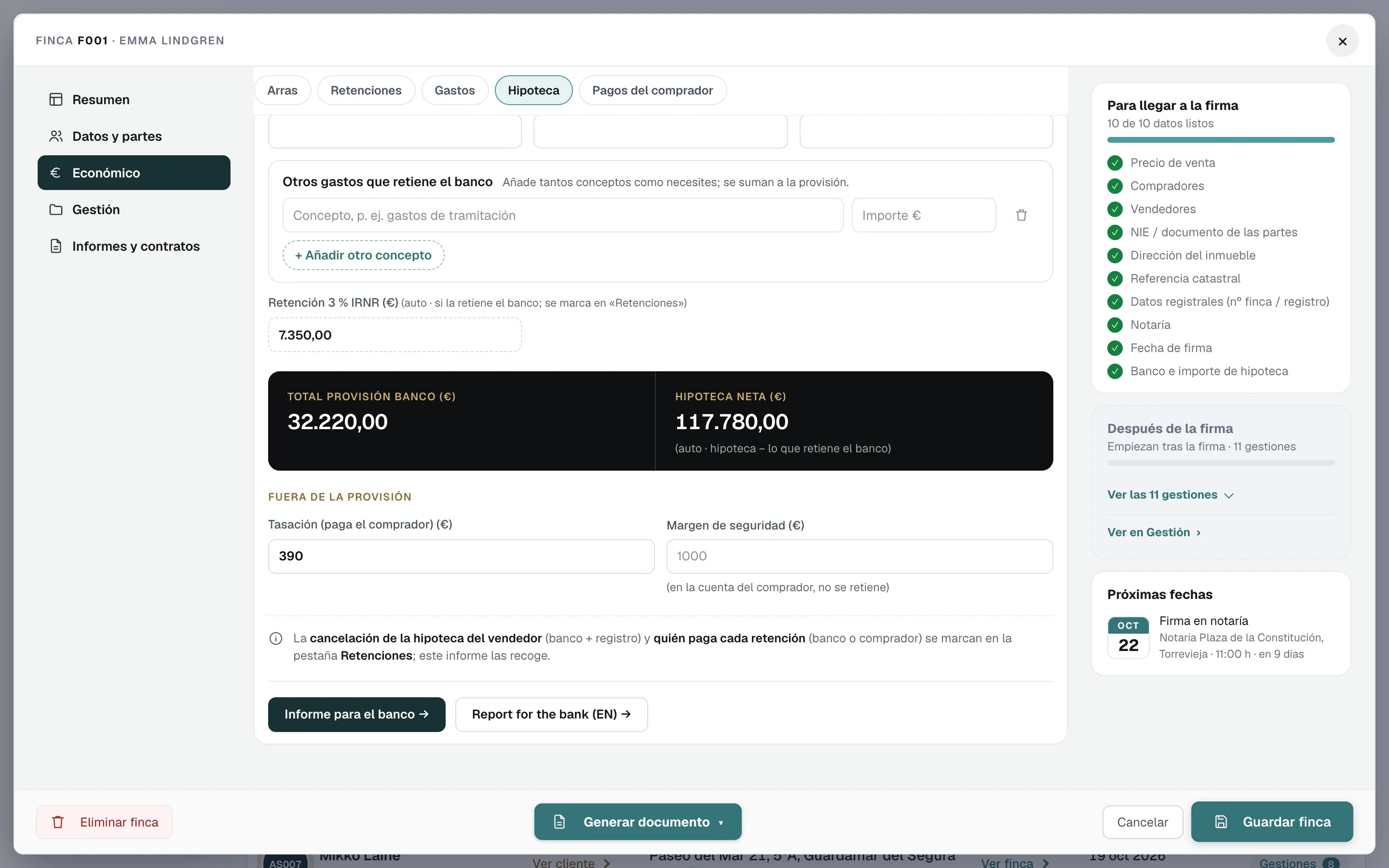
  • Bank provision of funds
  • Signing-day cheques
  • Notary report
  • Bank report
  • Seller’s mortgage cancellation
  • Documents and NIE
  • Public Cadastre data
  • Direct link to request the land registry extract
  • Signing calendar
  • Transfer tax filing
  • Form 210 for non-resident sellers
  • Land Registry registration
  • Direct debits for the bills
  • Plusvalía tax
  • Utility and IBI transfers

Your CRM stops at “deal closed”. Annexa starts there.

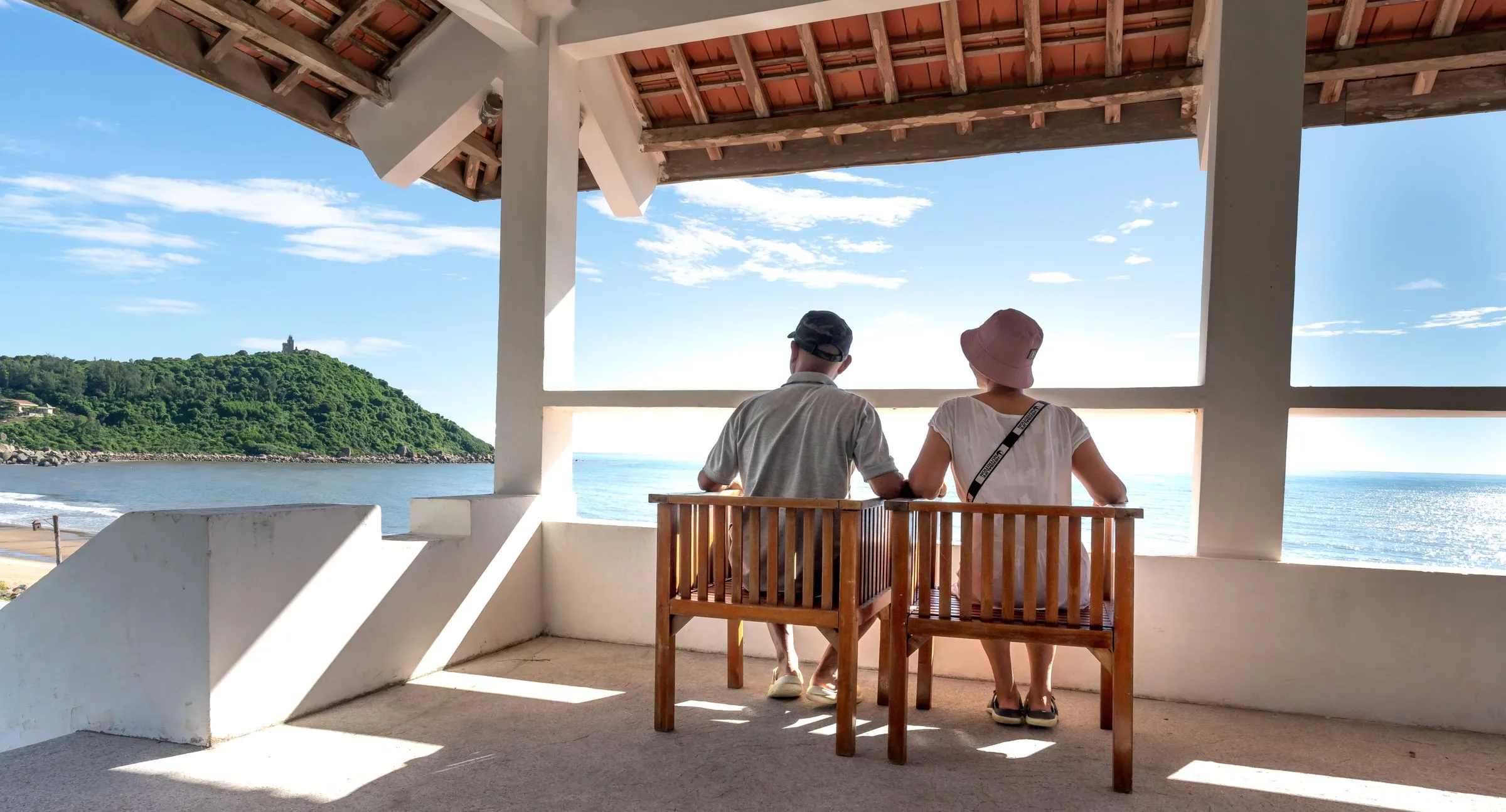
A couple looks out to sea from the terrace of a coastal home

The hidden cost of every sale

Today, closing paperwork keeps one or more people busy. With Annexa, just one.

Between the deposit contract and the keys, someone works out taxes and cheques, drafts contracts, chases documents, writes to every party and watches the deadlines. In an estate agency or an advisory firm, that is the salary of one or more people.

Today, by hand

  • Working out transfer tax or VAT and stamp duty, the 3% and the cheques in a spreadsheet
  • Drafting deposit contracts, annexes and powers of attorney by retyping the data
  • Chasing the NIE, the land registry extract and the certificates
  • Writing to the notary, the bank, the buyer and the seller one by one
  • Noting the Land Registry, the plusvalía and utility transfers in a diary

With Annexa

  • One person enters the sale’s data just once
  • Annexa works out taxes, withholdings and cheques instantly
  • Produces the documents filled in, in Spanish and English
  • Drafts the emails to every party: you review and send
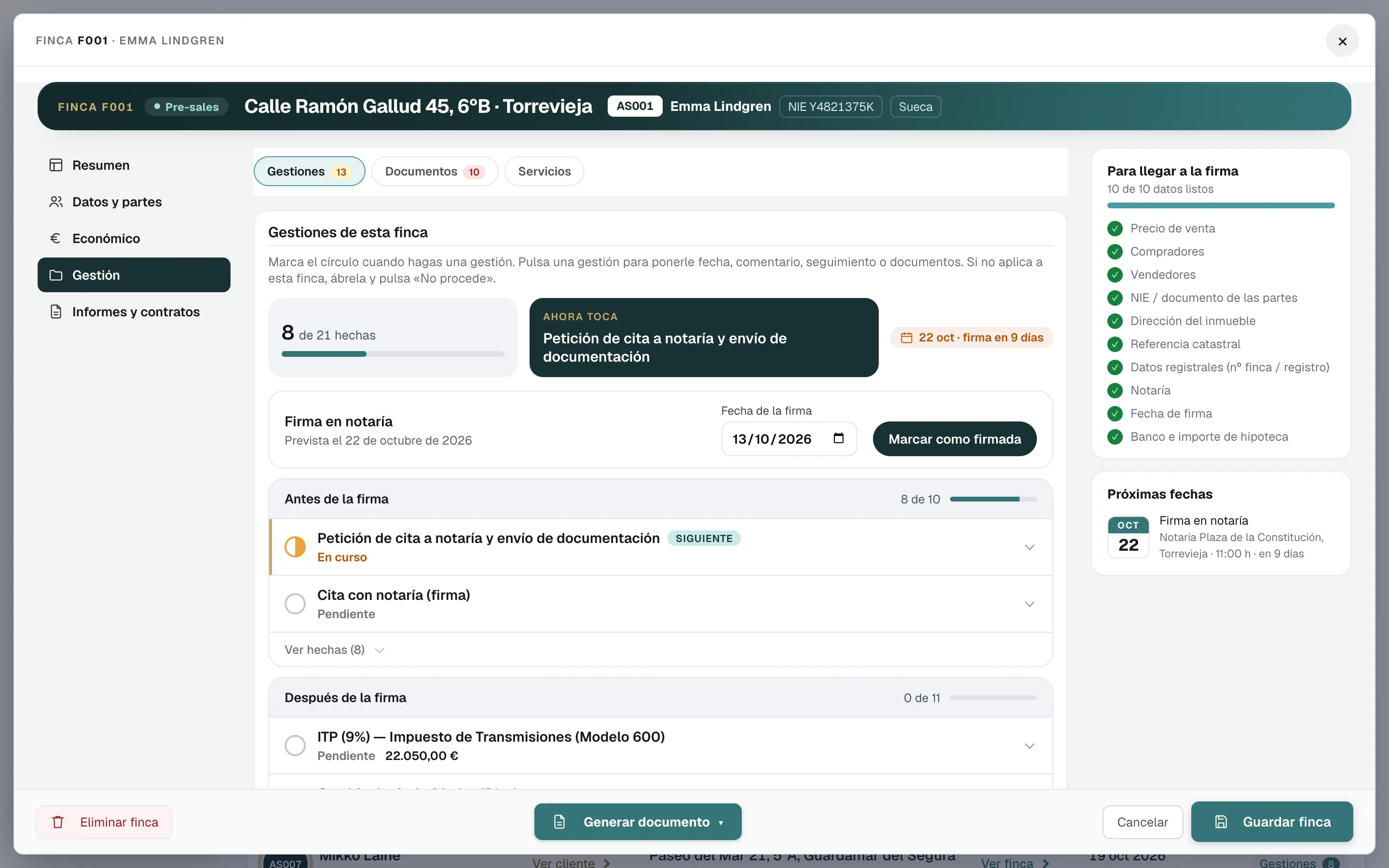
  • Flags what is missing and every deadline, before and after signing

Your team leaves the paperwork behind and gets back to selling and looking after clients. And you do not need to hire anyone else as your sales grow.

Run the numbers with your own figures

Change the figures: they are just an example.

Today, per month
With Annexa, per month
Estimated saving per month

A rough estimate: we assume Annexa brings the admin work down to 20% and subtract the €99 monthly fee (3-user plan). Your real saving depends on how you work today.

The closing stages

One file per property, five stages

  1. Reservation
  2. Deposit
  3. Pre-signing
  4. Signing
  5. After-sales

For estate agencies and advisory firms on the Costa Blanca

01Onboarding and engagement

The client, set up. The engagement, ready to sign.

The buyer’s or seller’s details are entered just once, or read straight from their NIE or passport. Our templates produce the power of attorney, with its instructions, for buyer and seller alike, plus the proposal or the service contract.

A fountain pen resting on a stack of documents
New clientAS014
Emma L.Buyer · details read from her passport
  • Power of attorney and instructionsESEN
  • Service proposalSent
  • Service contractSigned
02Documents and deposit

The paperwork, collected. The deposit contract, in one click.

Every property knows which documents it has and which are missing: NIE, land registry extract, energy certificate, power of attorney. With the cadastral reference it brings in the public Cadastre data and links to the official site to request the land registry extract.

The deposit contract comes out bilingual, side by side, is sent to the parties and every payment is kept with its date. If there is a reservation contract, it is kept in the file.

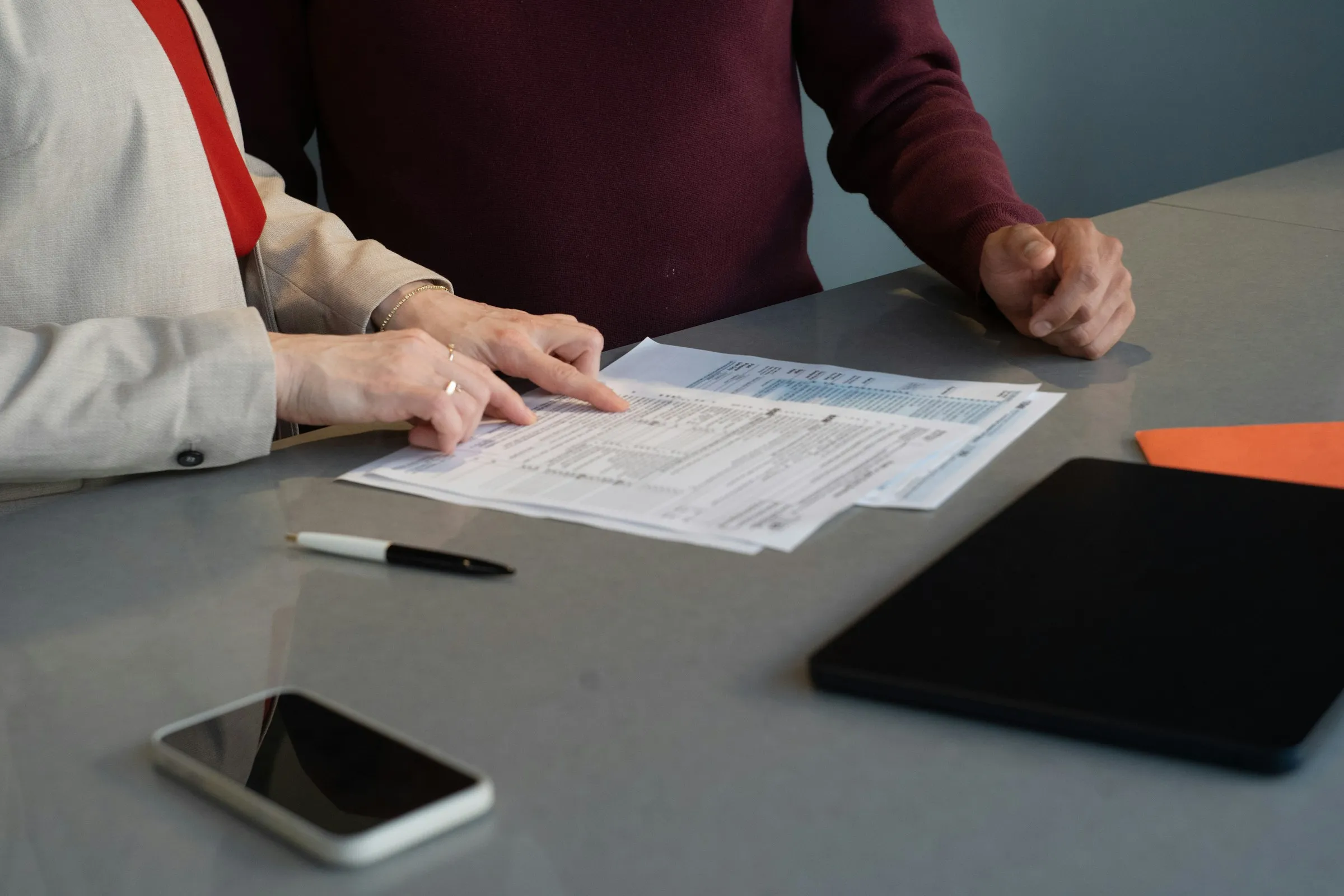
Two people go through documents at a table, with a phone and a tablet beside them
Deposit signed8 of 10 docs

Property F014 · Orihuela Costa

  • Deposit (10%) · 6 Oct€24,500
  • NIEReceived
  • Land registry extractReceived
  • First occupancy certificateMissing

03Signing at the notary

The notary gets everything. The parties get the appointment.

In one click, the notary gets the documents and the report with the amounts by email. Buyer, seller and agencies get the date, time and place of signing. And everyone arrives knowing which cheque to bring: transfer tax, or VAT and stamp duty, the 3% non-resident withholding, the bank’s provision and the seller’s mortgage.

Two people review and sign documents at a white table
22 Oct · 11:00

Notary signing

Example notary, Torrevieja

  • Cheque to the seller€196,000
  • Documents to the notarySent
  • Date and place to the partiesSent

04After signing

After the keys, too

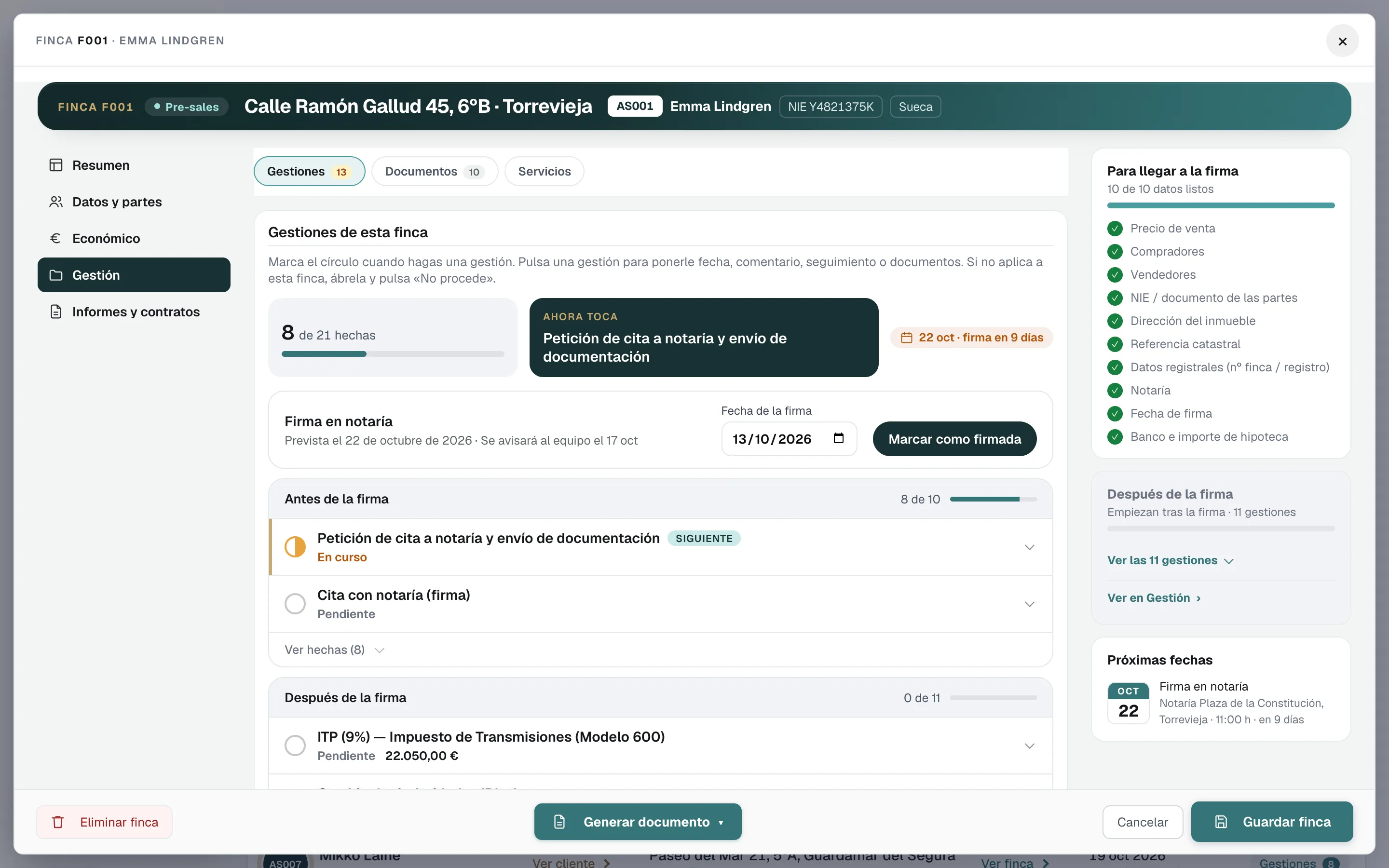
Filing the transfer tax, or VAT and stamp duty on a new build, the non-resident seller’s Form 210, registration at the Land Registry, the plusvalía with a link to the SUMA calculator, direct debits for the bills and electricity, water and IBI transfers in a single email. At the end, an email telling the client everything that has been done.

A hand hands over house keys on a little house keyring, in front of an open door
After signing5 of 6

Property F014 · tasks

  • Transfer tax filedDone
  • PlusvalíaDone
  • Land RegistryIn progress
  • Email to the clientSent
ElectricityWaterIBI

05At every stage

An email to every party, at every step

When you mark a task as done, Annexa drafts the email for the buyer, the seller, the agencies, the bank or the notary: in their language, with your branding and the right attachments. You review it and send it from your Gmail, and it is logged in the file.

Book a demo
Property F014 · signing on 22 Oct4 emails ready
  • Example notaryDocuments for the signing on 22 October4ES
  • Emma L.Your signing: 22 October, 11:00, at the notaryEN
  • Henrik M.Your sale: date, time and place of signingEN
  • Inmobiliaria Ejemplo LevanteF014: signing confirmed for 22 OctoberES

Nothing is sent until you click

Emails to every party

You mark the task as done. Annexa writes to every party.

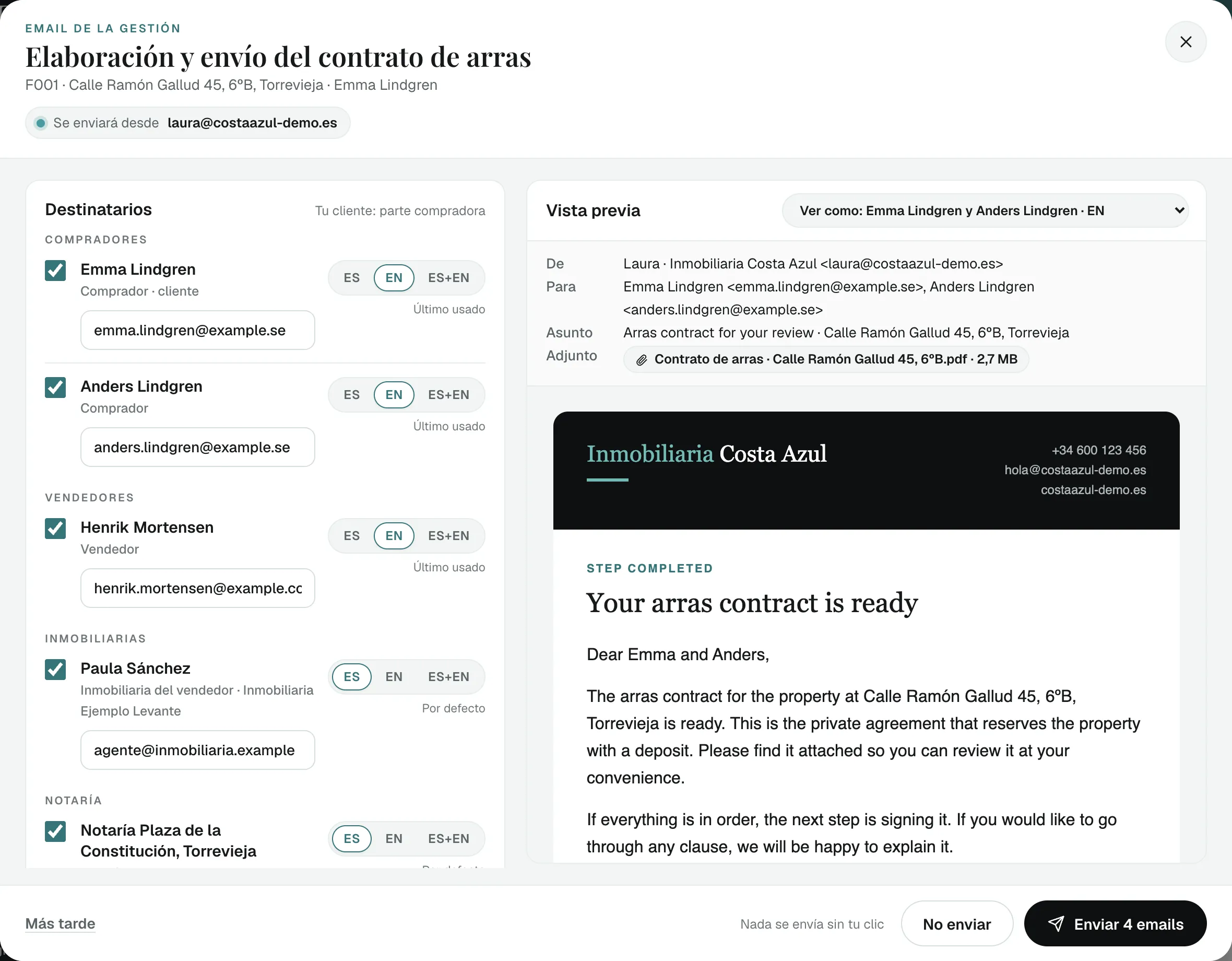
When you mark a step as done (the NIE, the arras contract, the notary appointment, the Land Registry entry), Annexa drafts an email for the buyer, the seller, the estate agents and the notary: in your branding, in Spanish, English or both, and with the right document attached. You check it and send it from your Gmail.

Email window for the arras contract: buyers, seller, estate agent and notary ticked, each with their language, the contract attached and the email preview (made-up data)
The window that opens when you mark the task as done: who it goes to, in which language and with which attachment.
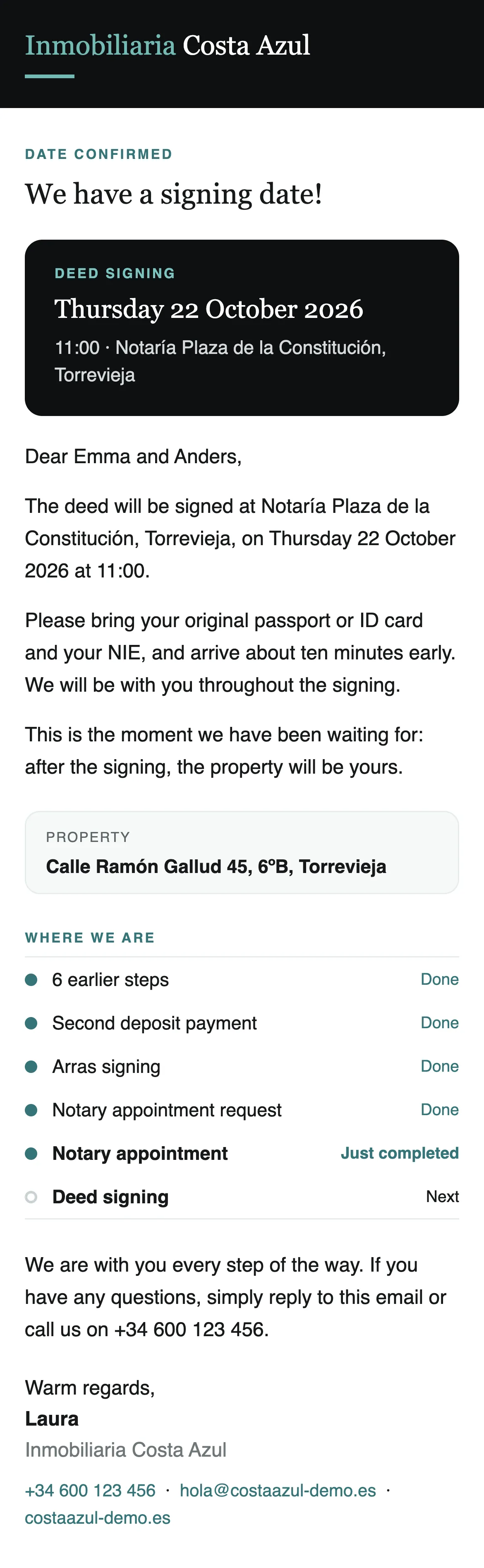
Notary appointment email on the client’s phone: date, time and notary, what to bring and where the purchase stands (made-up data)
What your client receives.

One click, one email each

What goes out when you press “Enviar 4 emails” in the window above:

  • Emma and Anders Lindgren Buyers, your clients in English “Arras contract for your review · …”
  • Henrik Mortensen Seller in English “Arras contract for your review · …”
  • Paula Sánchez Seller’s estate agent in Spanish “Contrato de arras para revisión · …”
  • Notaría Plaza de la Constitución Notary in Spanish “Contrato de arras para revisión · …”

Buyers who share a language get one joint email; everyone else gets their own, with the contract attached and wording written for them.

An email at every key step of the sale

Before signing

NIE and bank account
To the buyer, when they are your client, and to whoever holds their power of attorney if you tick them
Power of attorney sent and received
To whoever signs it, plus their representative and the estate agents if you tick them
Arras (deposit) contract
To the buyer and the seller separately, plus the estate agents and the notary if you tick them
Deposit payments and arras signing
To your client, plus the estate agents if you tick them (payments via “Preparar email”)
Notary appointment requested and signing date confirmed
To your client, plus the estate agents and the notary if you tick them

After signing, when you act for the buyer

Deed filed and registered at the Land Registry
To the buyer
Plusvalía tax filed
To the buyer
Electricity, water, IBI and community fees in the buyer’s name
One email to the buyer once all four are done or marked as not applicable

Mortgage

Mortgage application
From “Solicitar hipoteca”: to the bank you choose, with the documents and the client’s authorisation, plus a notice to the client in Spanish and English

The whole closing, in one file

Your CRM keeps the listings and viewings. Annexa steps in when the buyer says yes and stays with the sale until the keys are handed over.

Two people go through documents at a table, with a phone beside them

20

documents in one click

Deposit contracts, reports, cost summaries, powers of attorney and emails, filled in from the file.

5

stages per property

  1. Reservation
  2. Deposit
  3. Pre-signing
  4. Signing
  5. After-sales

Spanish and English

on client documents

Bilingual, side by side, or in Spanish or in English, depending on the document.

30min

demo, with a sample sale

We walk you through a whole sale, from reservation to keys.

Book a demo

Documents

From quote to notary, the paperwork for every stage

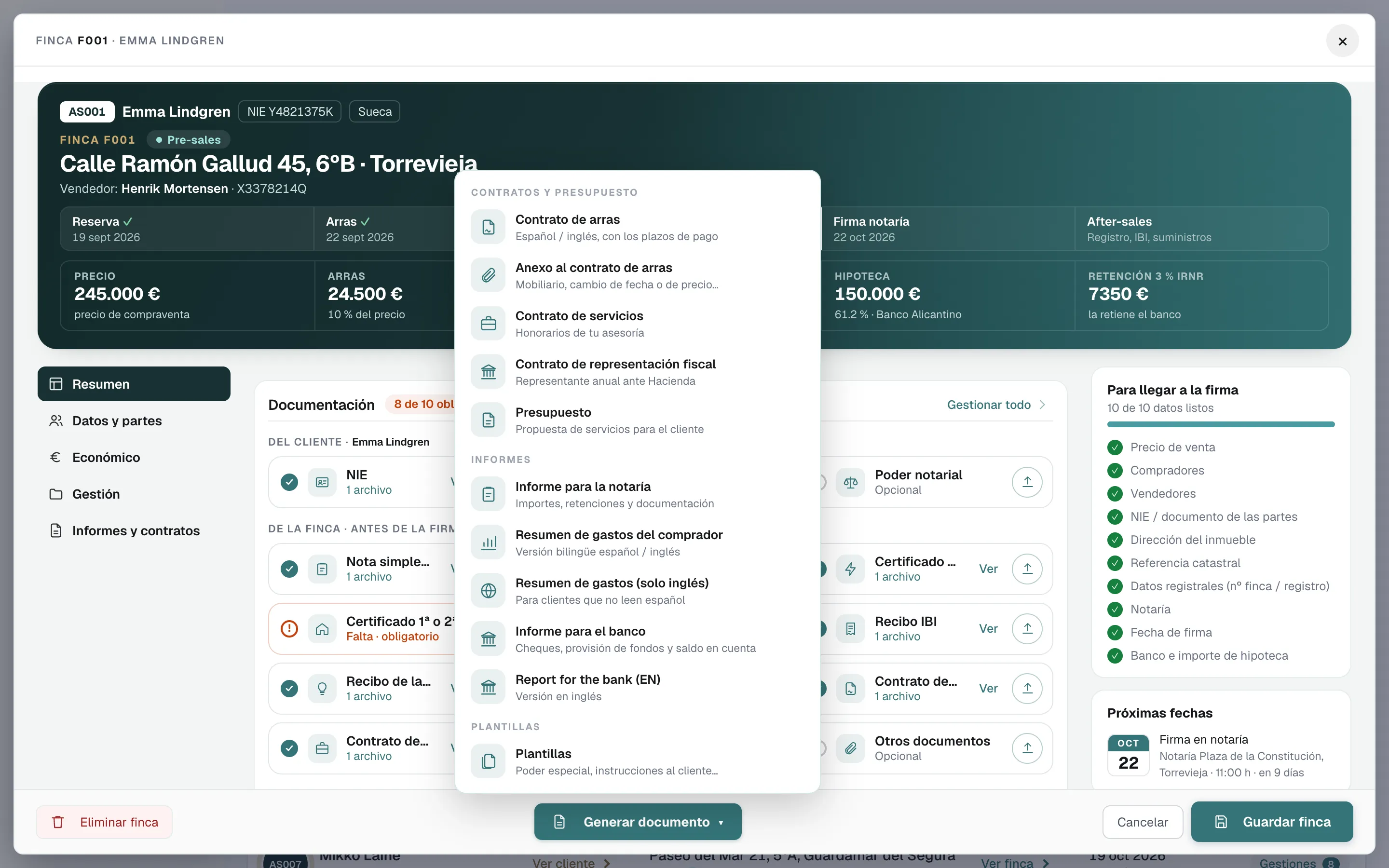
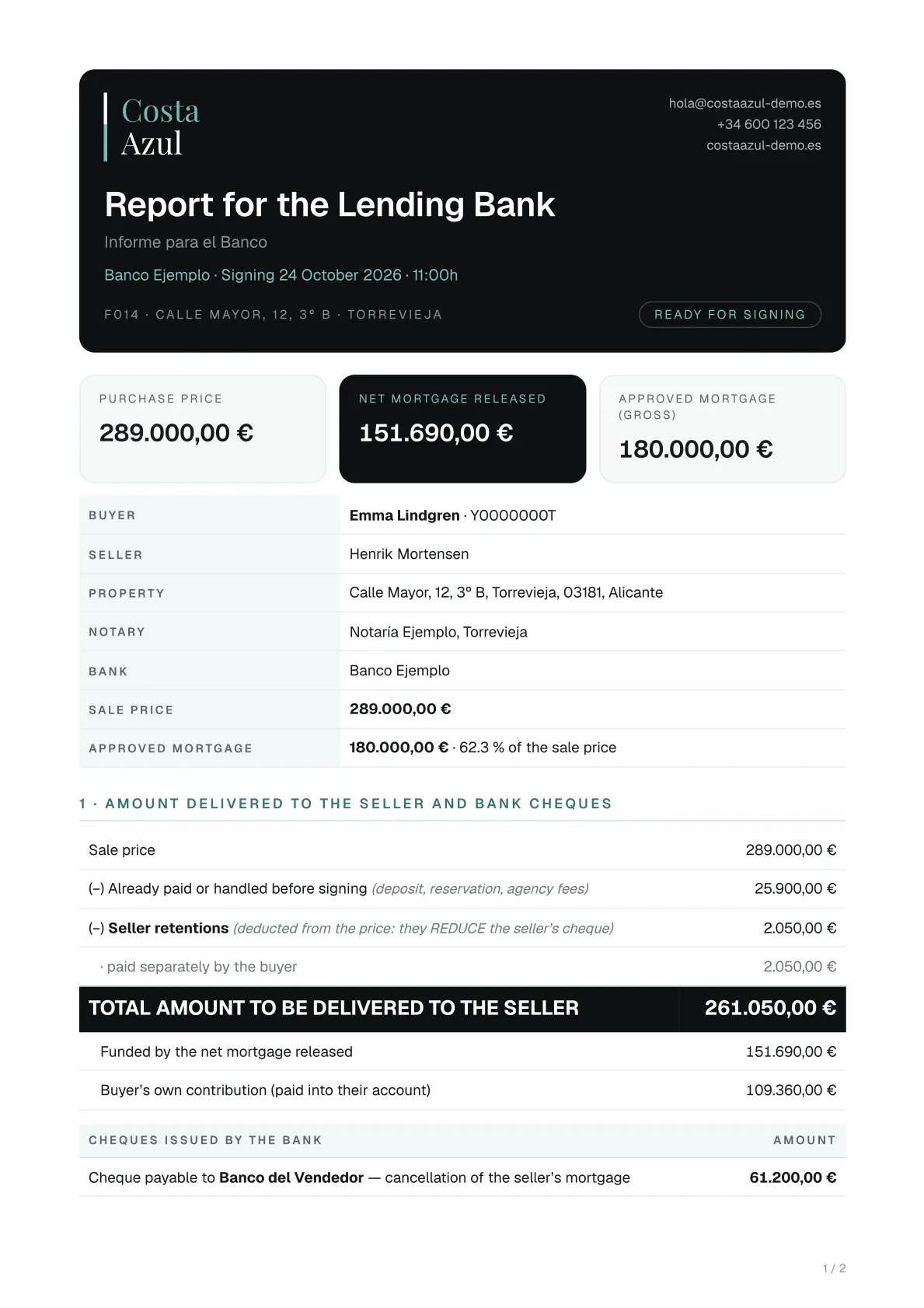
Contracts, annexes, powers of attorney, cost summaries and reports for the notary and the bank, filled in from the file: some bilingual, side by side, others in Spanish or in English. Pick one and look inside: these are real examples from the software, made with a fictitious sale.

Here are 16 documents for the client, the seller, the notary and the bank. The software produces 4 more: the commission invoice, the email to the notary and two internal sheets (cash control and the transaction file).

Client engagement

Reservation and deposit

Pre-signing

Signing

After-sales

Separate from the sale

Tax services

Client engagement

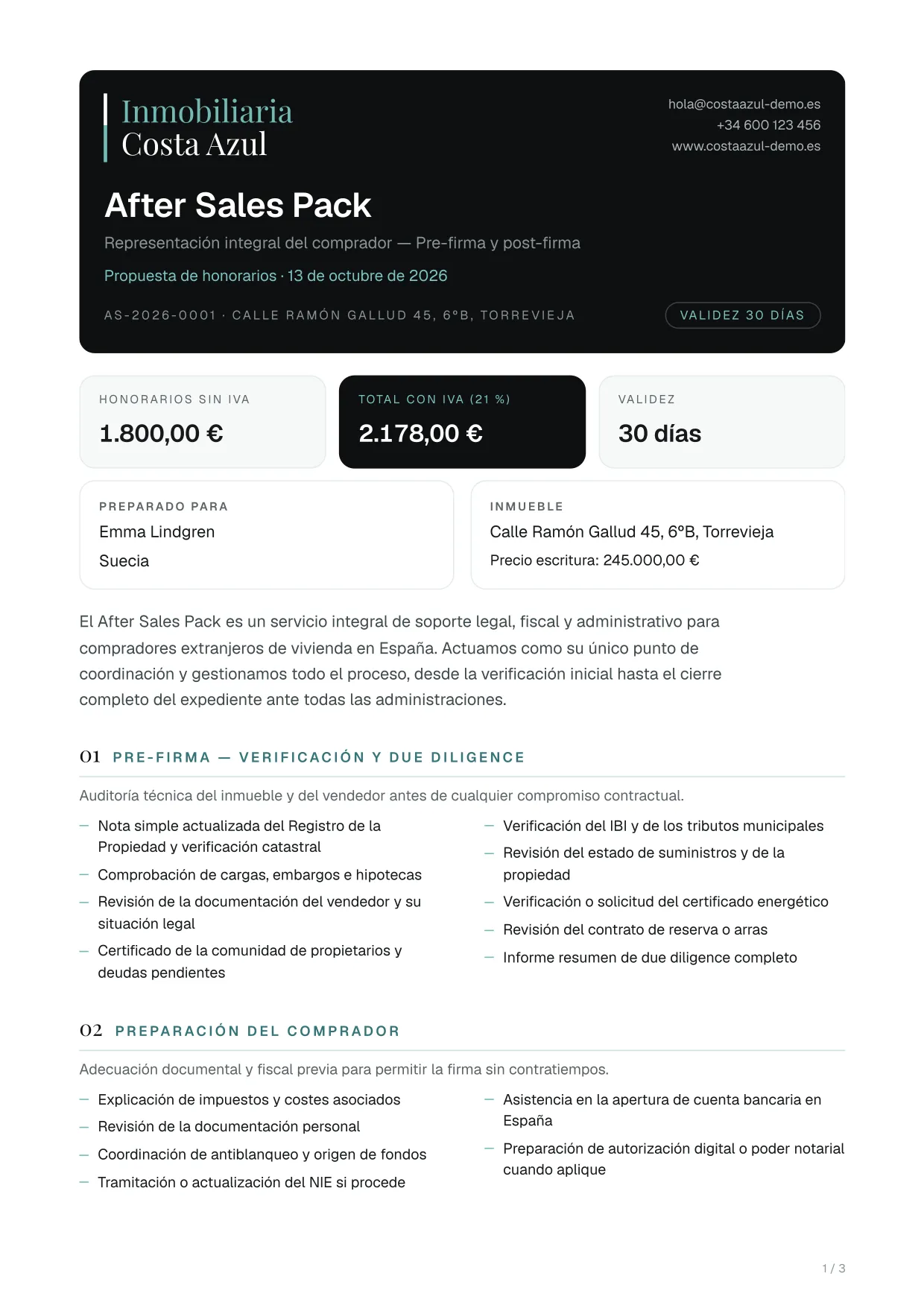
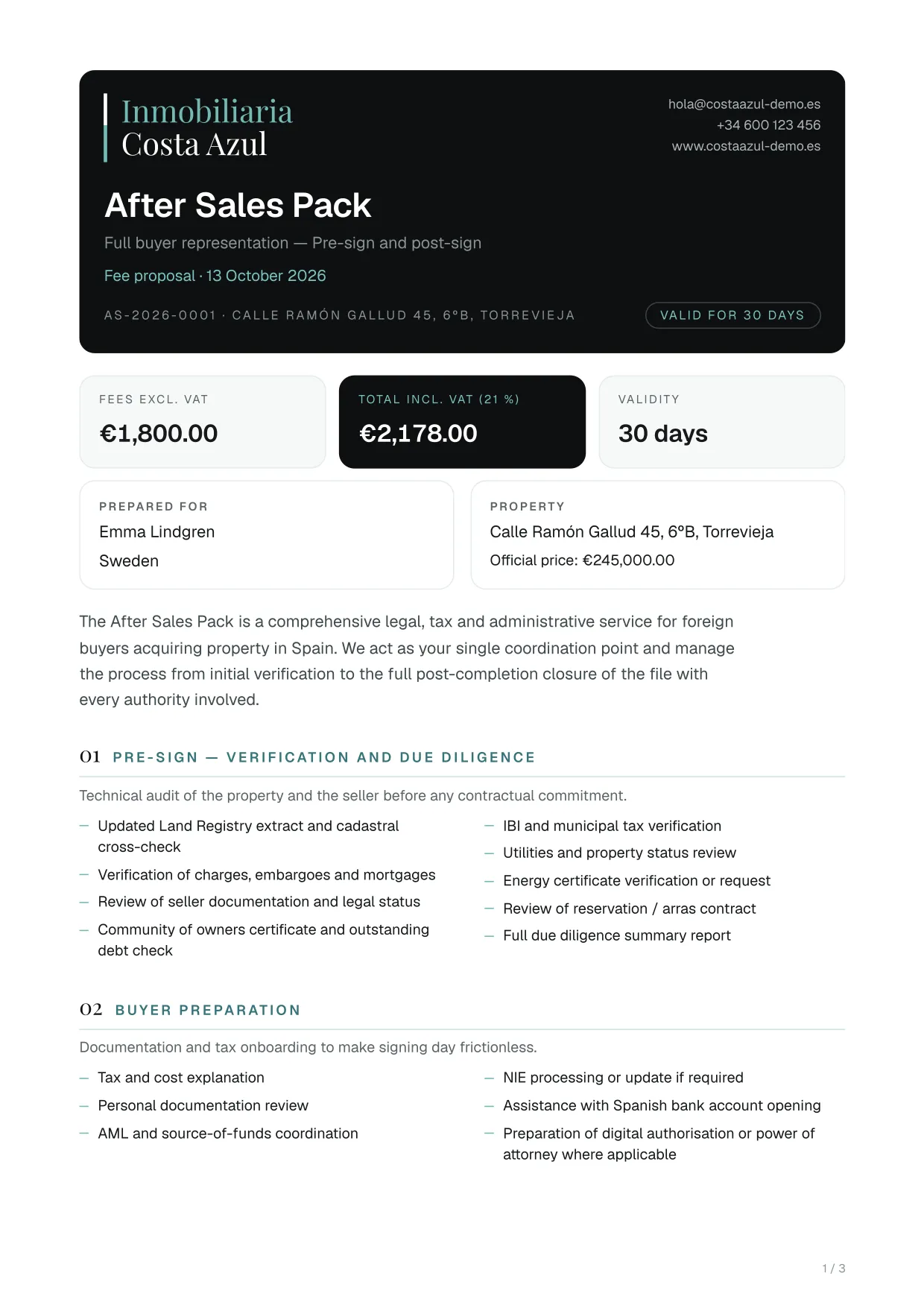
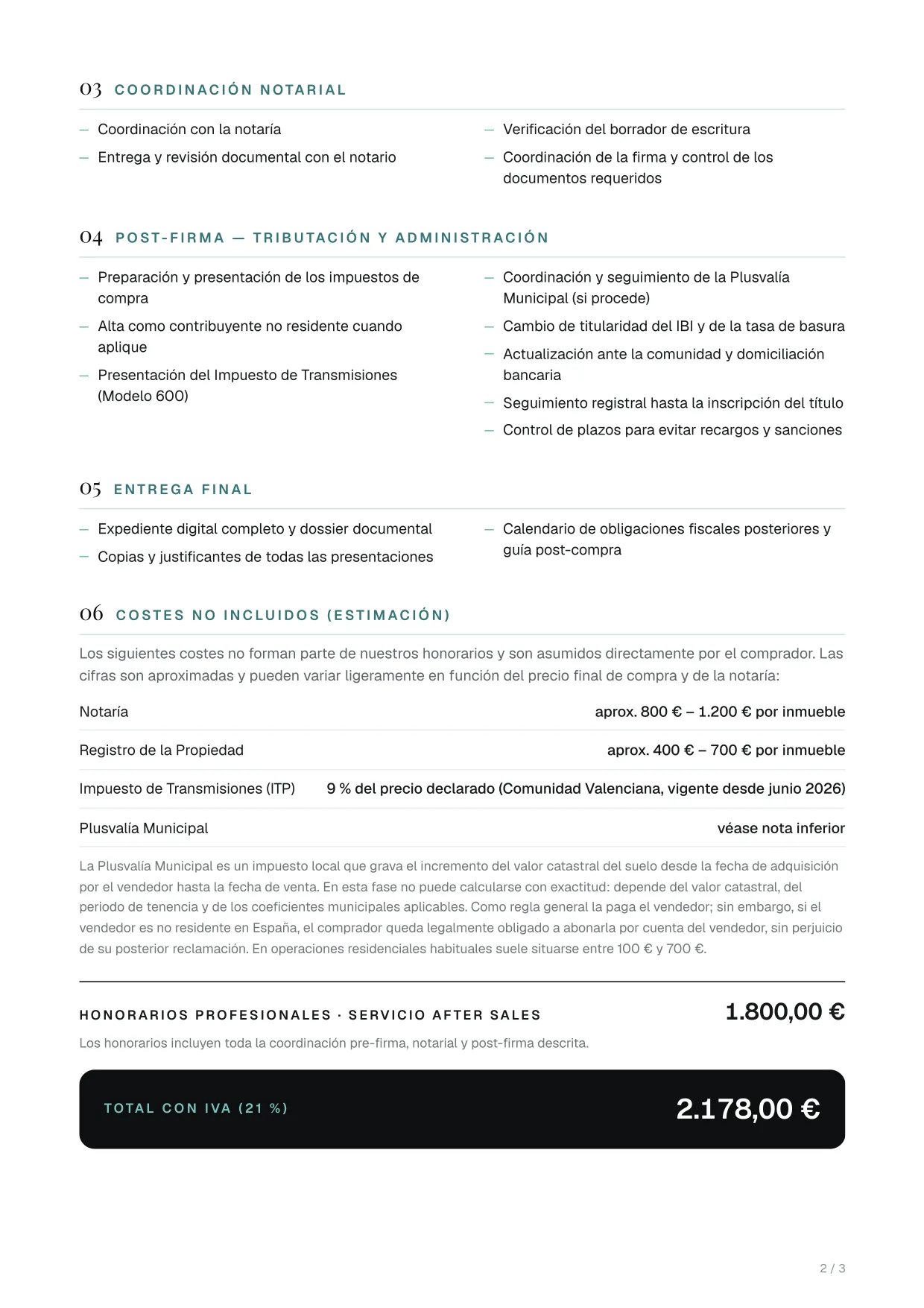
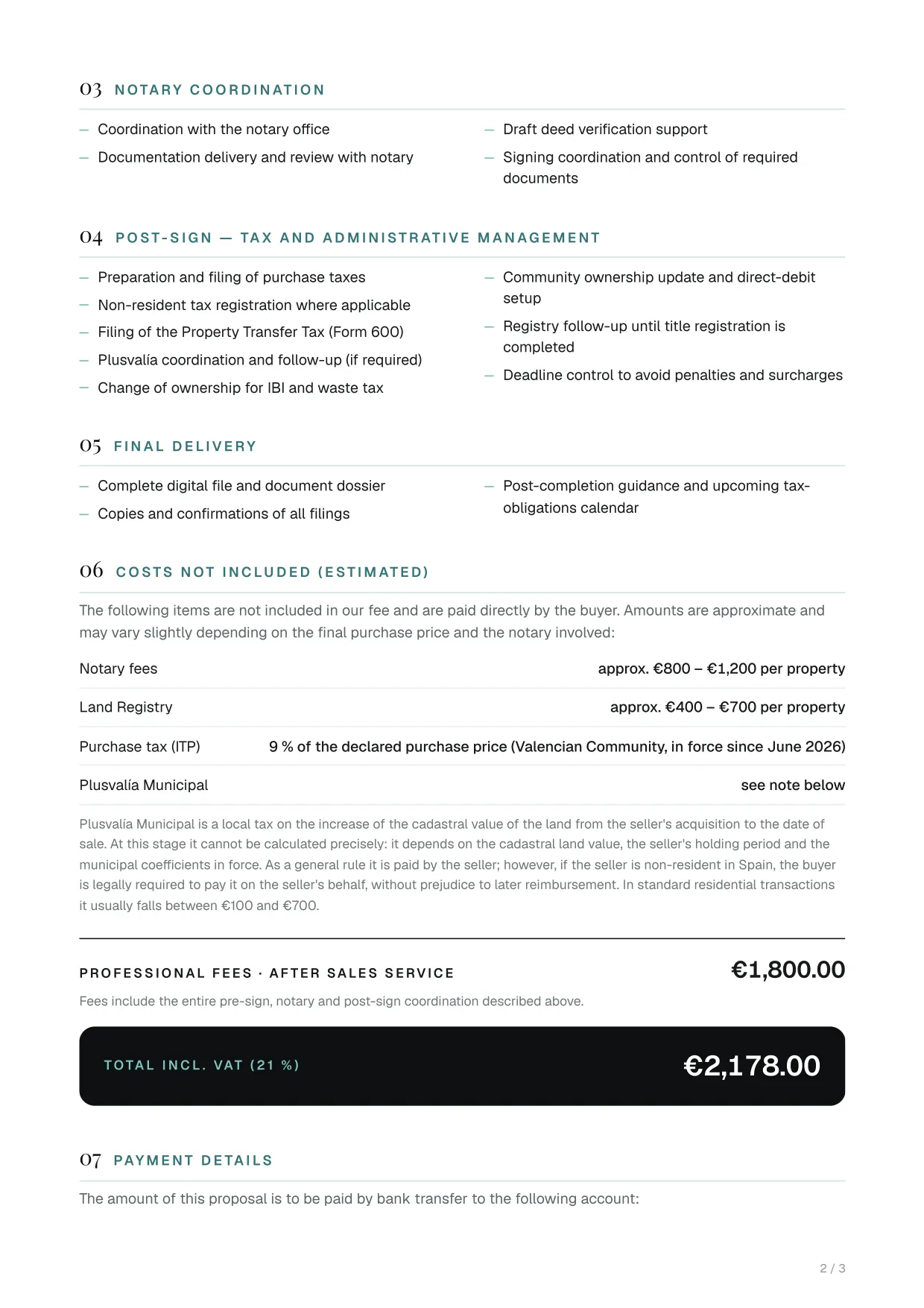
Fee proposal

The fee proposal for the full service to a foreign buyer, valid for 30 days.

What it includes

  • The service explained in blocks: due diligence, buyer preparation, notary, taxes and final handover
  • An estimate of the costs it does not include
  • Fees before VAT and the total with VAT
  • Several properties of the same client, with a bundle discount
  • The payment details

Before it is generated, a window asks for the reference, the prices, the fees and the properties included.

Who it is for
The buyer, before hiring the service
Languages
In Spanish or in English: you choose when you generate it
Format
Opens ready to print or save as PDF
Where to find it (menus in Spanish)
Ficha del cliente (client file)Presupuesto (quote)Also in the property file, under «Generar documento» (generate document).

Example pages

Fee proposal (English): page 1 of 3, example made with a fictitious sale
Page 1 of 3
Fee proposal (English): page 2 of 3, example made with a fictitious sale
Page 2 of 3

Showing pages 1 and 2 of 3, from a fictitious sale. Click a page to see it full size.

Client engagement

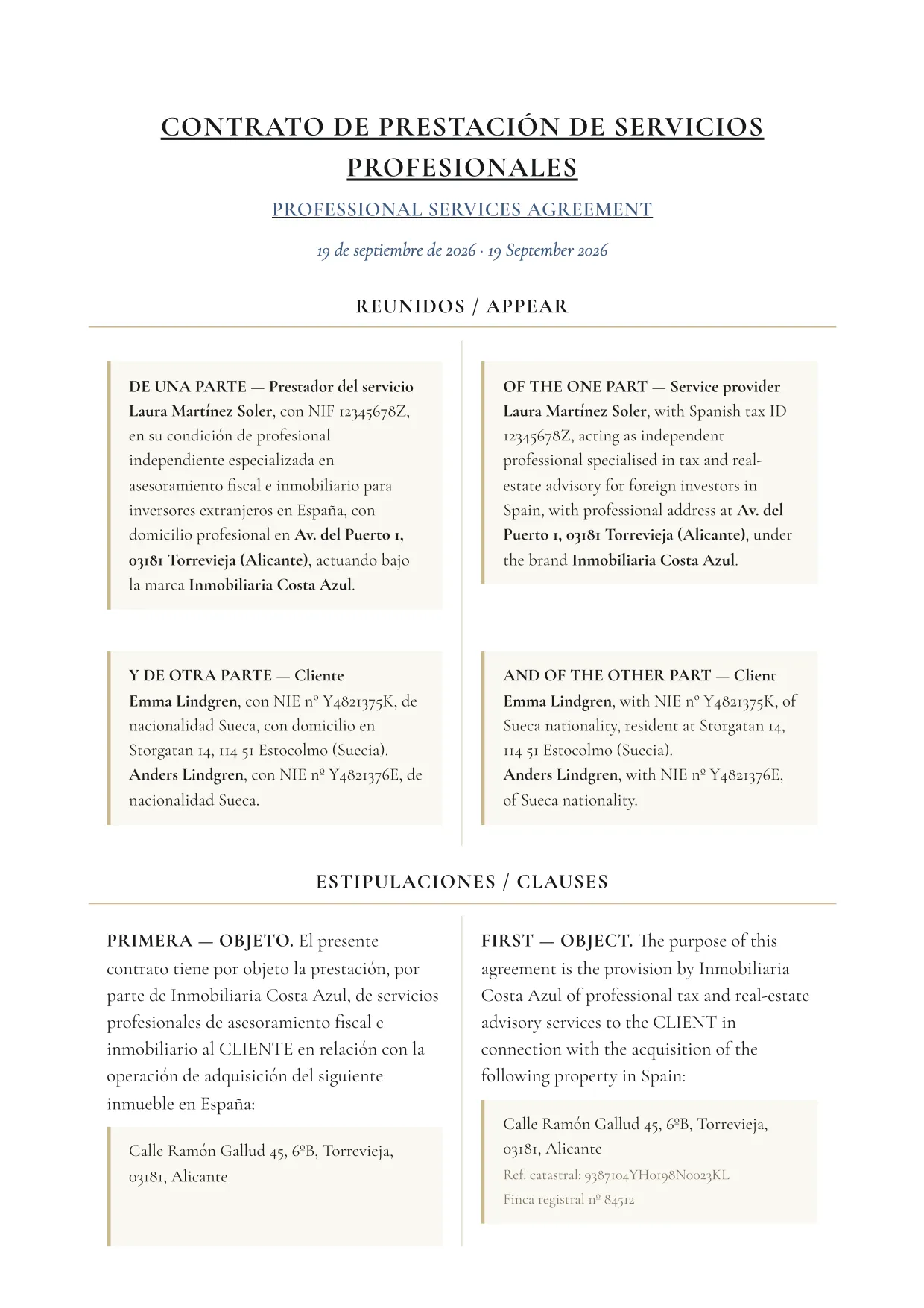
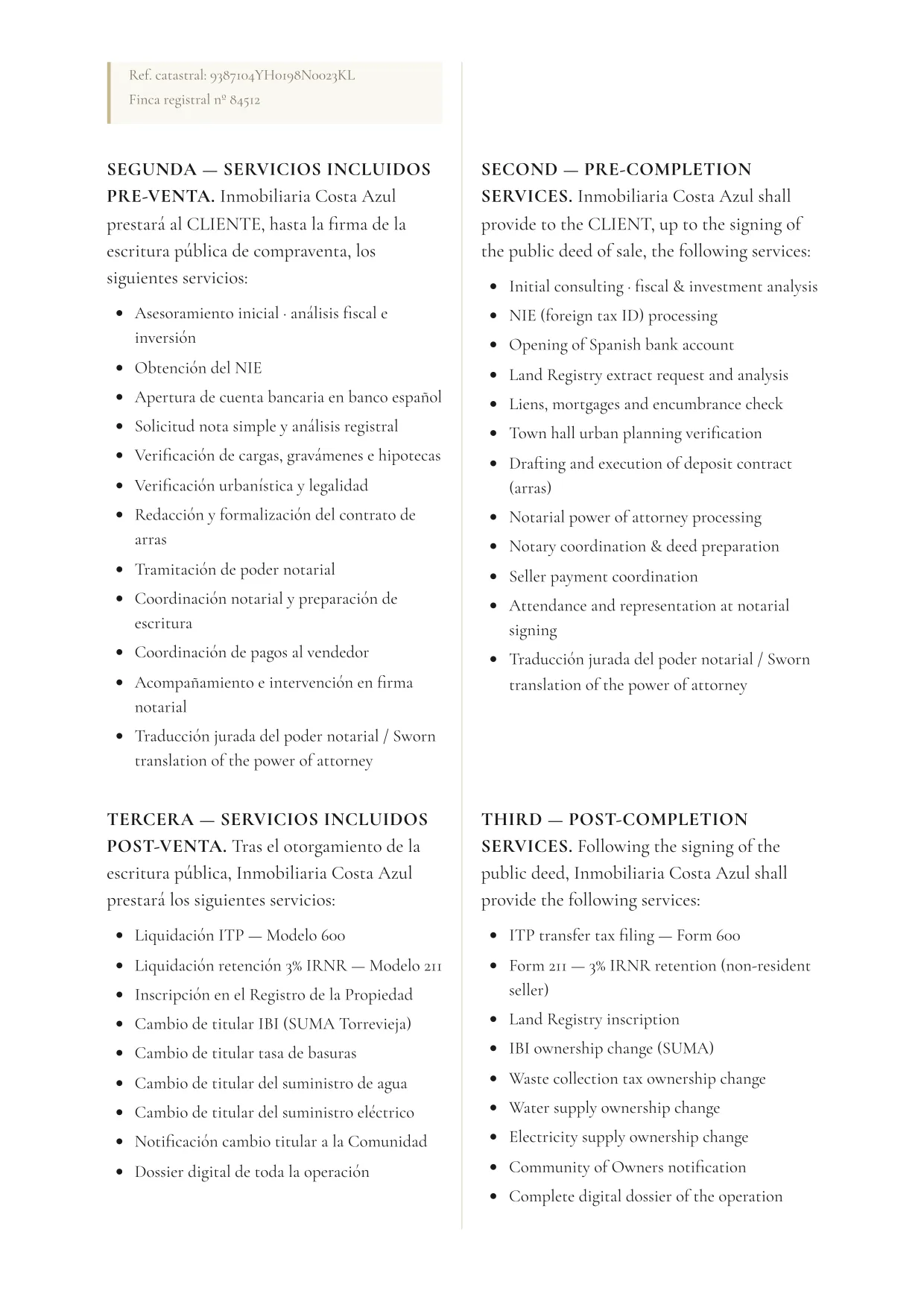
Services agreement

The services agreement between the advisory firm and the client, with the chosen services and their fees.

What it includes

  • The parties and the properties
  • Pre-sale services, from a list of 15: NIE, bank account, land-registry extract, deposit contract, power of attorney, signing…
  • Post-sale services, from a list of 11: Form 600, Form 211, Land Registry, changes of holder…
  • Services added by hand and, if switched on, annual tax representation
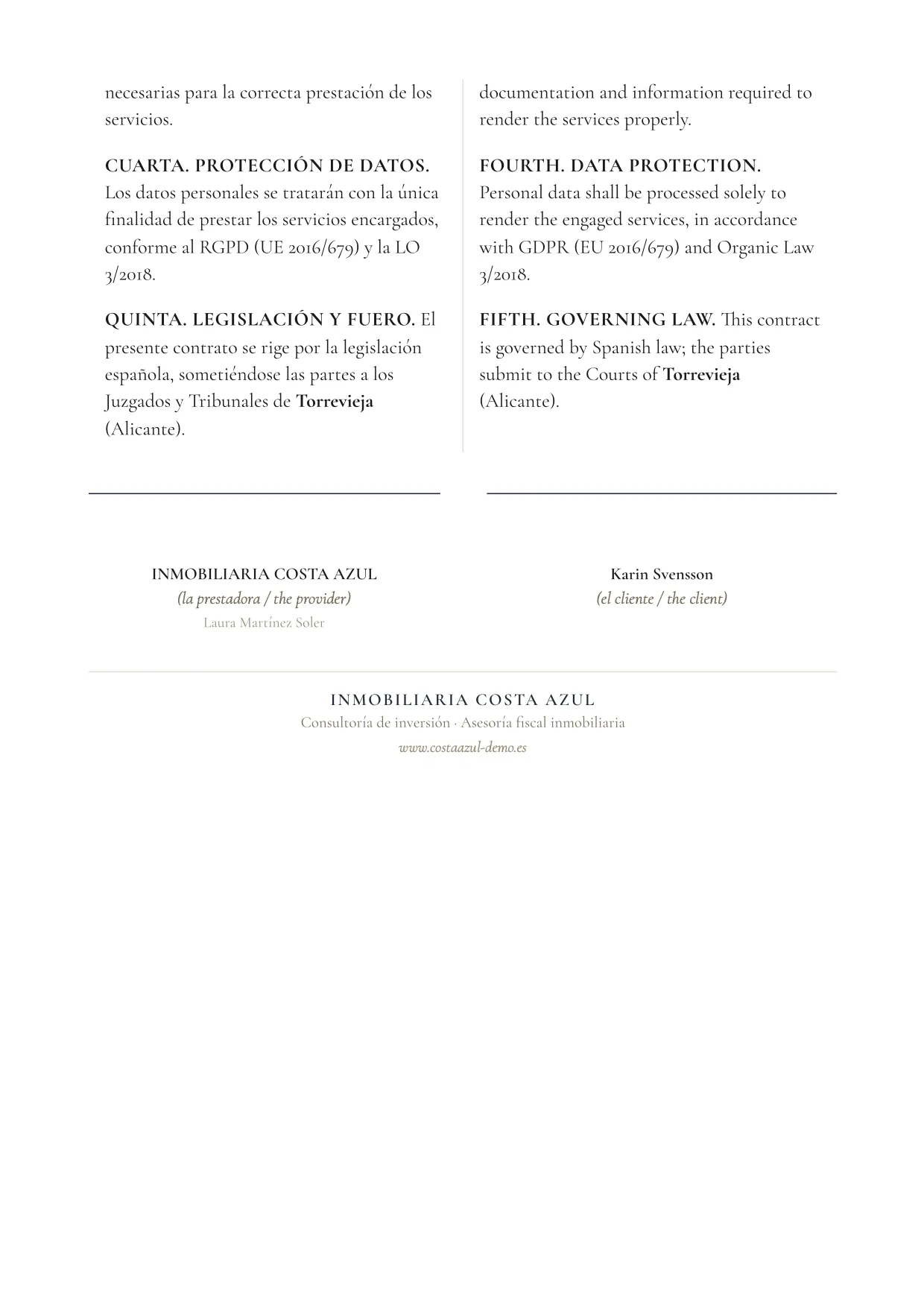
  • Fees with VAT, payment terms, liability, anti-money-laundering, data protection and jurisdiction

It also comes as a blank template in four types: pre-sale, post-sale, both together or annual tax representation.

Who it is for
The buyer, who signs it with the advisory firm
Languages
Spanish and English in the same document, in two columns
Format
Opens ready to print or save as PDF
Where to find it (menus in Spanish)
Ficha de la finca (property file)Generar documento (generate document)Services and fees are chosen beforehand, in Gestión › Servicios (management › services).

Example pages

Services agreement: page 1 of 8, example made with a fictitious sale
Page 1 of 8
Services agreement: page 2 of 8, example made with a fictitious sale
Page 2 of 8

Showing pages 1 and 2 of 8, from a fictitious sale. Click a page to see it full size.

Client engagement

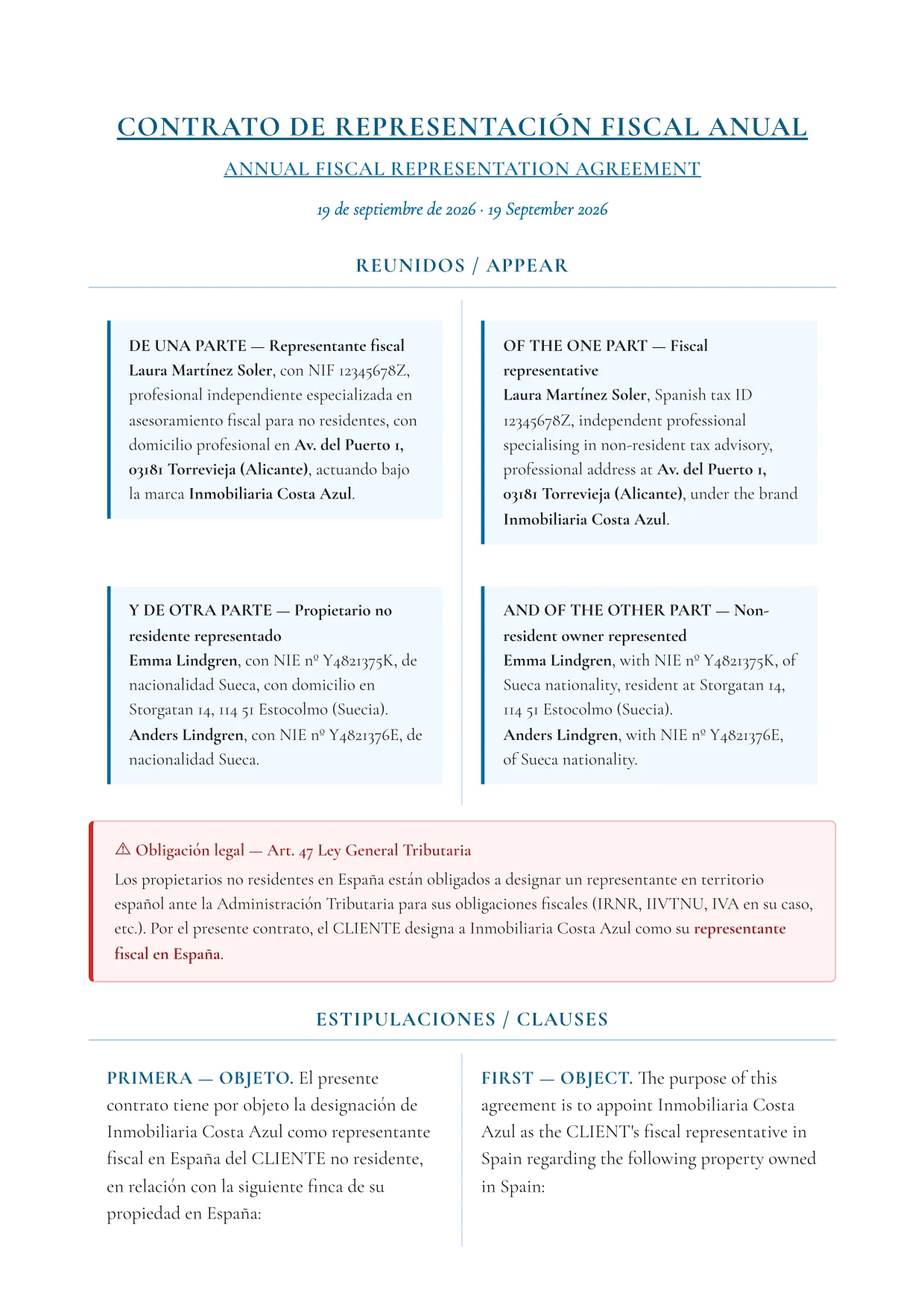
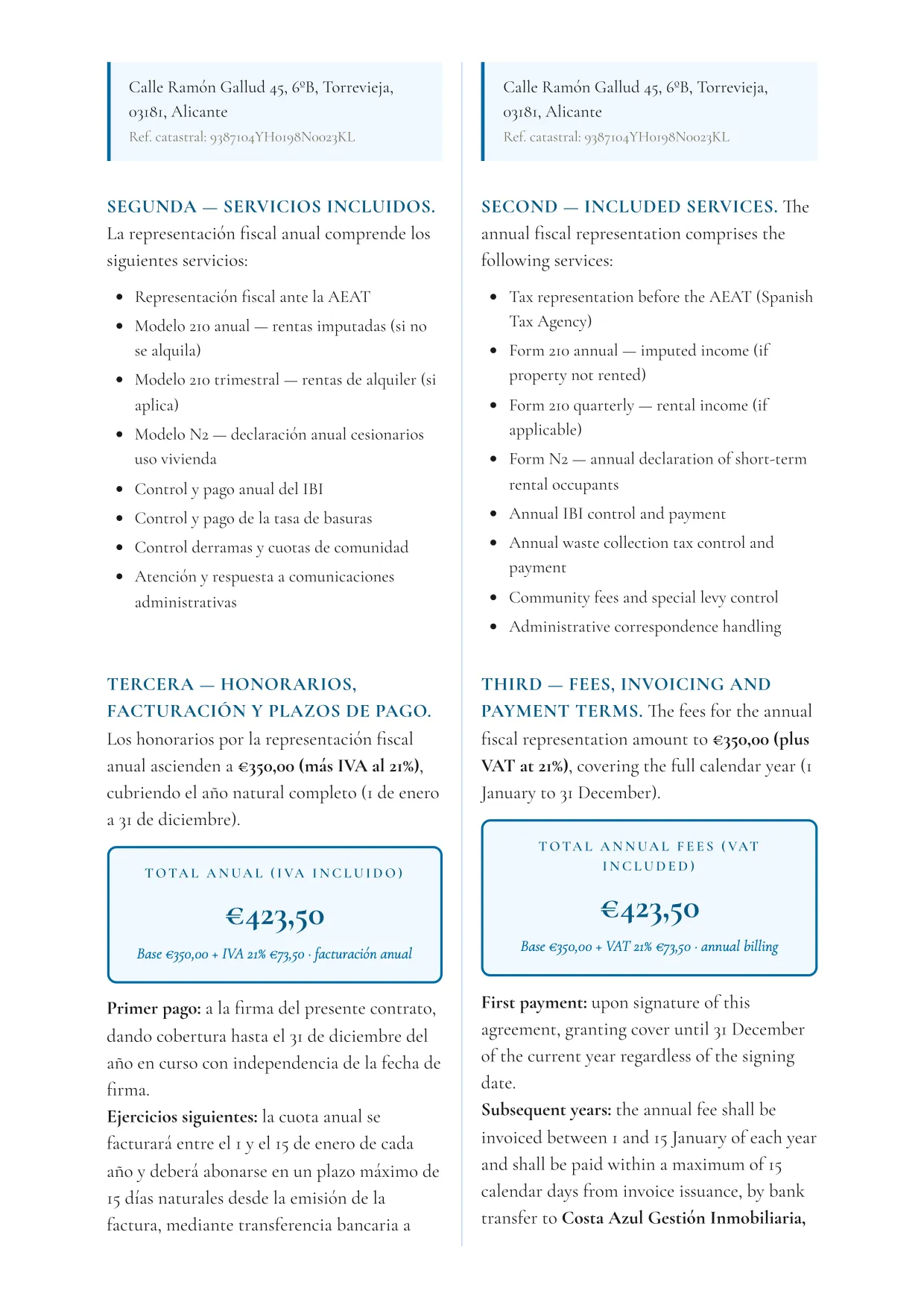
Tax representation agreement

The non-resident owner appoints the advisory firm as their representative before the Spanish Tax Agency, for a renewable year.

What it includes

  • Representation before the Tax Agency and replies to its notices
  • Annual Form 210, quarterly if the property is let, and Form N2
  • Tracking and payment of IBI, waste tax and community fees
  • 13 clauses: annual fee with VAT, proportional refund, renewal and revocation, anti-money-laundering, confidentiality and jurisdiction
Who it is for
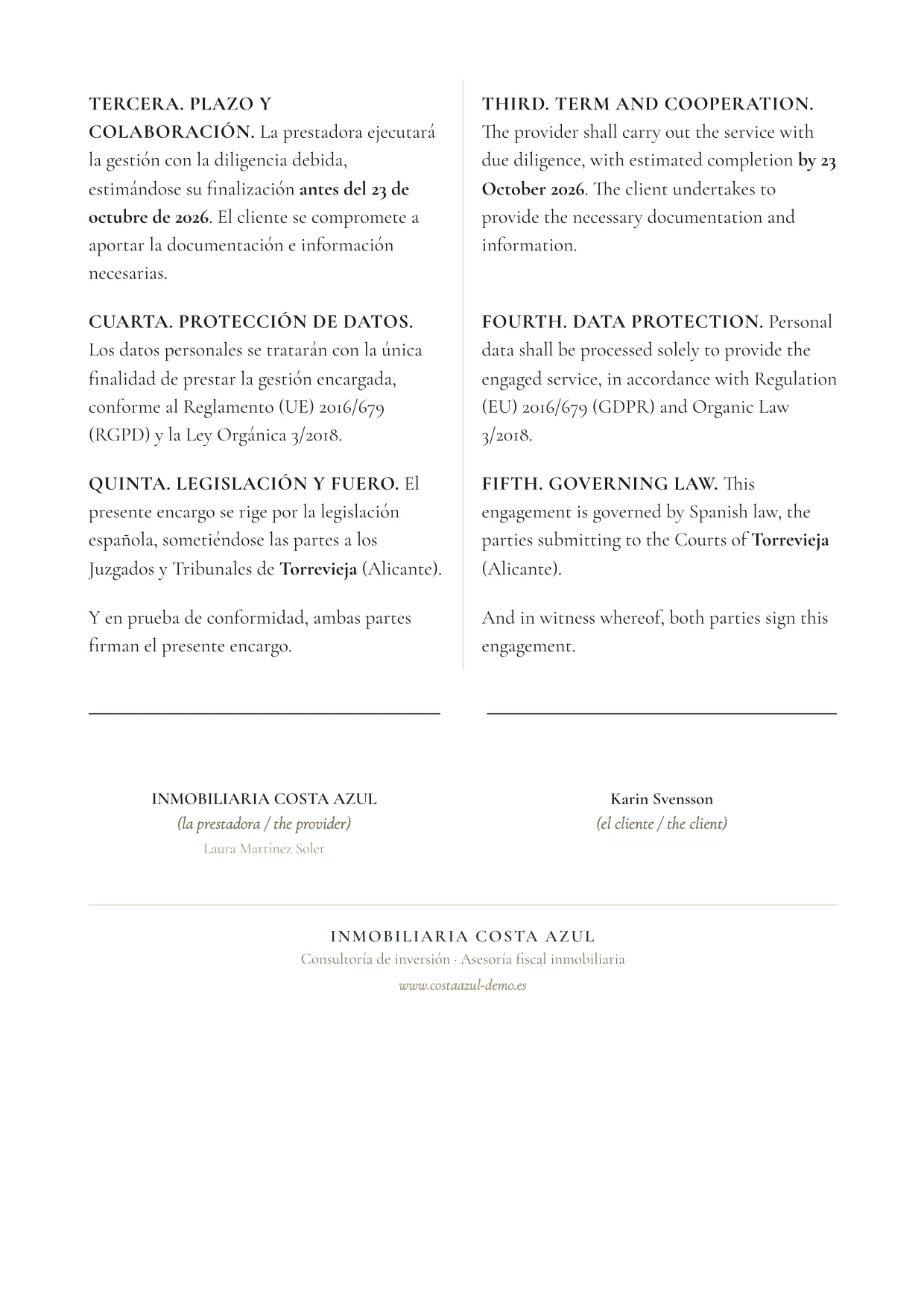
The non-resident owner, usually after the purchase
Languages
Spanish and English in the same document, in two columns
Format
Opens ready to print or save as PDF
Where to find it (menus in Spanish)
Ficha de la finca (property file)Generar documento (generate document)It is switched on in Gestión › Servicios (management › services). Also as a blank template, under Plantillas (templates).

Example pages

Tax representation agreement: page 1 of 7, example made with a fictitious sale
Page 1 of 7
Tax representation agreement: page 2 of 7, example made with a fictitious sale
Page 2 of 7

Showing pages 1 and 2 of 7, from a fictitious sale. Click a page to see it full size.

Reservation and deposit

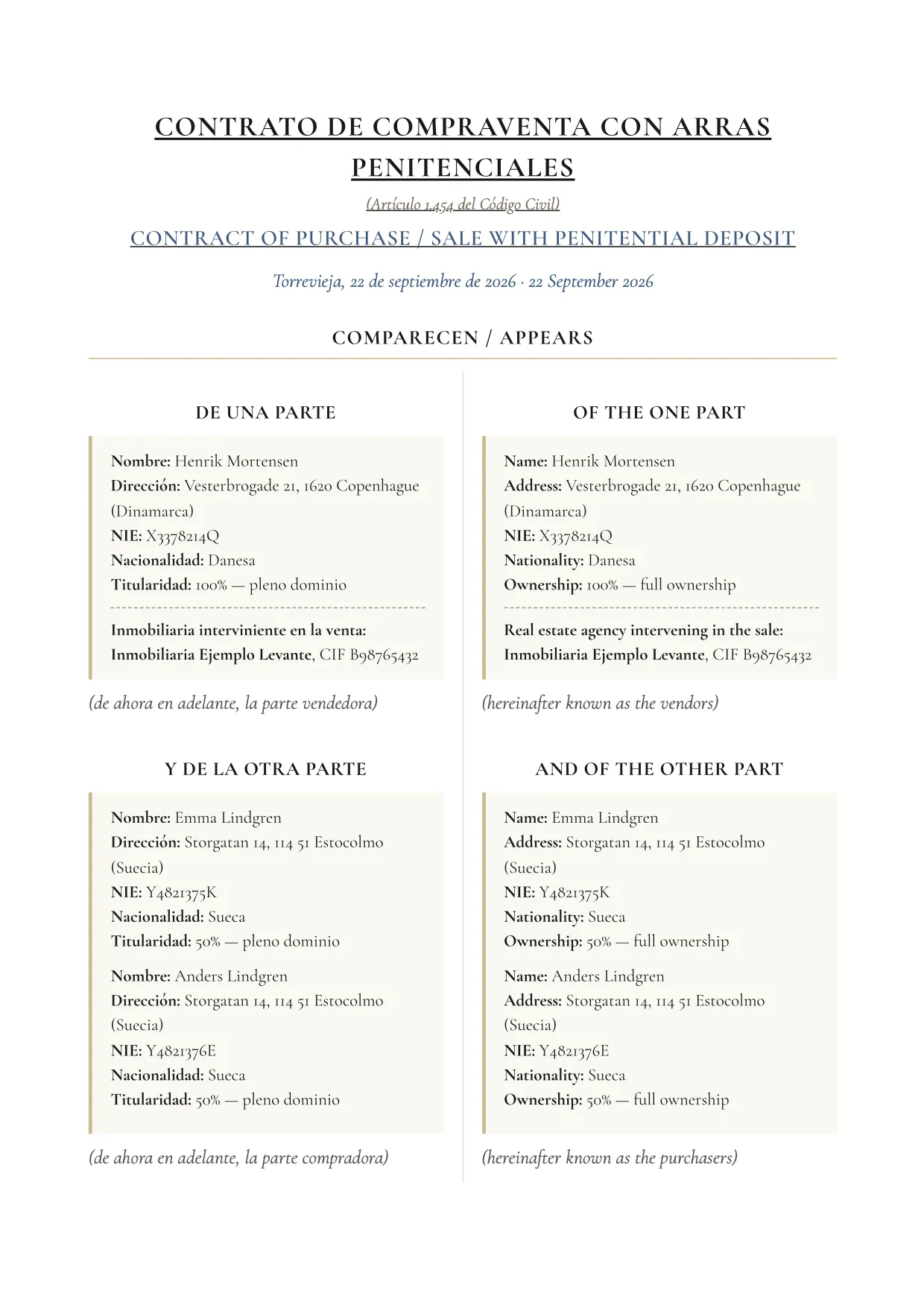
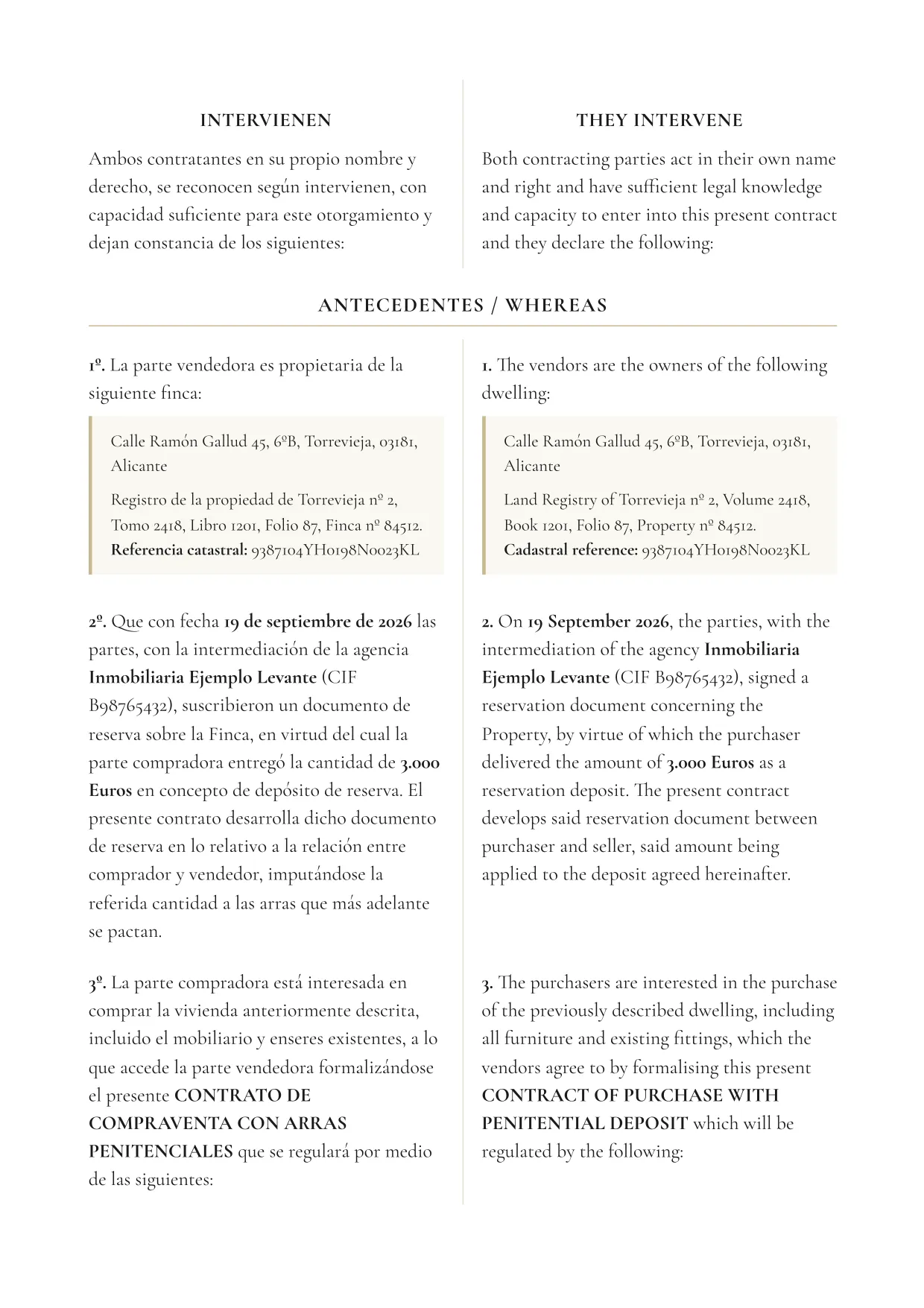
Deposit contract

The purchase agreement with a penitential deposit (art. 1454 of the Spanish Civil Code) or a confirmatory one (art. 1455).

What it includes

  • Parties, attorneys and property, with land-registry and cadastral details
  • Price in figures and words, with the prior reservation as background
  • Each deposit payment, with its date, recipient and account
  • Withholdings at the deed, agency fees and escrow of the deposit, if any
  • Deadline for the deed, costs, encumbrances, breach and your own clauses

Before generating it, it warns you if the address, the price, the deposit amount, the date or the sellers are missing.

Who it is for
Buyer and seller, who sign it; a copy for the agencies
Languages
Spanish and English in the same document, in two columns; there is no single-language version
Format
Opens ready to print or save as PDF
Where to find it (menus in Spanish)
Ficha de la finca (property file)Generar documento (generate document)Also in the «Informes y contratos» (reports and contracts) section.

Example pages

Deposit contract: page 1 of 10, example made with a fictitious sale
Page 1 of 10
Deposit contract: page 2 of 10, example made with a fictitious sale
Page 2 of 10

Showing pages 1 and 2 of 10, from a fictitious sale. Click a page to see it full size.

Reservation and deposit

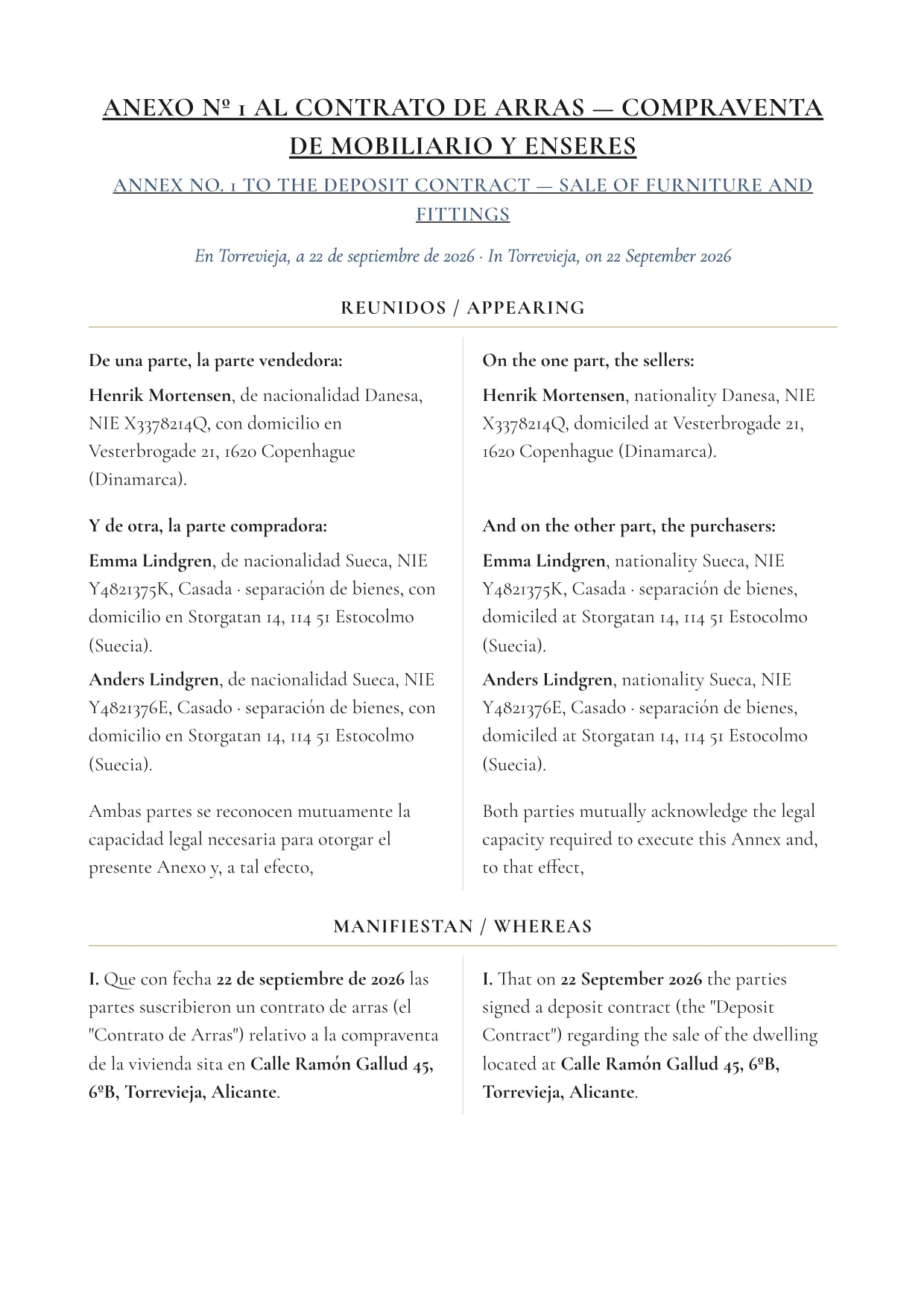
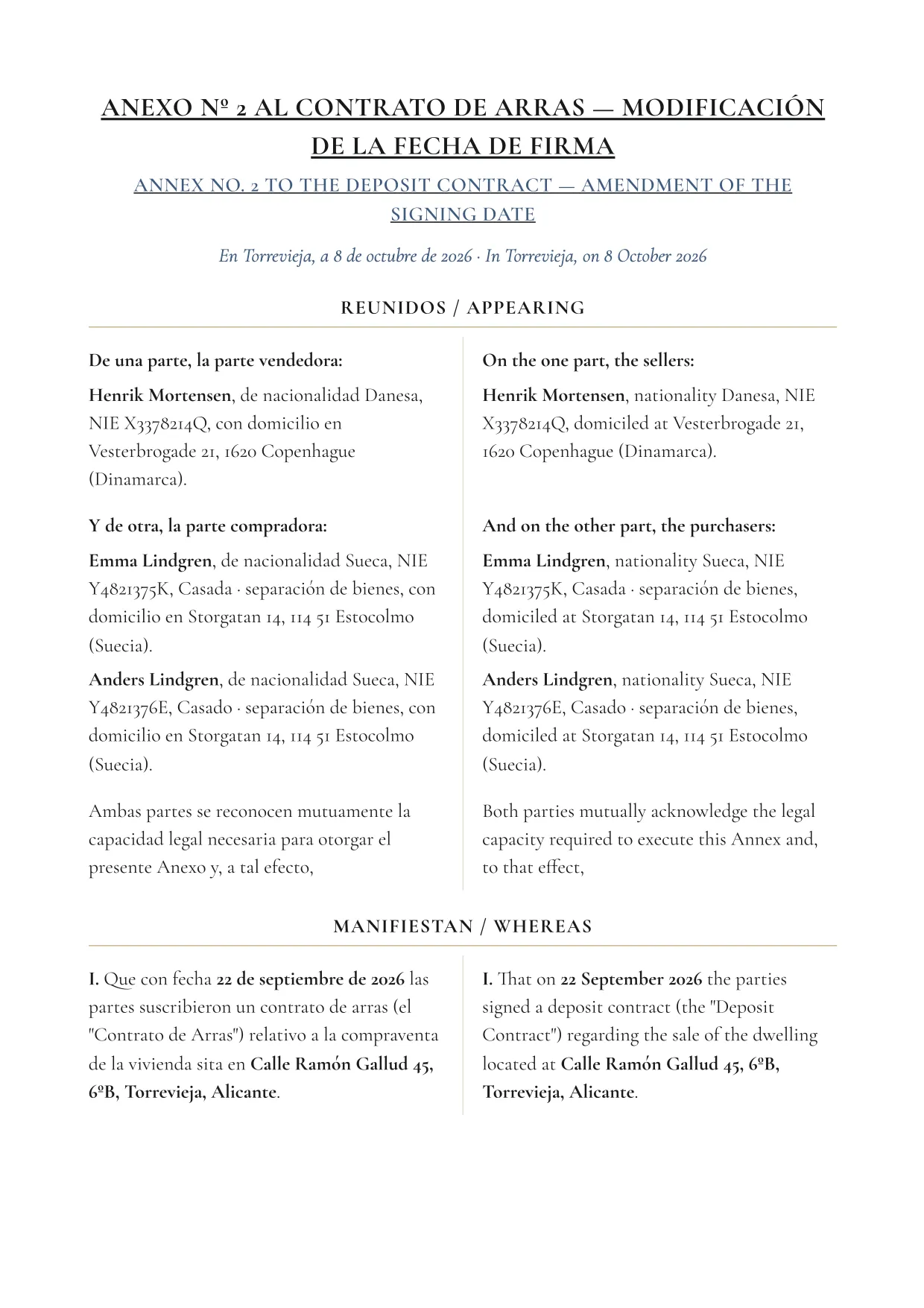
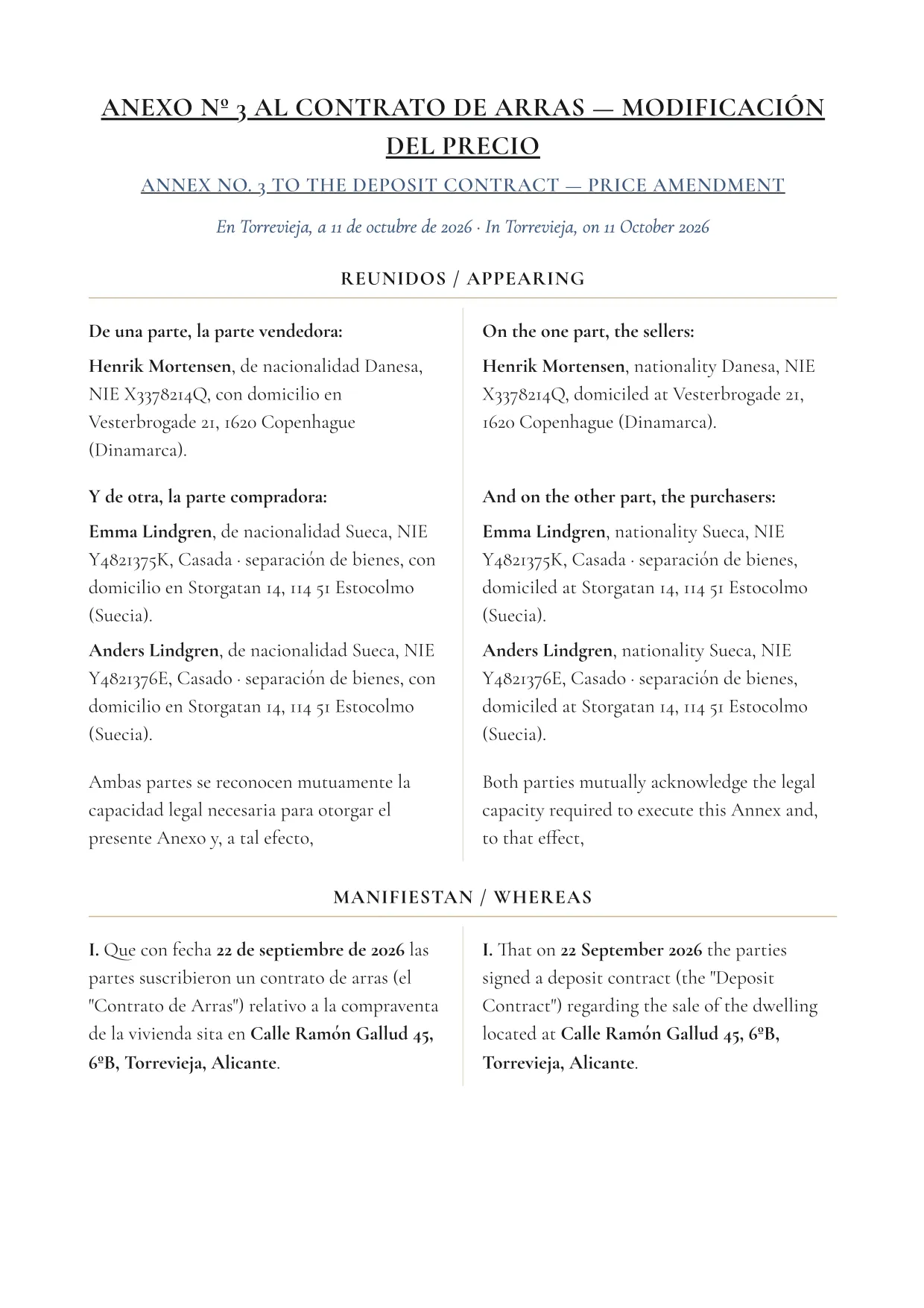
Annexes to the deposit contract

Numbered annexes that amend or add to the signed deposit contract. The parties and the property come from the file.
4 types

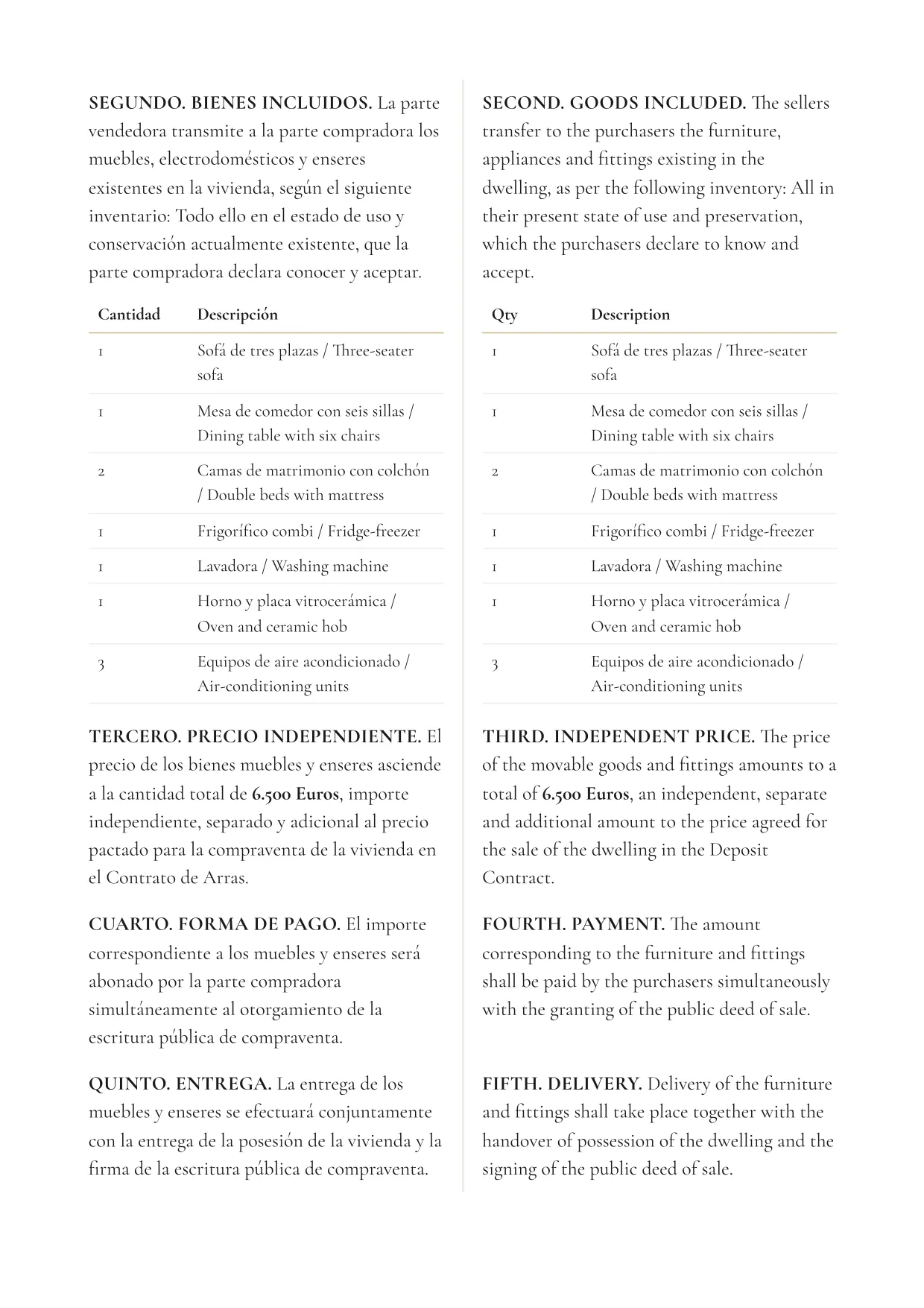
  • Sale of furniture and fittings, with the price and the inventory
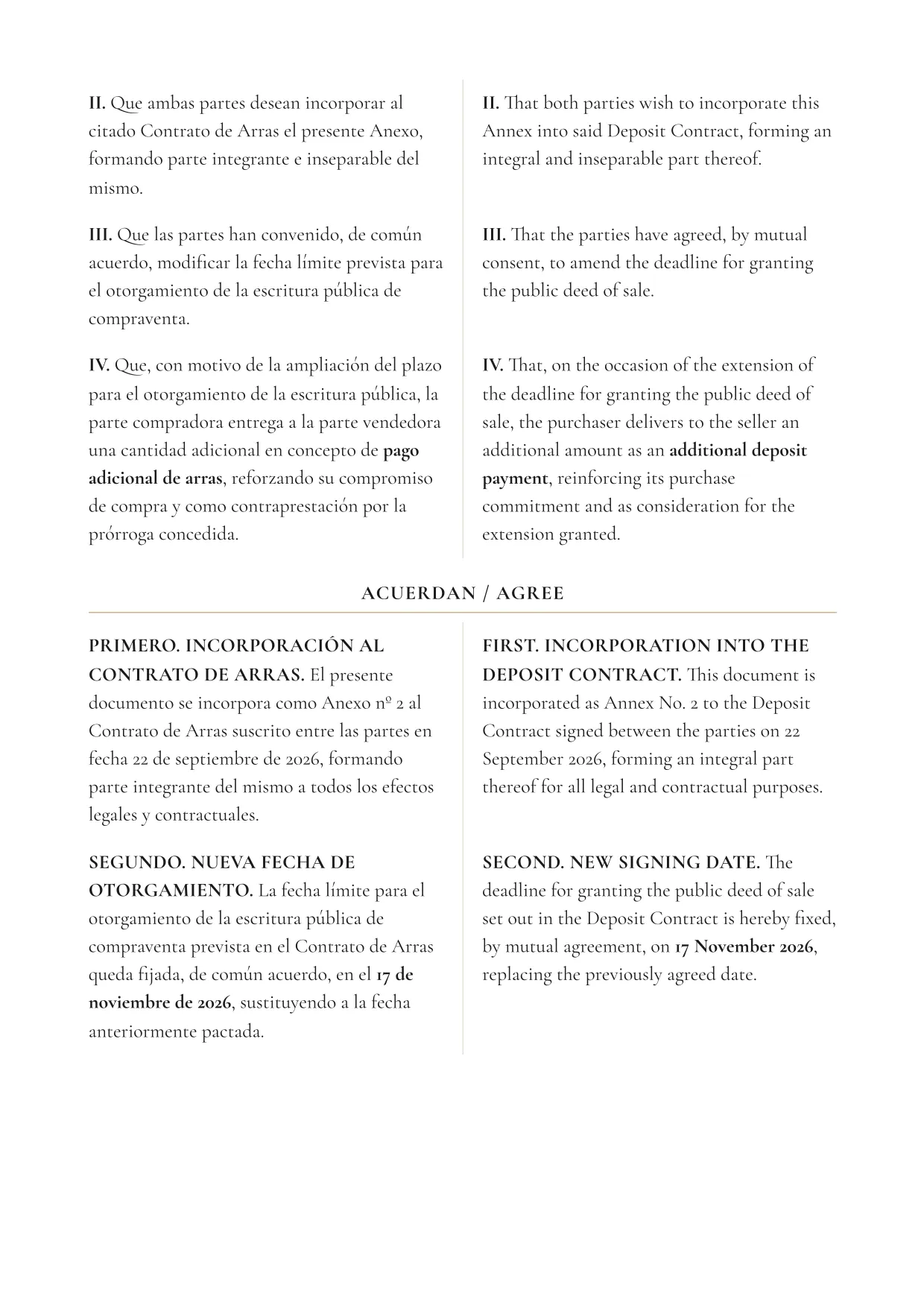
  • Extension of the deadline or a new signing date, with an extra payment if any
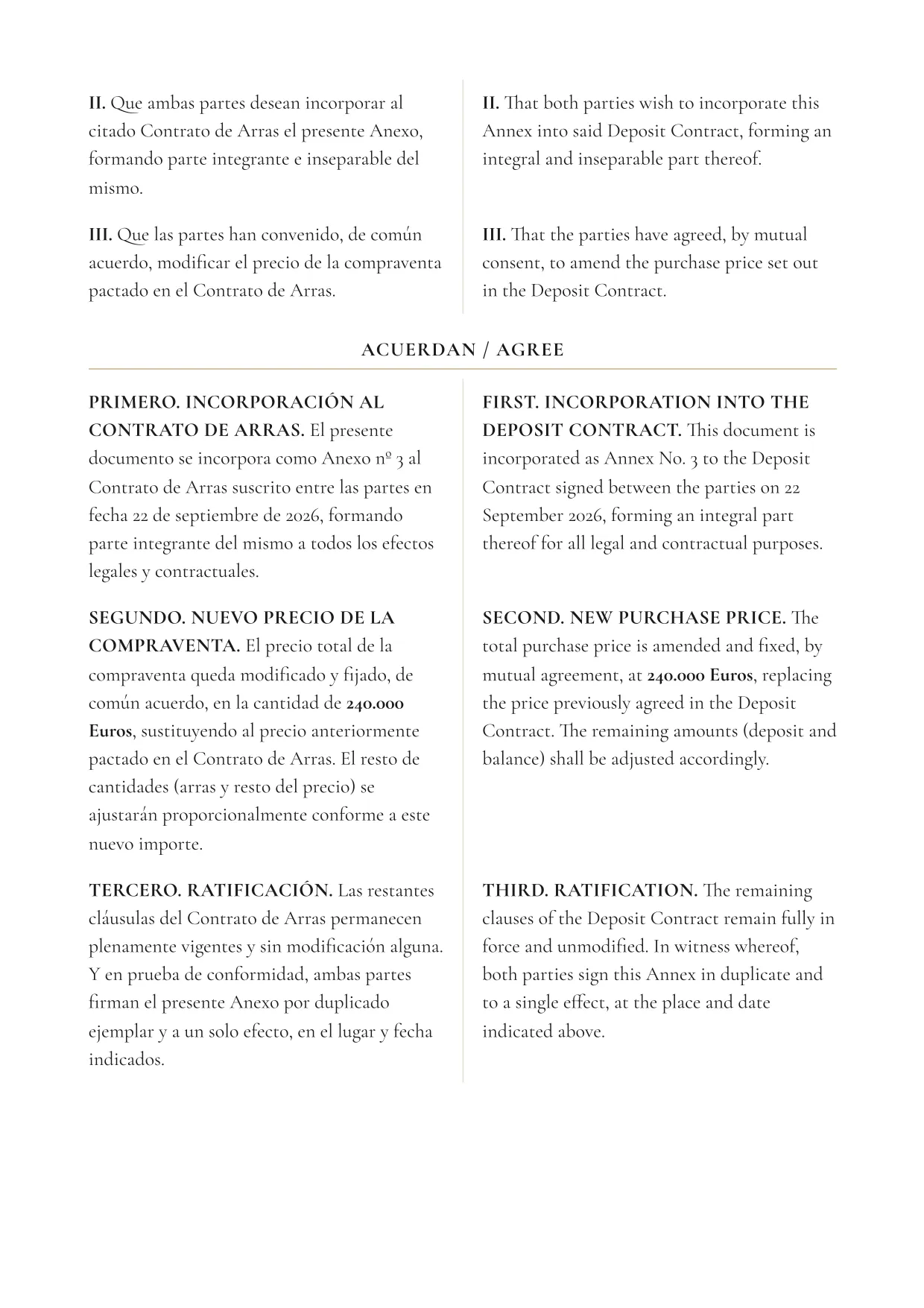
  • Price amendment
  • Free-text annex

Each annex includes the recitals, the agreed terms and the signatures.

Who it is for
Buyer and seller, who sign it
Languages
Spanish and English in the same document, in two columns
Format
Opens ready to print or save as PDF
Where to find it (menus in Spanish)
Ficha de la finca (property file)Económico (financials)Arras (deposit)Anexos (annexes)

Example pages

Annexes to the deposit contract (Furniture): page 1 of 4, example made with a fictitious sale
Page 1 of 4
Annexes to the deposit contract (Furniture): page 3 of 4, example made with a fictitious sale
Page 3 of 4

Showing pages 1 and 3 of 4, from a fictitious sale. Click a page to see it full size.

Reservation and deposit

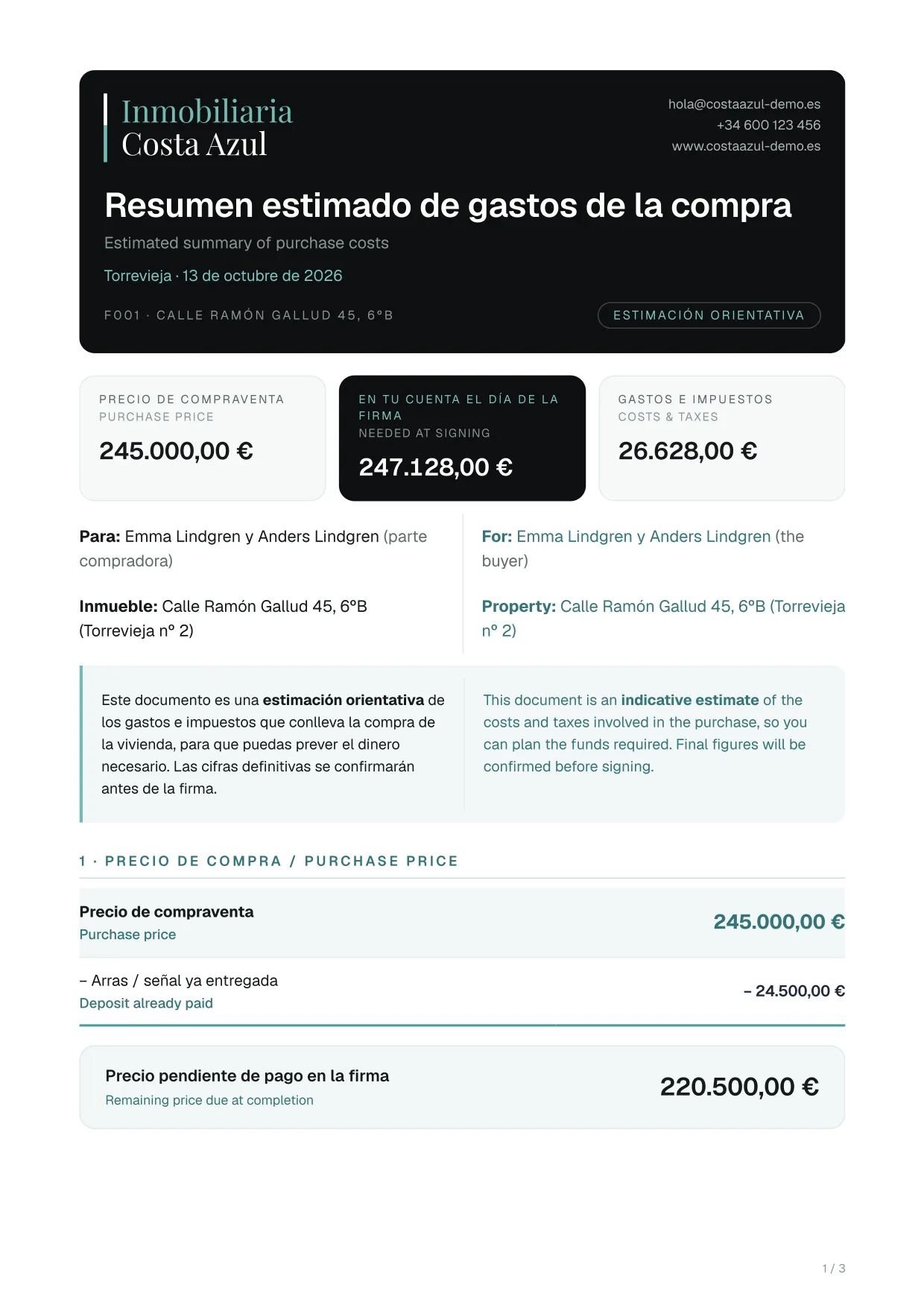
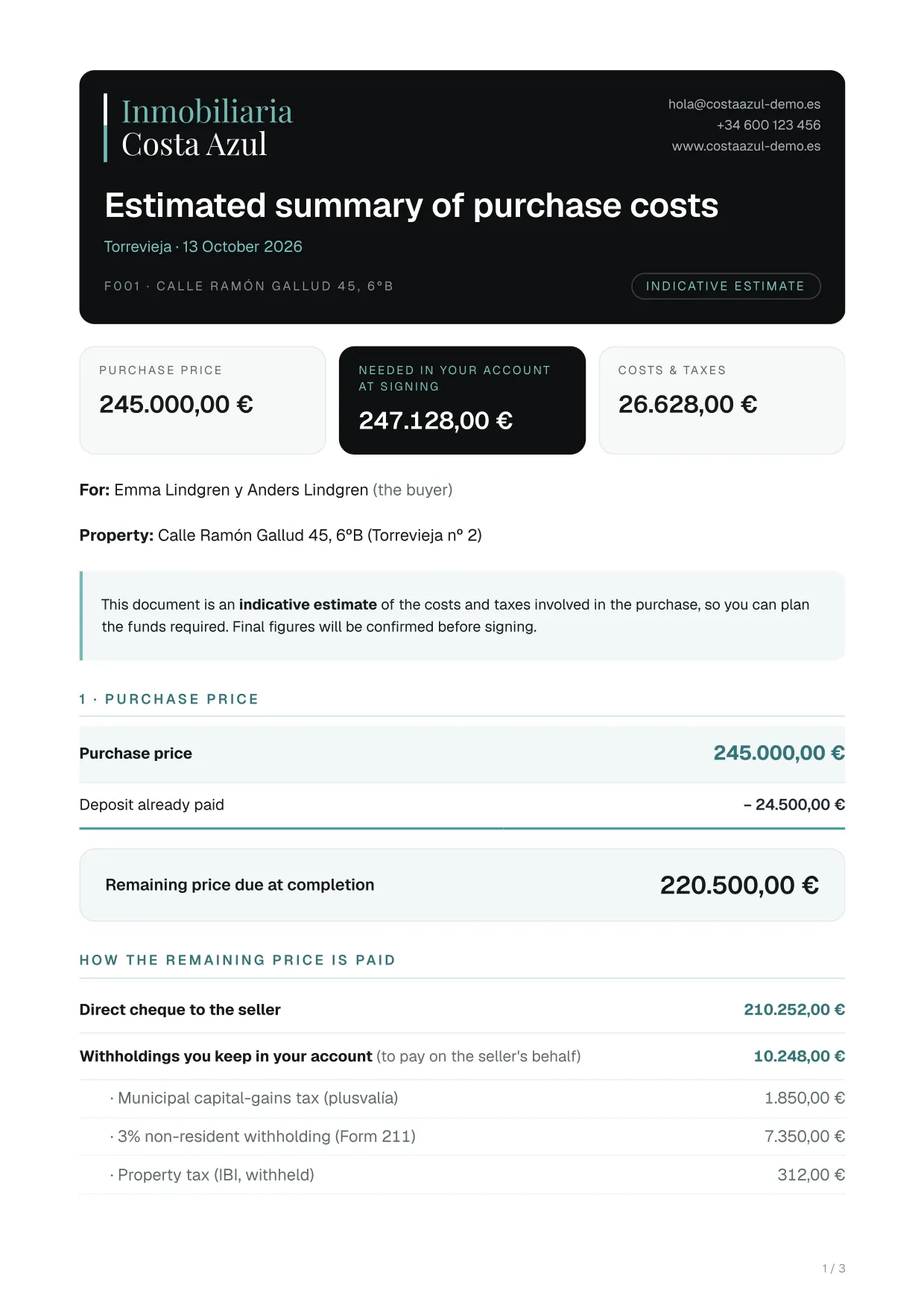
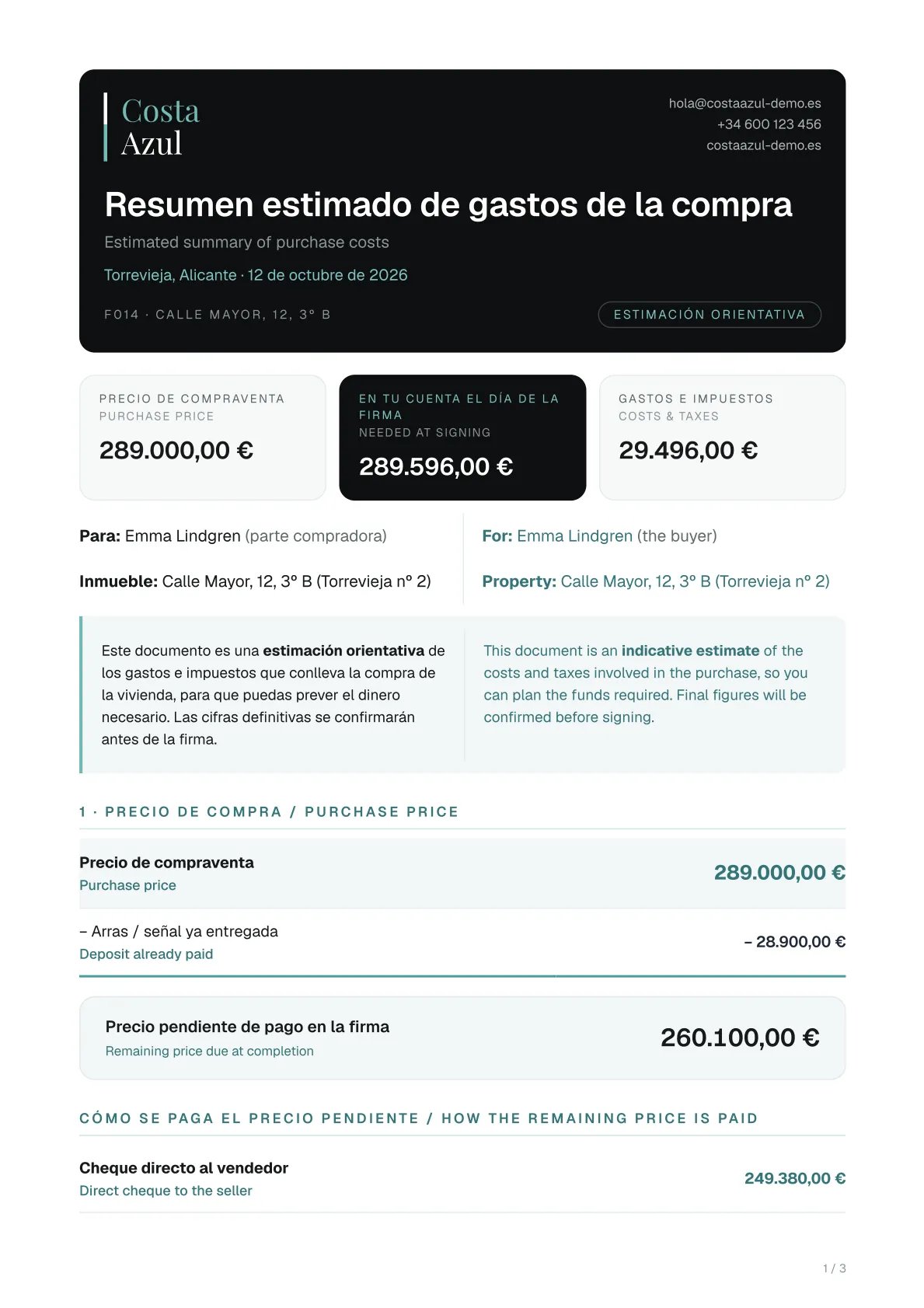
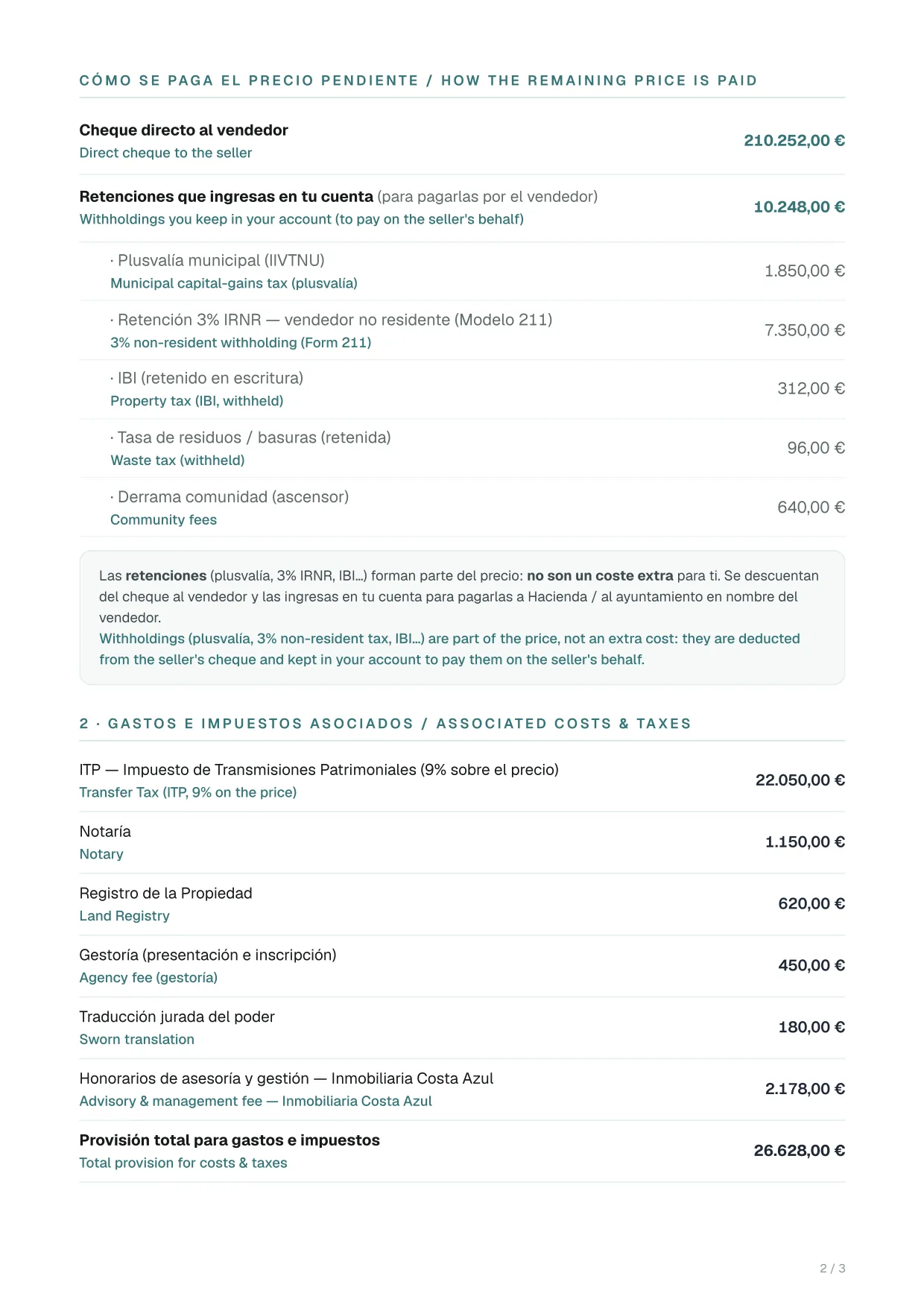
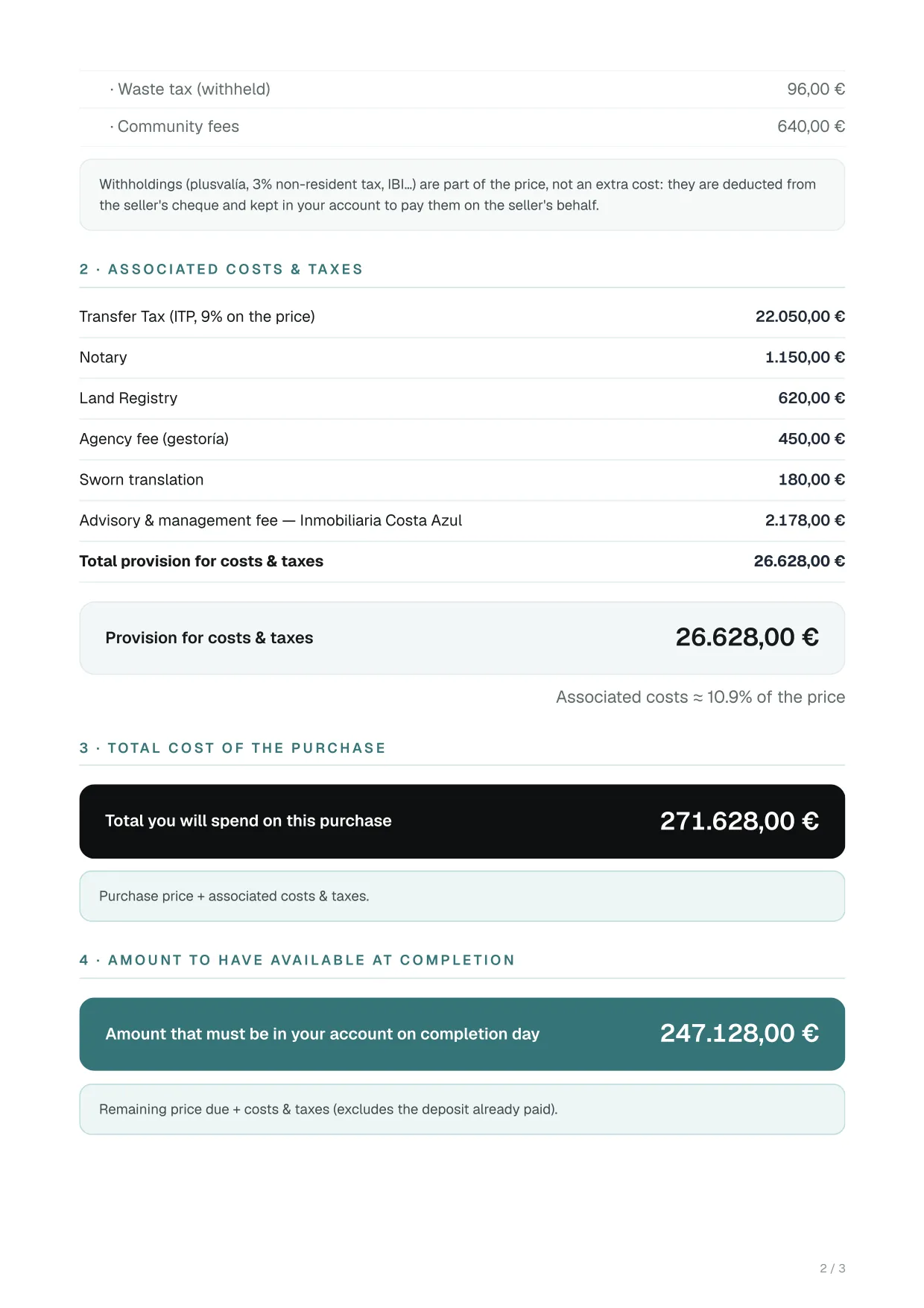
Buyer’s cost summary

An indicative estimate of what the purchase costs and of the money the buyer needs in their account on signing day.

What it includes

  • Three figures at the top: price, money needed in the account for signing, and costs and taxes
  • The price less the deposit already paid, and how the rest is paid
  • Transfer tax (ITP), or VAT and stamp duty for new builds, notary, land registry and agency fees, with their percentage of the price
  • Your own notes
Who it is for
The buyer
Languages
Bilingual, or English only for buyers who do not read Spanish
Format
Opens ready to print or save as PDF
Where to find it (menus in Spanish)
Ficha de la finca (property file)Generar documento (generate document)Also in Económico › Gastos (financials › costs).

Example pages

Buyer’s cost summary (English only): page 1 of 3, example made with a fictitious sale
Page 1 of 3
Buyer’s cost summary (English only): page 2 of 3, example made with a fictitious sale
Page 2 of 3

Showing pages 1 and 2 of 3, from a fictitious sale. Click a page to see it full size.

Reservation and deposit

Seller’s cost summary

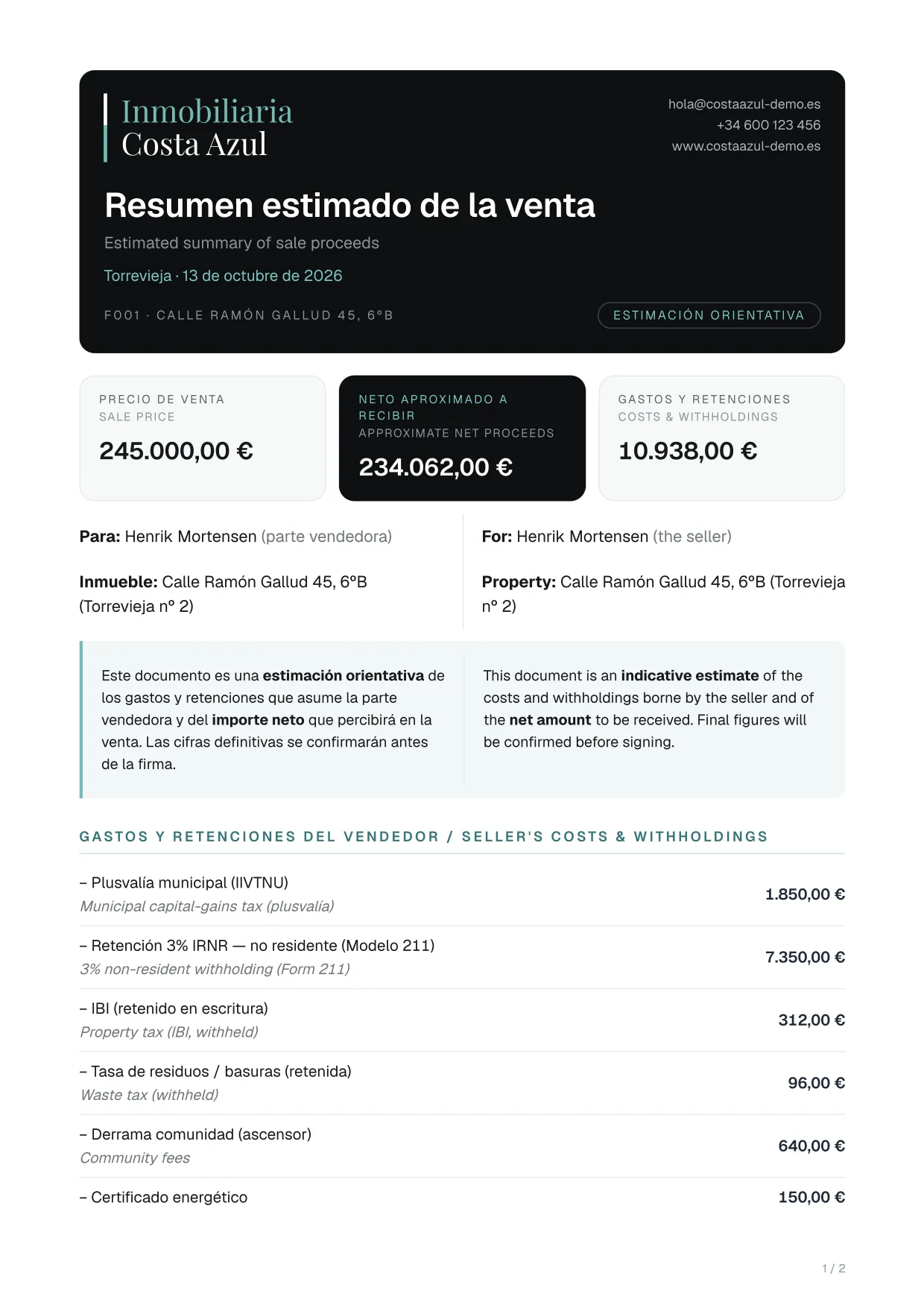
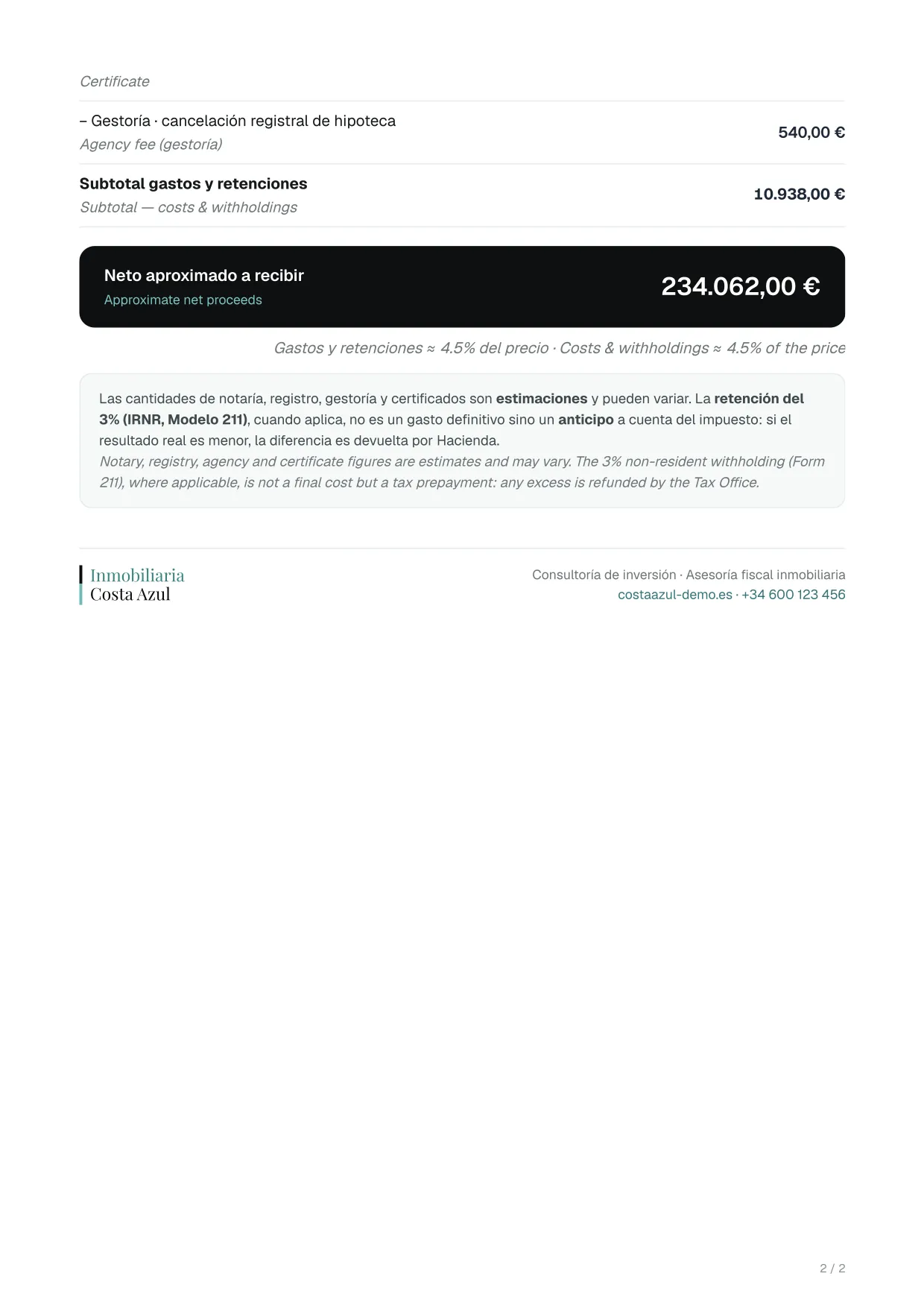
An indicative estimate of what the seller will receive: the price, the approximate net amount and everything deducted from it.

What it includes

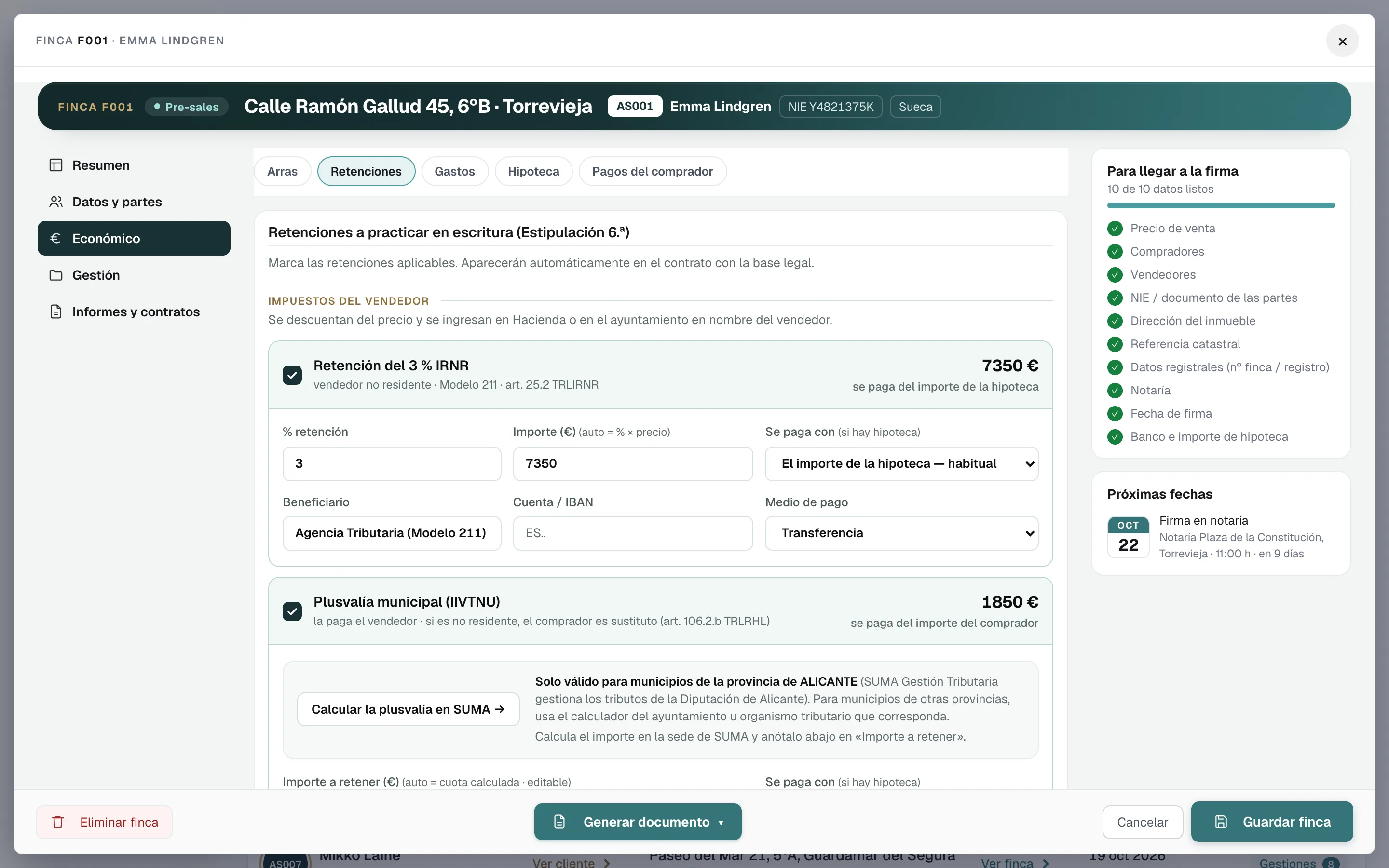
  • Municipal capital-gains tax (plusvalía)
  • The 3% non-resident withholding (Form 211), explained as a tax prepayment, not a cost
  • Withheld IBI and waste tax, and the second-occupancy licence
  • Seller costs, such as cancelling the mortgage or the energy certificate
  • The net amount and its percentage of the price
Who it is for
The seller
Languages
Spanish and English in the same document
Format
Opens ready to print or save as PDF
Where to find it (menus in Spanish)
Ficha de la finca (property file)Económico (financials)Gastos (costs)The «Informe de gastos del vendedor» button (seller cost report).

Example pages

Seller’s cost summary: page 1 of 2, example made with a fictitious sale
Page 1 of 2
Seller’s cost summary: page 2 of 2, example made with a fictitious sale
Page 2 of 2

Showing pages 1 and 2 of 2, from a fictitious sale. Click a page to see it full size.

Pre-signing

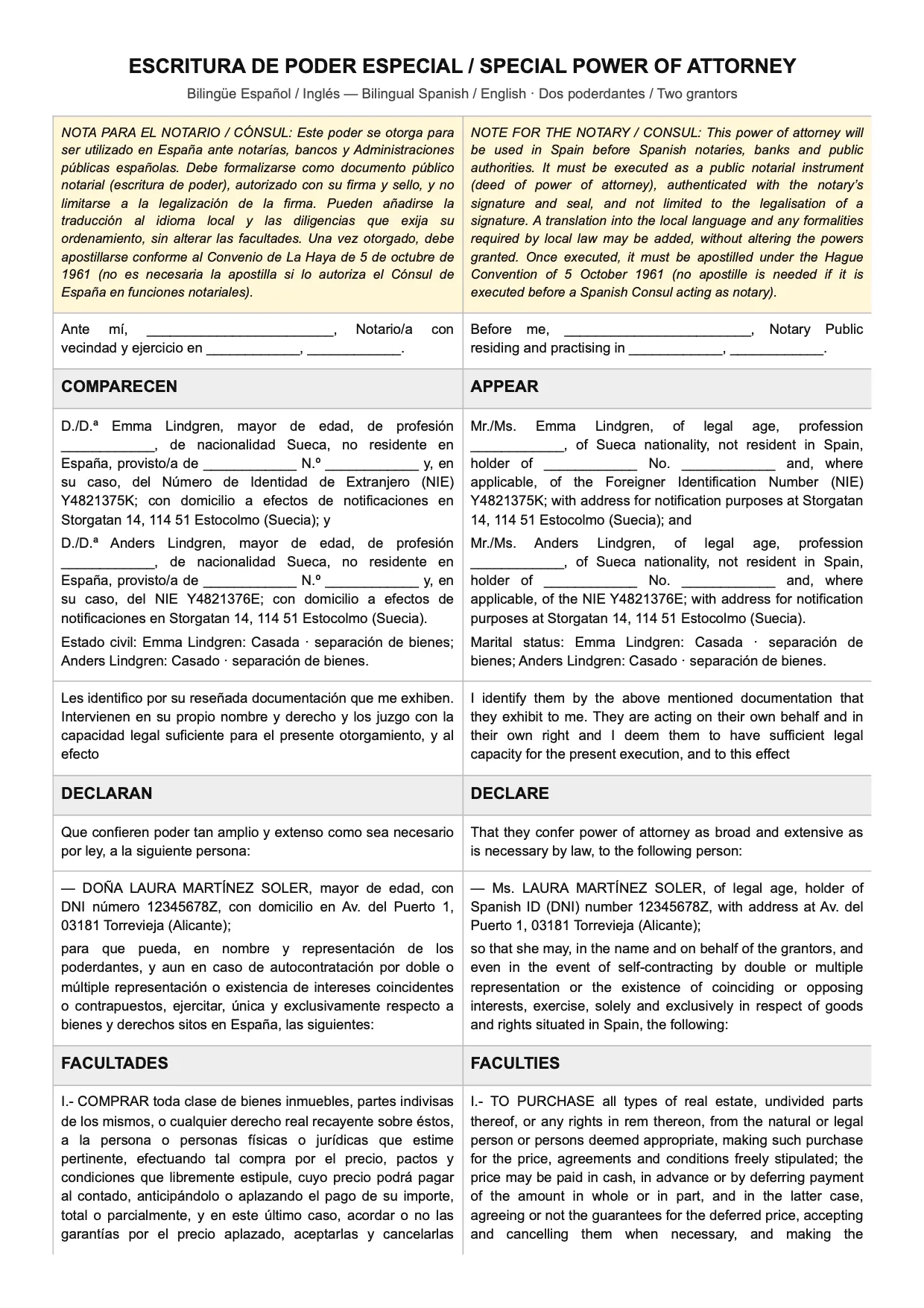
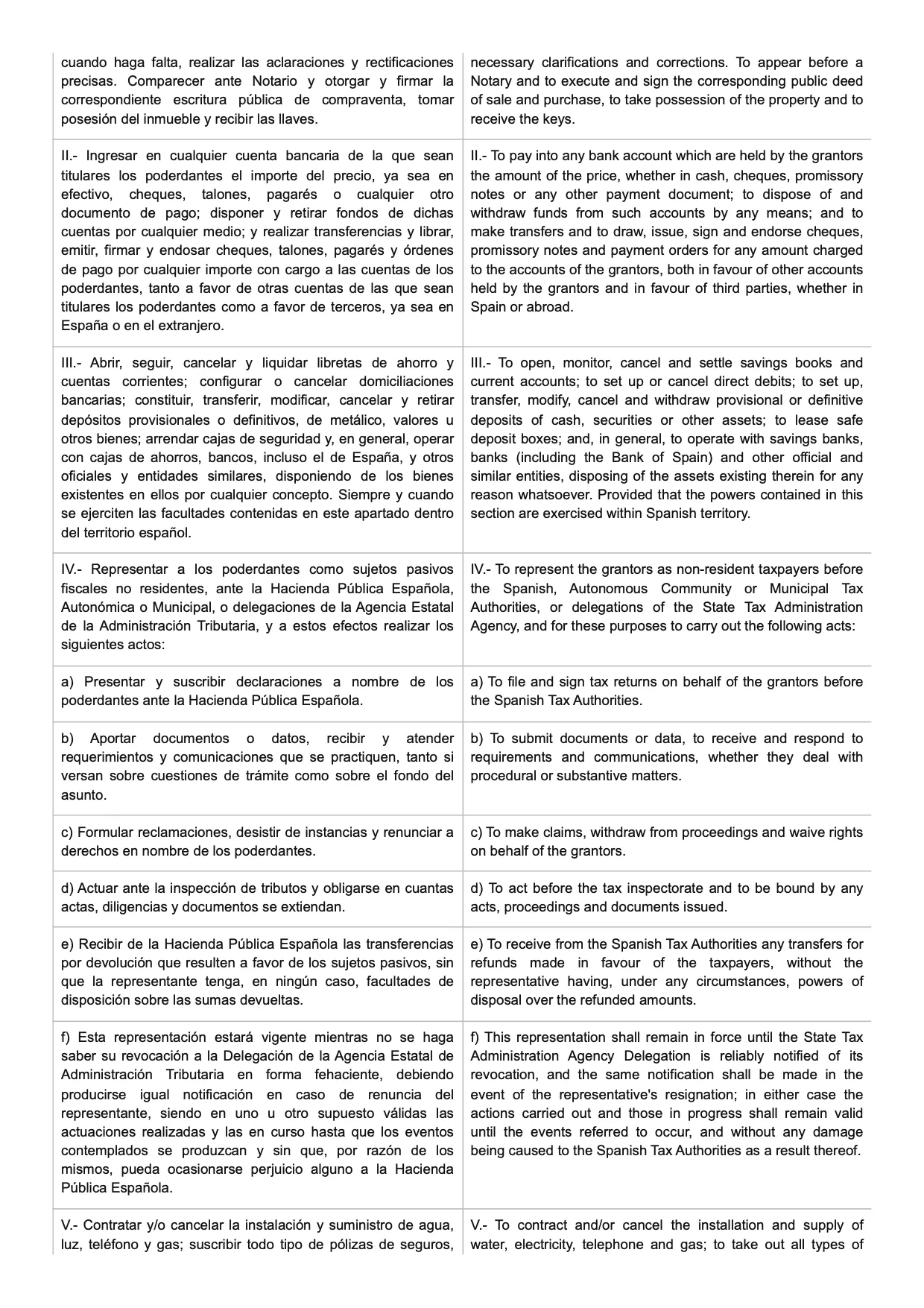
Special power of attorney template

The special power of attorney deed so the client can buy without travelling to Spain, blank or filled in with their details.

What it includes

  • A note for the notary or the consul
  • Up to two grantors, filled in from the file: name, nationality, ID, NIE, address and marital status
  • 19 powers to choose from; 14 come ticked: buying, bank accounts, Tax Agency, utilities, NIE, Land Registry…
  • Powers written by hand in Spanish and English, with the numbering updated automatically
Who it is for
The buyer, who signs it before a notary or consulate, and the notary
Languages
Spanish and English in the same document, in two columns
Format
To print or save as PDF, plus a Word download
Where to find it (menus in Spanish)
Plantillas (templates)Poder especial (special power of attorney)Also in the property file, under «Informes y contratos» (reports and contracts).

Example pages

Special power of attorney template: page 1 of 5, example made with a fictitious sale
Page 1 of 5
Special power of attorney template: page 2 of 5, example made with a fictitious sale
Page 2 of 5

Showing pages 1 and 2 of 5, from a fictitious sale. Click a page to see it full size.

Pre-signing

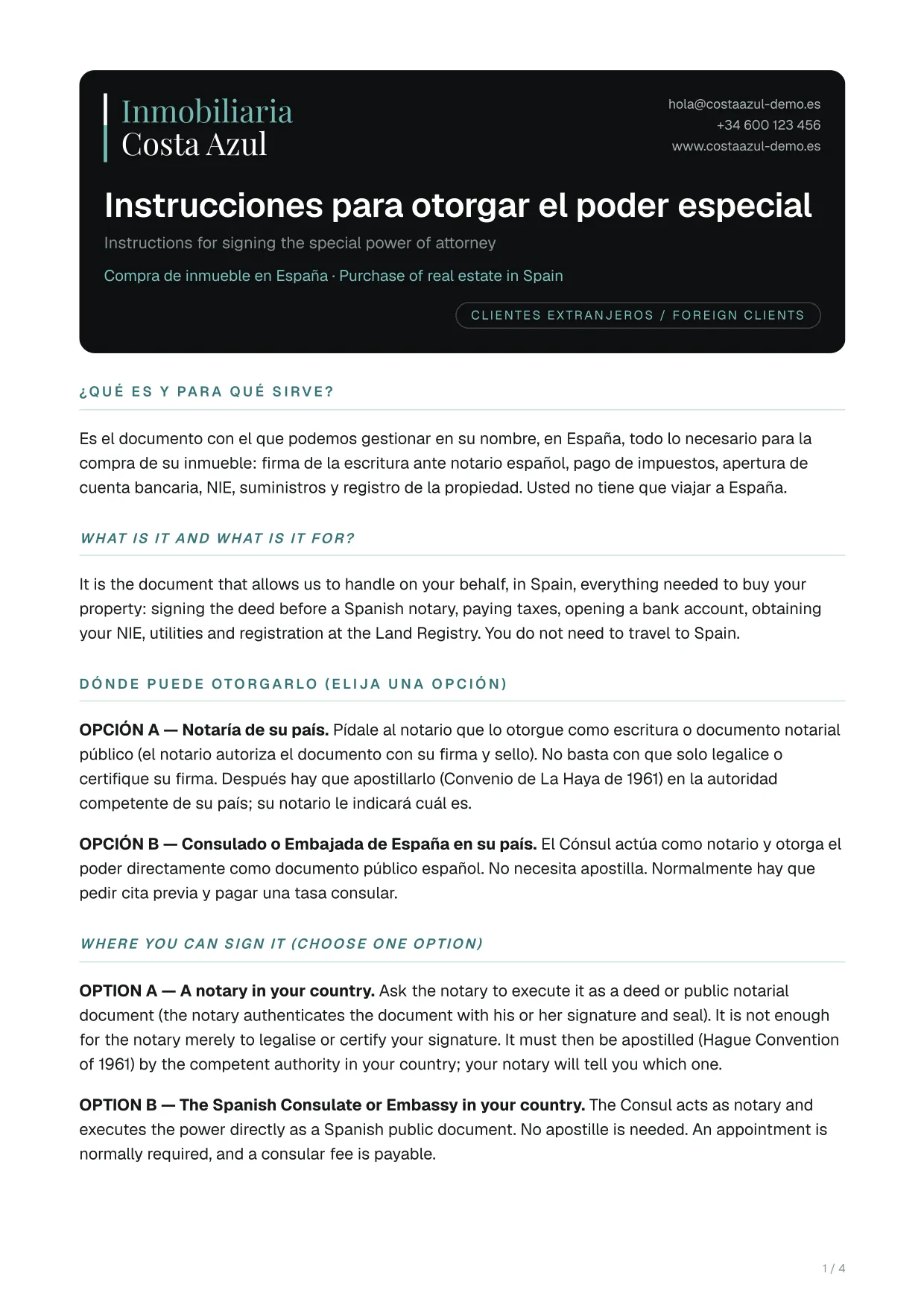
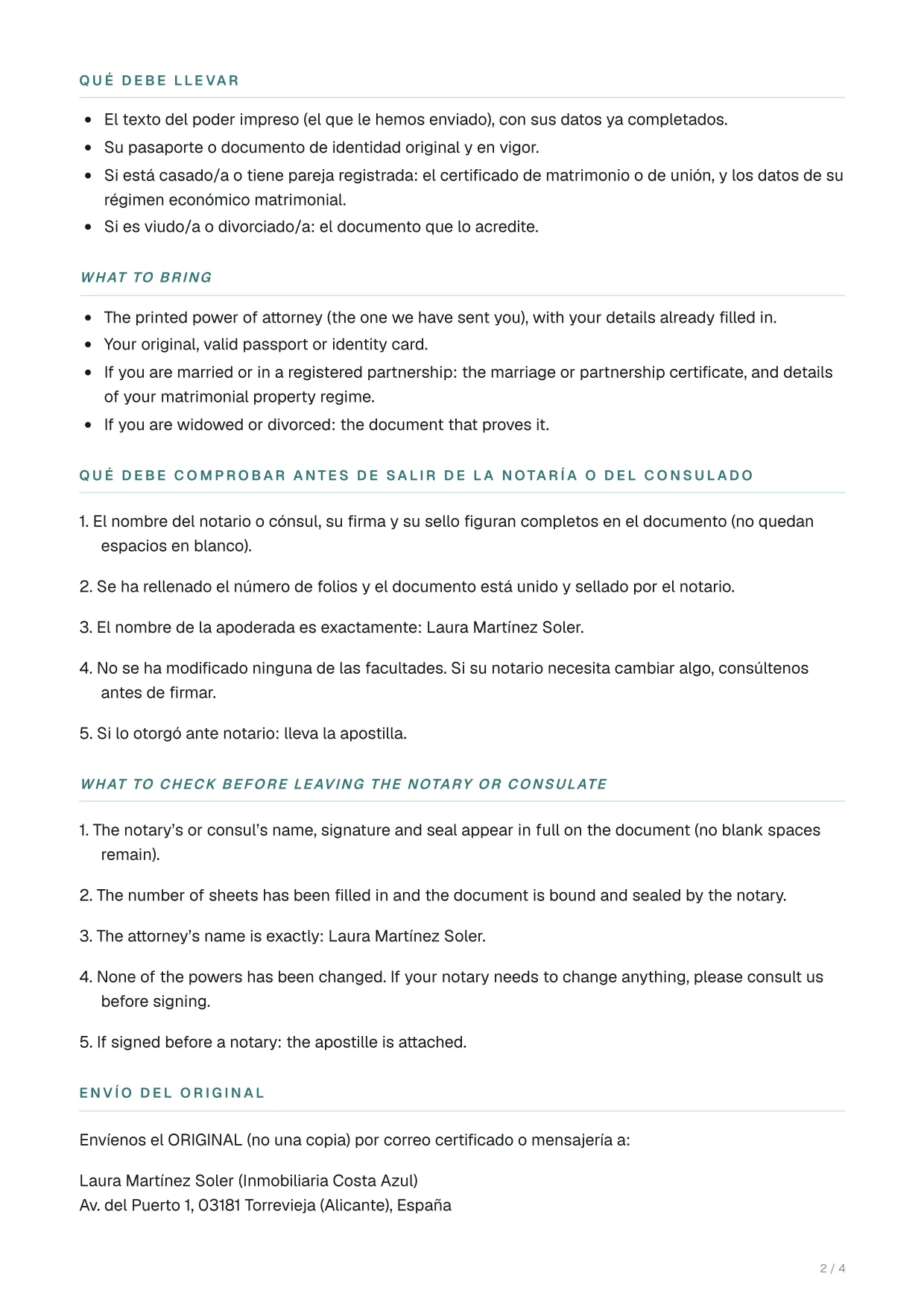
Instructions for signing the power of attorney

The step-by-step guide for clients who sign the power of attorney in their own country.

What it includes

  • What the power of attorney is and what it is for
  • Where to sign it: a local notary with a Hague apostille, or a Spanish consulate
  • What to bring and what to check before leaving the notary
  • How to send the original and when a sworn translation is needed
  • Indicative cost and timing
Who it is for
Buyers who live outside Spain
Languages
Spanish and English: each section in both languages
Format
To print or save as PDF, plus a Word download
Where to find it (menus in Spanish)
Plantillas (templates)Instrucciones para otorgar el poder (instructions for signing the power of attorney)Also in the property file, under «Informes y contratos» (reports and contracts).

Example pages

Instructions for signing the power of attorney: page 1 of 4, example made with a fictitious sale
Page 1 of 4
Instructions for signing the power of attorney: page 2 of 4, example made with a fictitious sale
Page 2 of 4

Showing pages 1 and 2 of 4, from a fictitious sale. Click a page to see it full size.

Pre-signing

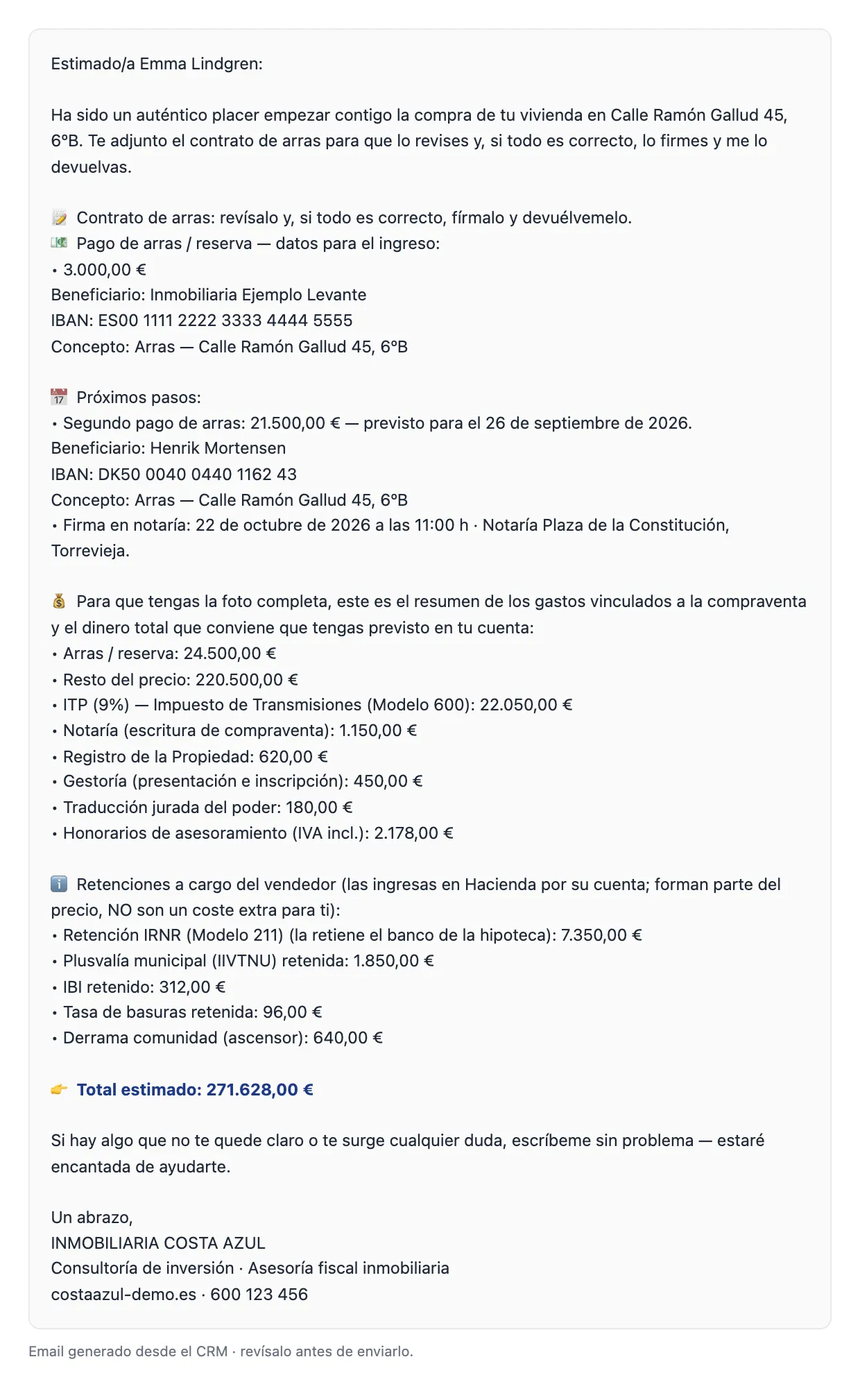
Client email before signing

An email drafted from the property file that tells the client where their purchase stands. If they have several properties, all are included.

Two messages

  • First message: the deposit contract to sign and the payment details for the deposit or the reservation
  • The next steps, such as the second payment and the notary appointment
  • The cost summary, with the total funds to set aside
  • Second message: the second deposit payment and a signing reminder
  • An opening and closing text, if you want one
Who it is for
The buyer
Languages
In Spanish, in English or in both
Format
Preview: copy the text, open it in your email with recipient and subject filled in, or print it
Where to find it (menus in Spanish)
Gestiones (tasks)Tarjeta de la finca (property card)The «Enviar al cliente un email con el estado de las gestiones» button (send the client an email with the status of each step).

Example

Client email before signing: email preview in the software, example made with a fictitious sale
Preview

Real email preview from the software, made with a fictitious sale and shown in Spanish. Click it to see it full size.

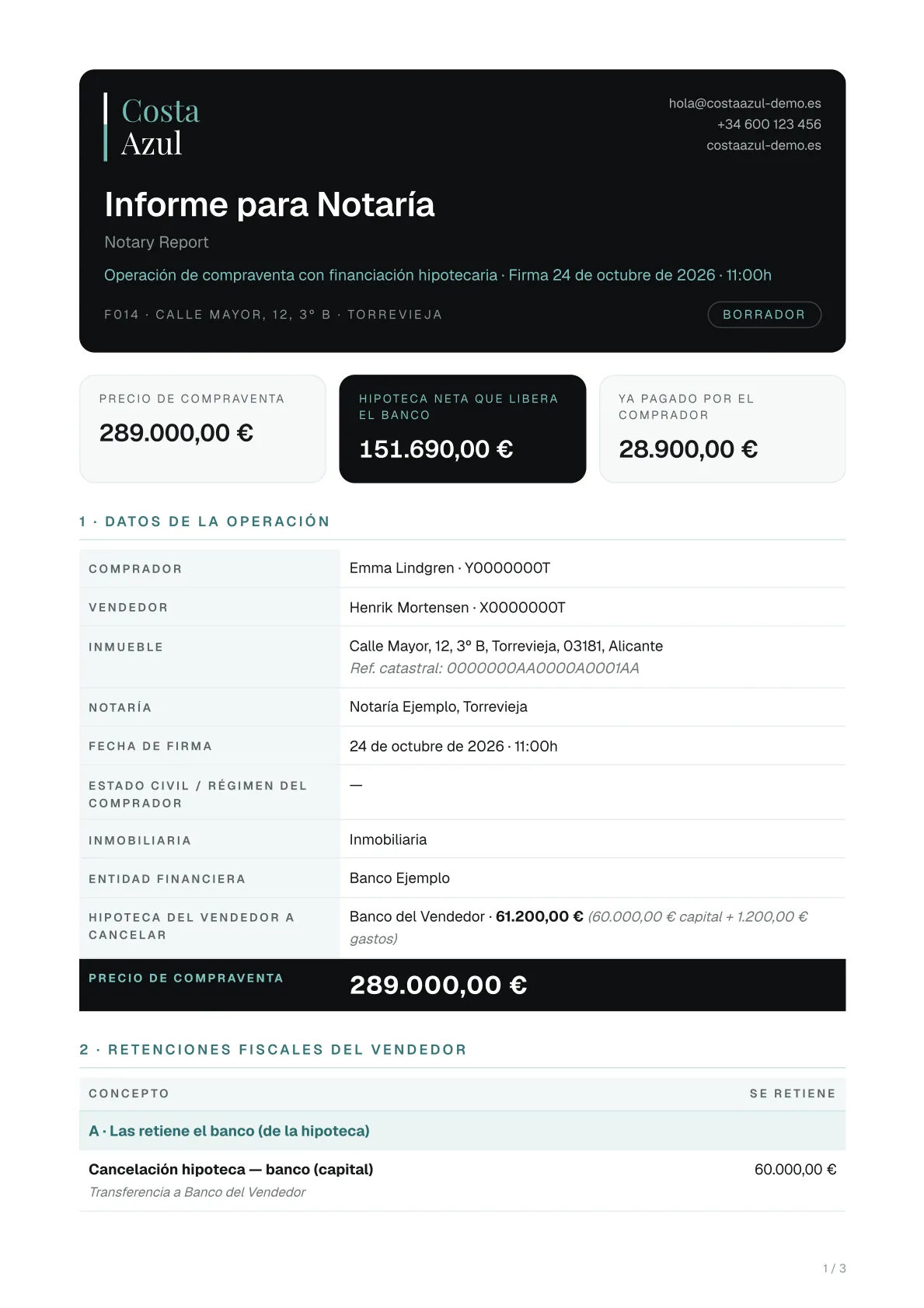
Signing

Notary report

Everything the notary needs to prepare the deed, in one report.

What it includes

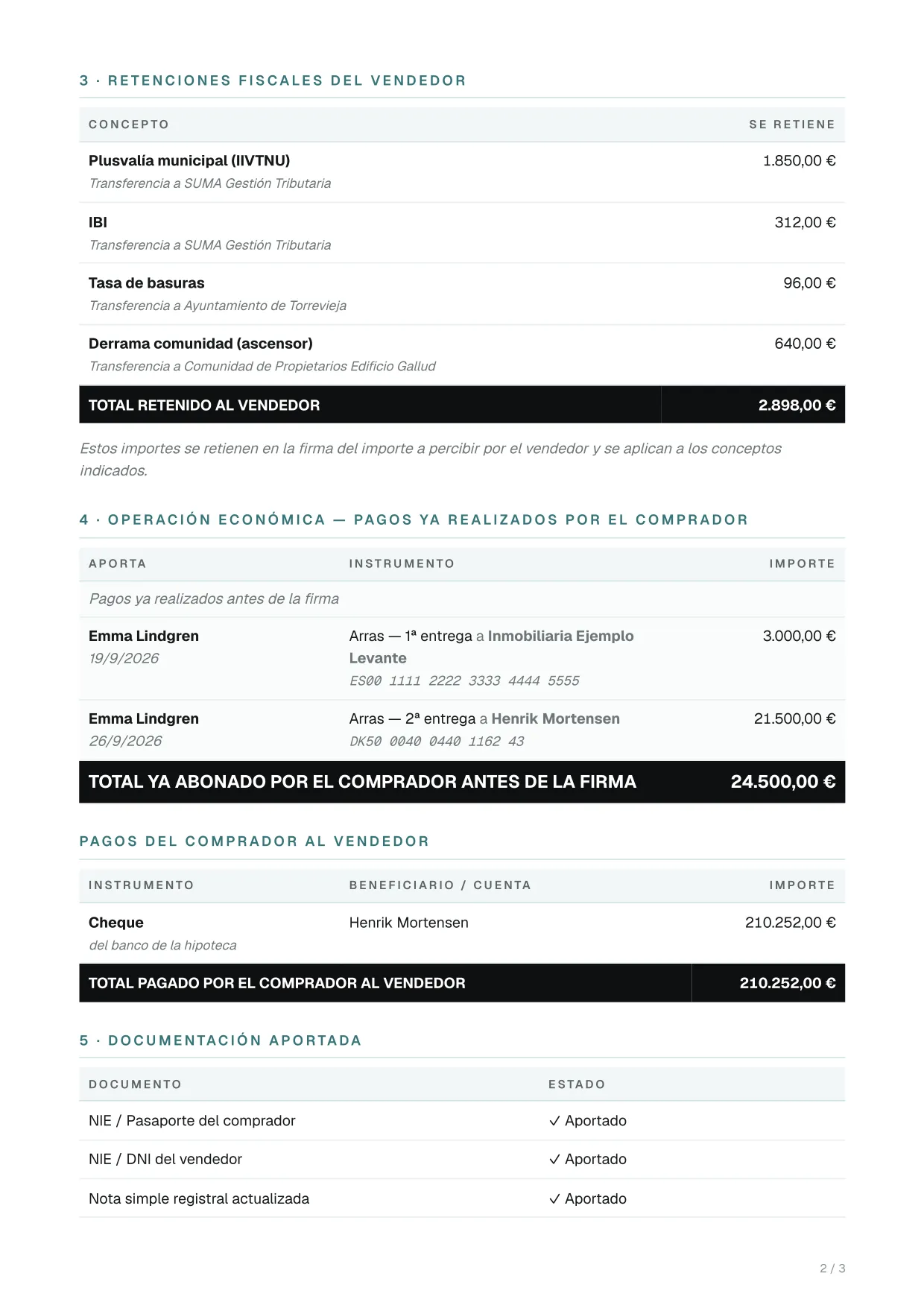
  • Price, net mortgage and what has already been paid
  • Buyers and sellers with ID, share and marital regime; property and cadastral reference
  • Settlement of the 3% non-resident withholding (Form 211) and the seller withholdings
  • Payments already made, and the cheques and transfers at signing
  • Documents provided and post-signing services

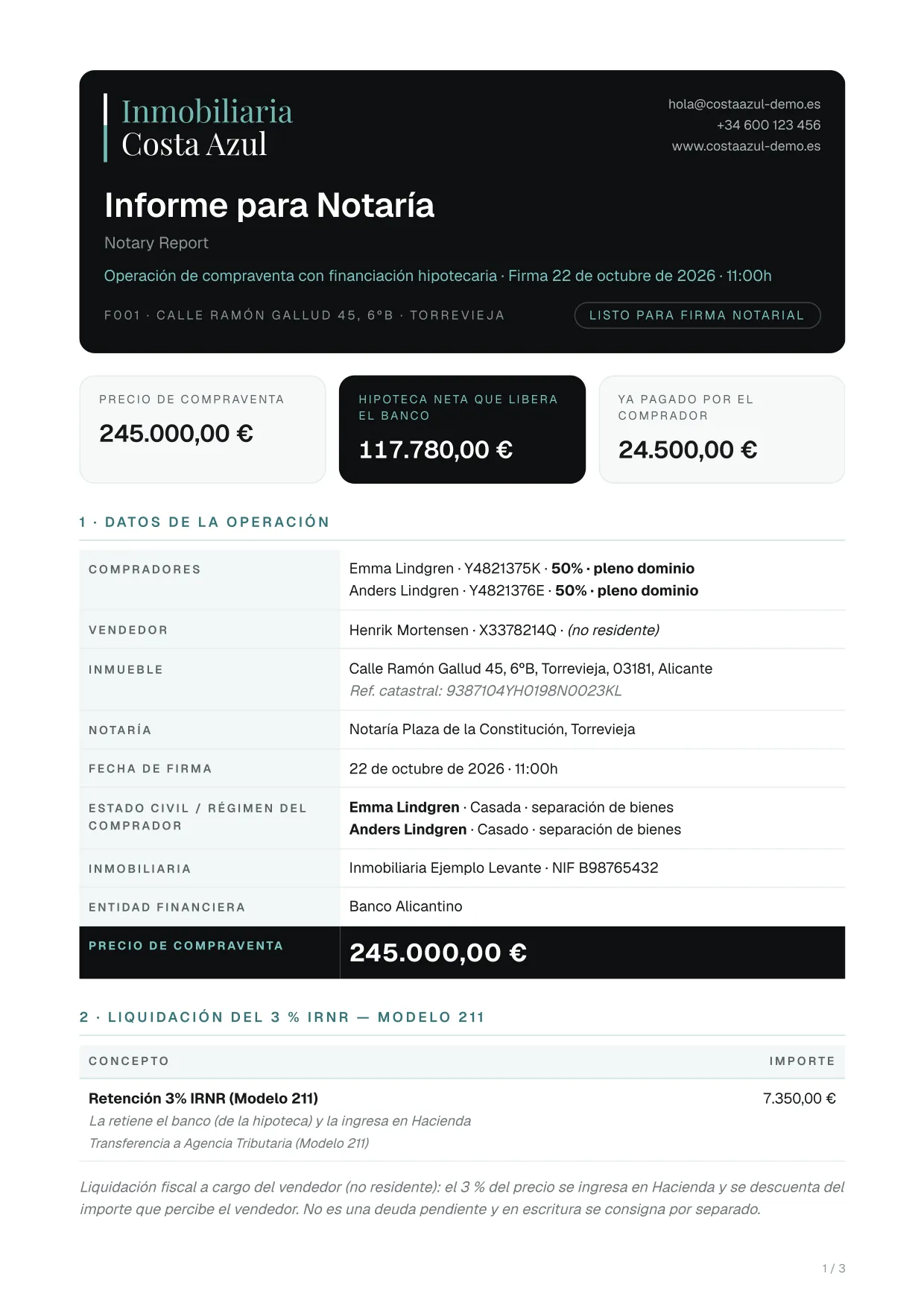
Before generating it, a window lets you add payment methods, tick the documents provided and write notes. From that same window you can download a ZIP of the documents provided, renamed by type, to send to the notary.

Who it is for
The notary, in Spanish; the foreign buyer, in English
Languages
In Spanish or in English: two versions
Format
Opens ready to print or save as PDF
Where to find it (menus in Spanish)
Ficha de la finca (property file)Generar documento (generate document)Also in the «Informes y contratos» (reports and contracts) section, with a data checklist.

Example pages

Notary report: page 1 of 3, example made with a fictitious sale
Page 1 of 3
Notary report: page 2 of 3, example made with a fictitious sale
Page 2 of 3

Showing pages 1 and 2 of 3, from a fictitious sale. Click a page to see it full size.

Signing

Bank report

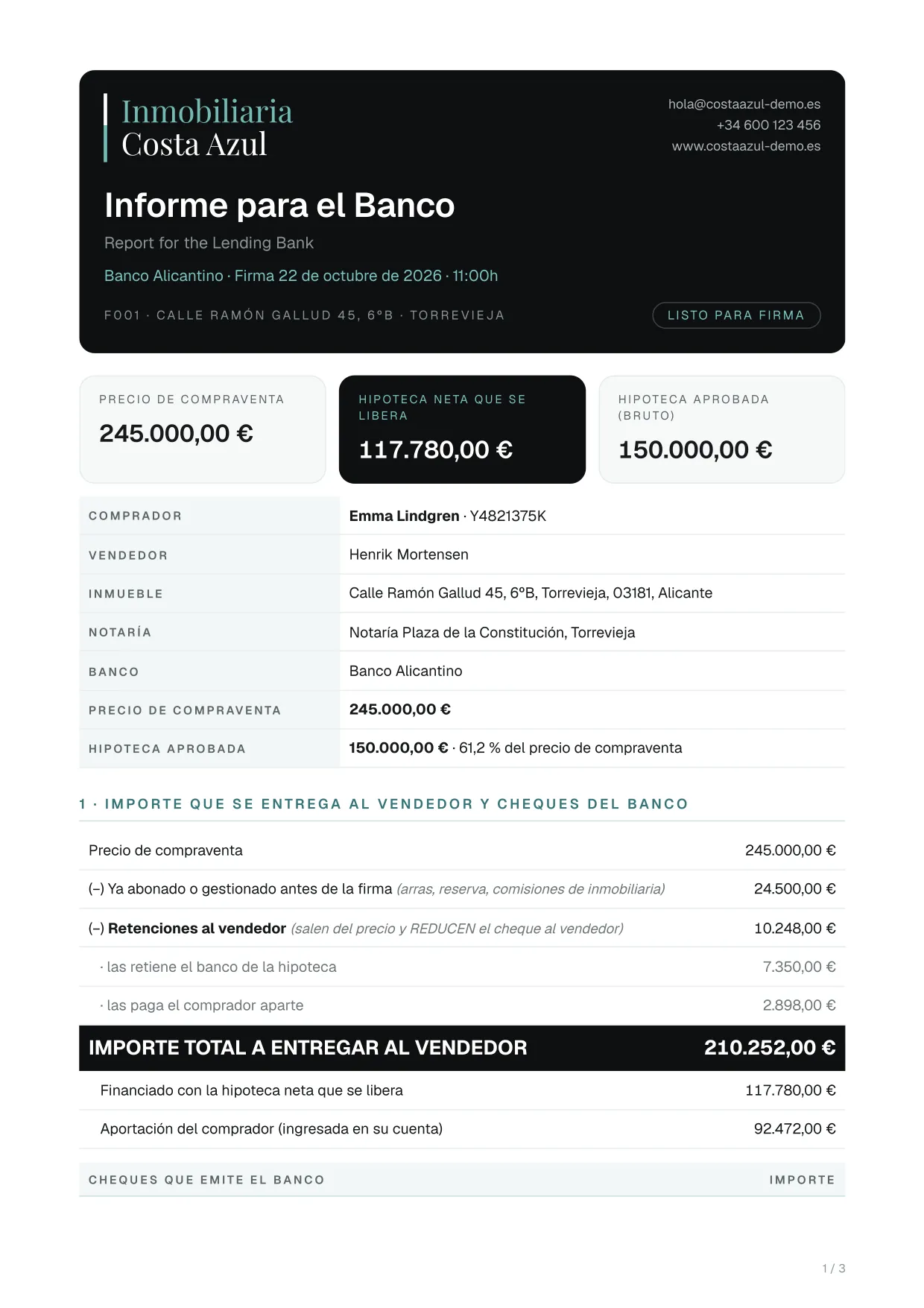
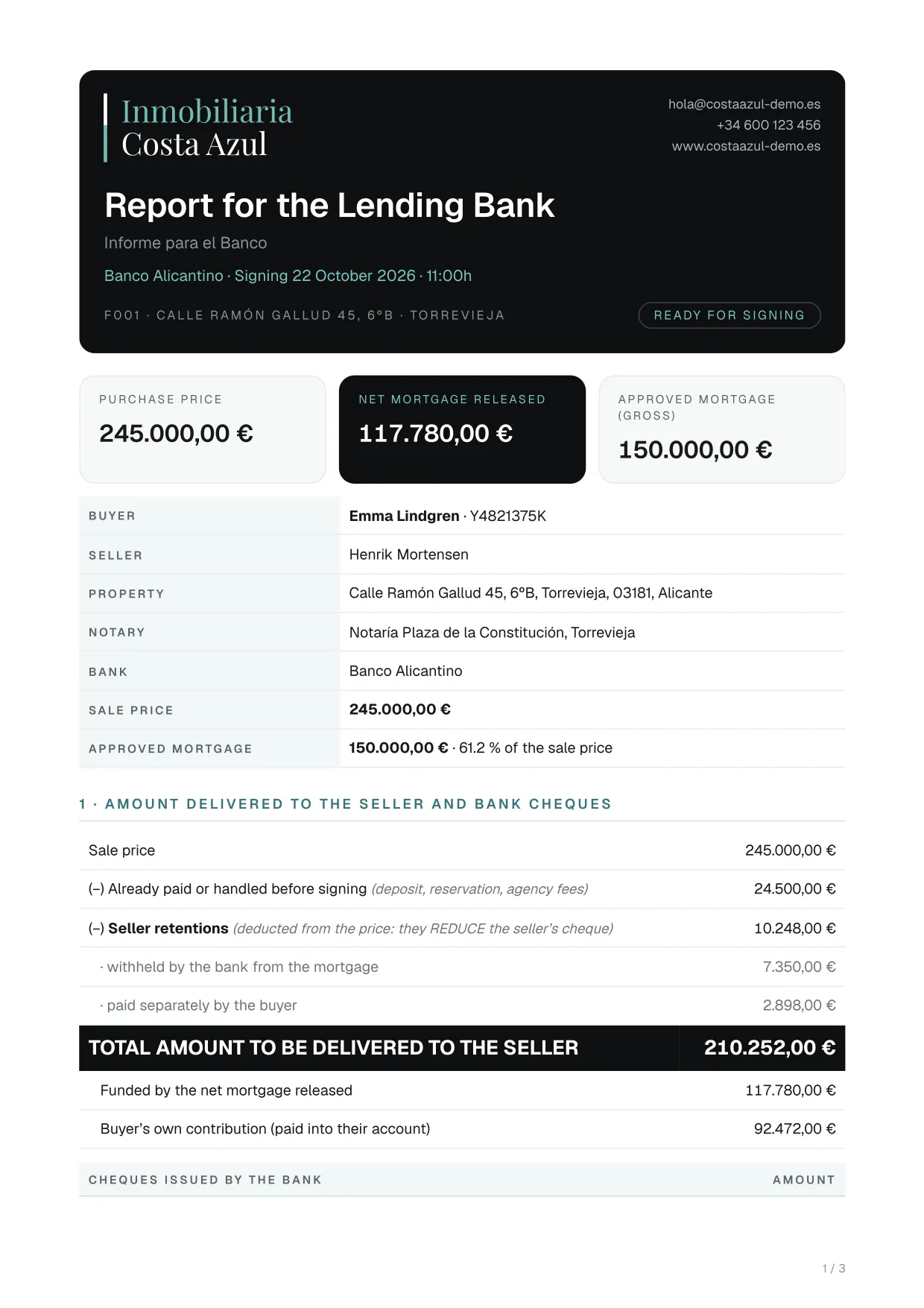
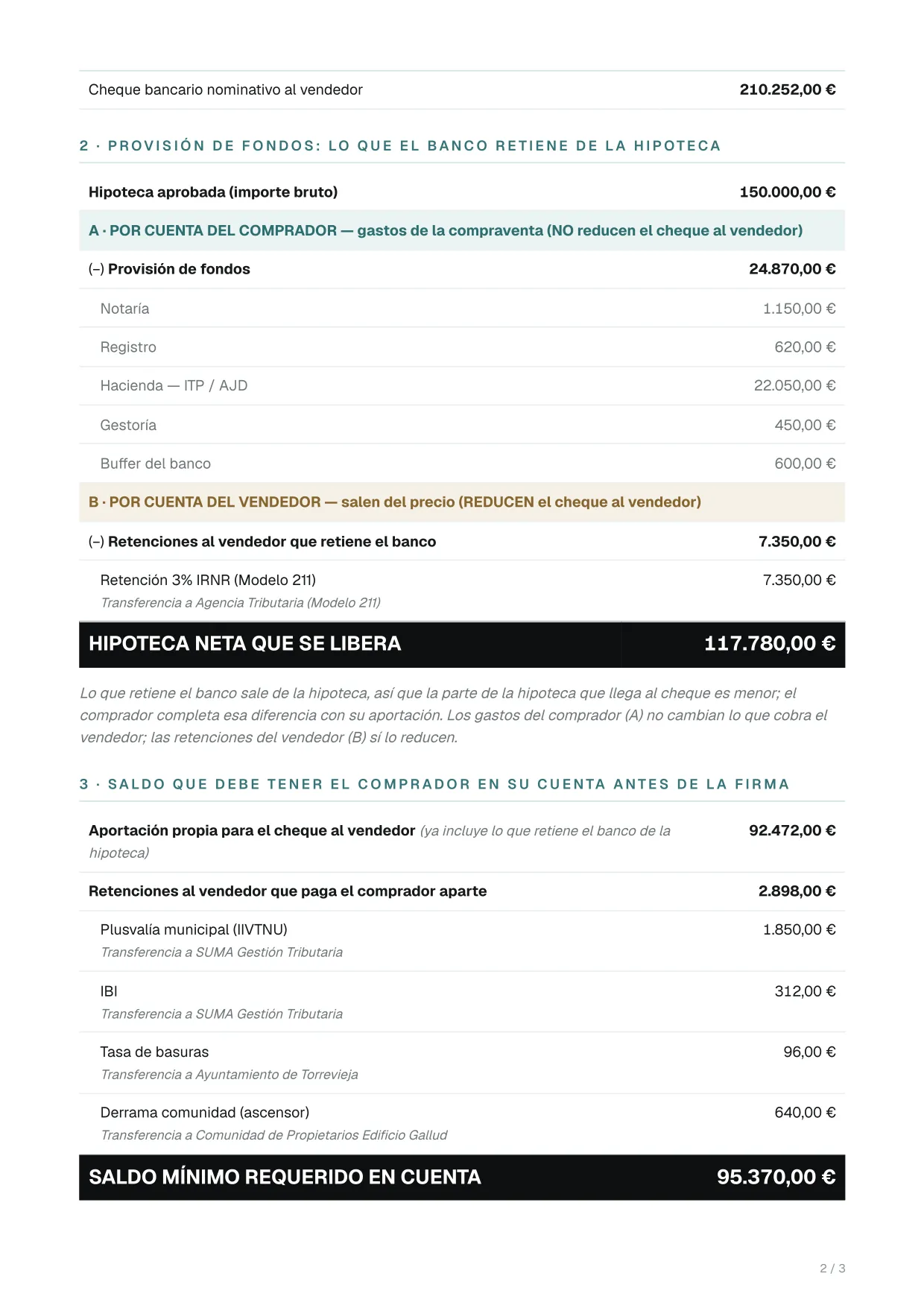
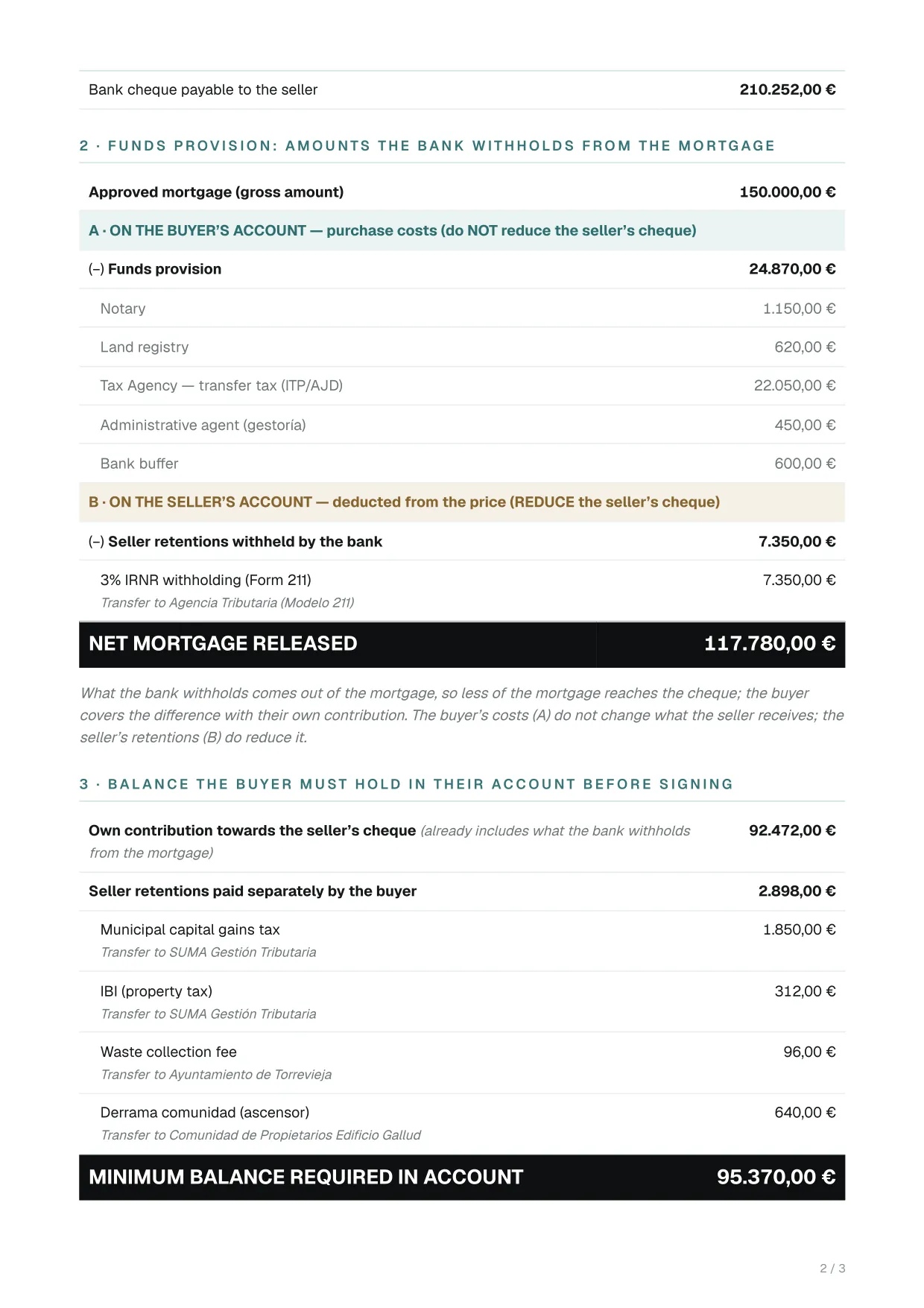
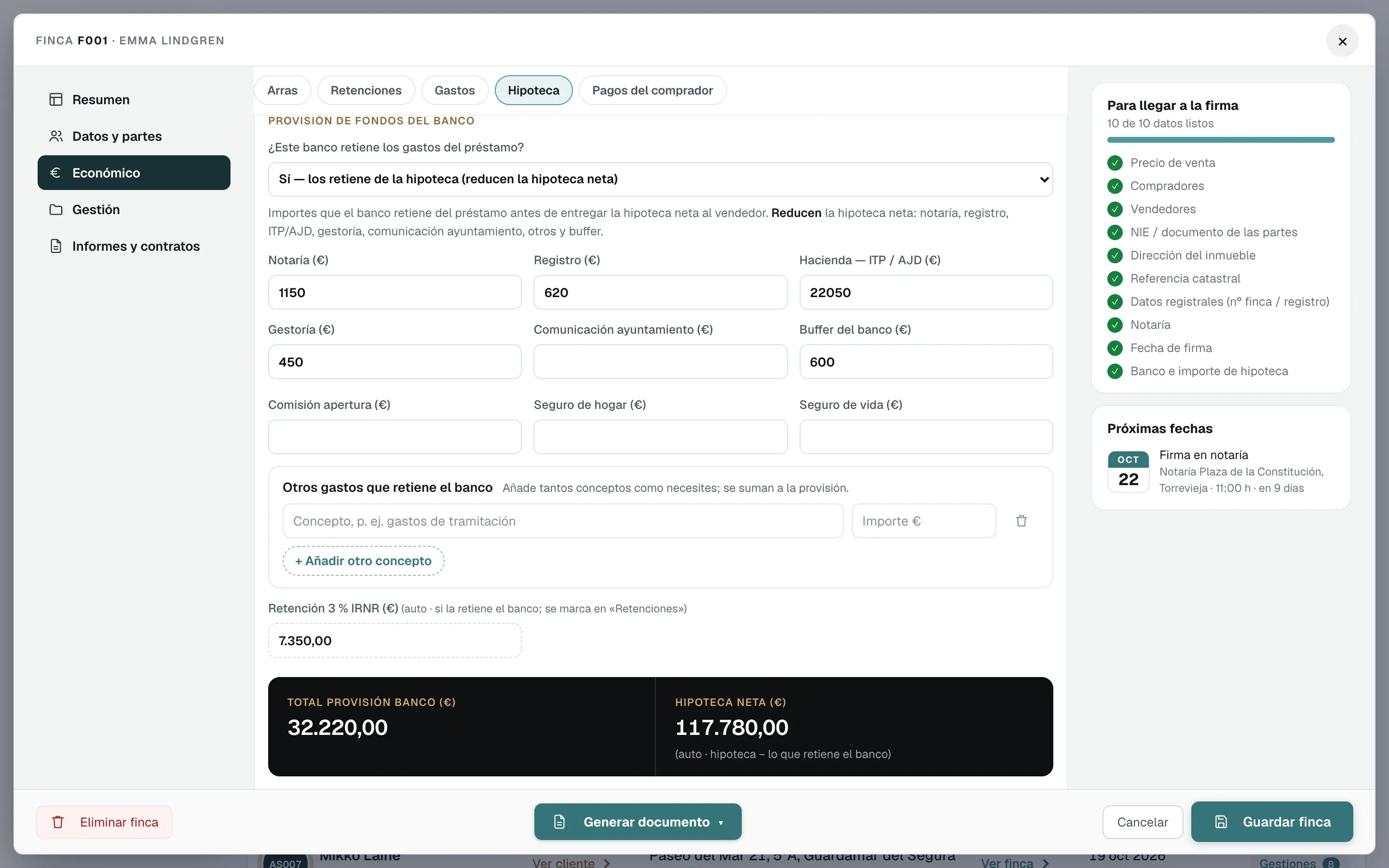
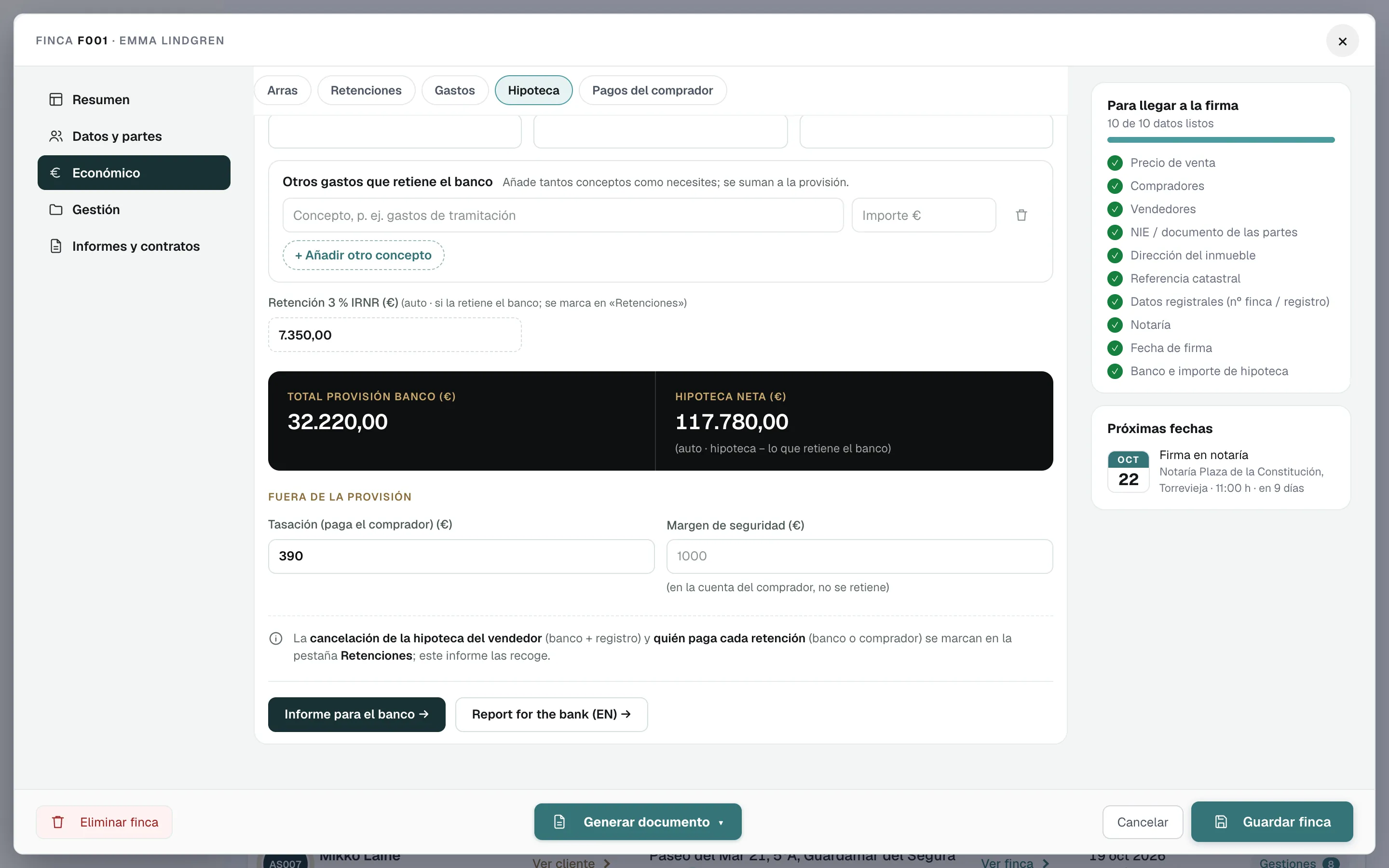
To agree the signing cheques and the funds provision with the bank. It is available when the property has a mortgage.

What it includes

  • Price, approved mortgage and the net mortgage released
  • Total amount for the seller and the cheques the bank issues, including the cancellation of the seller’s mortgage if there is one
  • Funds provision: what the bank withholds on behalf of the buyer and of the seller
  • The balance the buyer must hold in their account before signing
Who it is for
The lending bank, and the buyer
Languages
In Spanish or in English: two versions
Format
Opens ready to print or save as PDF
Where to find it (menus in Spanish)
Ficha de la finca (property file)Generar documento (generate document)Also in Económico › Hipoteca (financials › mortgage).

Example pages

Bank report (English): page 1 of 3, example made with a fictitious sale
Page 1 of 3
Bank report (English): page 2 of 3, example made with a fictitious sale
Page 2 of 3

Showing pages 1 and 2 of 3, from a fictitious sale. Click a page to see it full size.

After-sales

Client email after signing

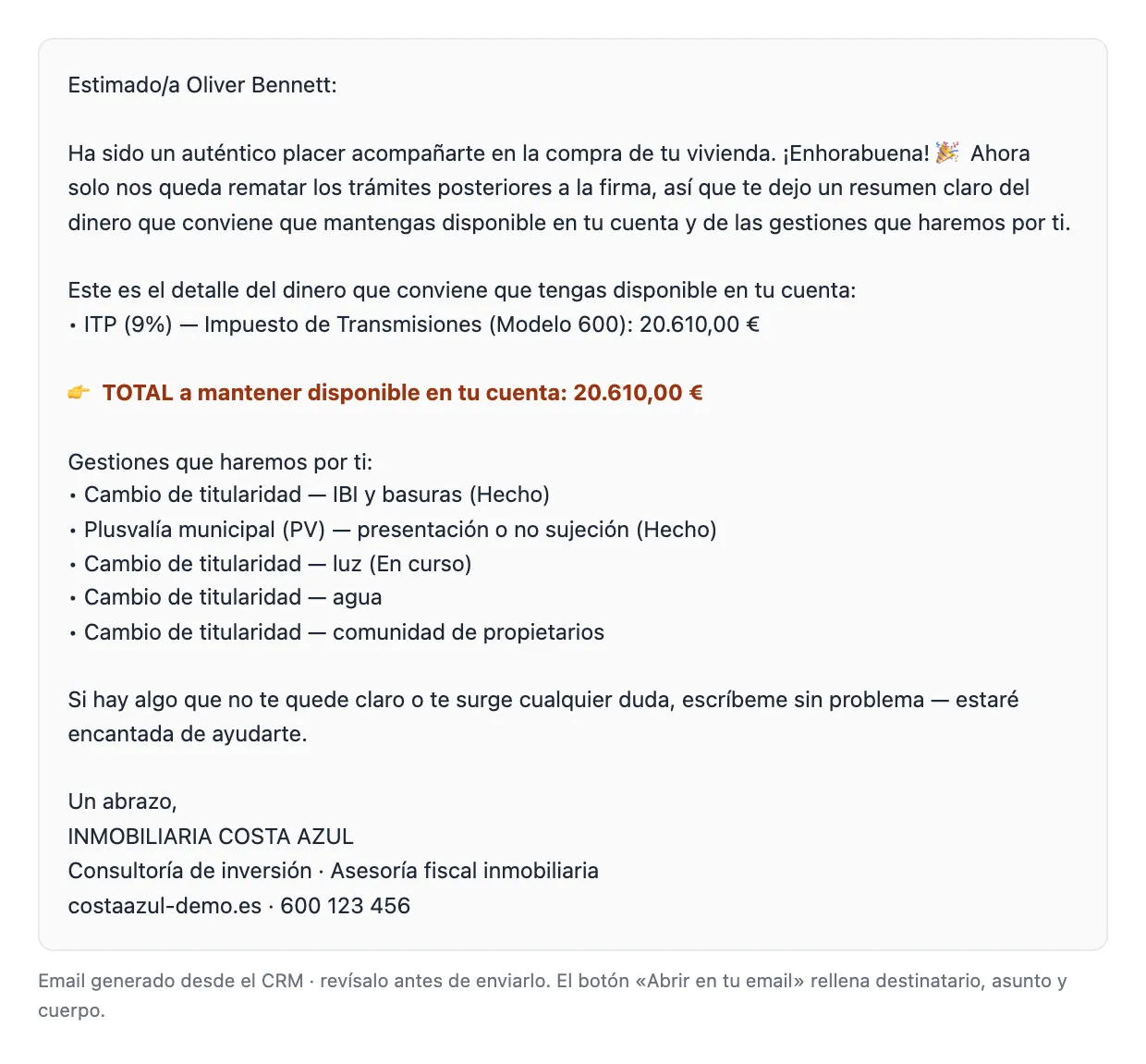
After signing, an email that tells the client what money to keep available and how each pending procedure is going.

What it includes

  • The money to keep in the account, such as transfer tax
  • The status of each procedure: changes of holder, plusvalía…
  • All of the client’s properties, if there are several
  • An opening and closing text, if you want one
Who it is for
The buyer
Languages
In Spanish, in English or in both
Format
Preview: copy the text, open it in your email with recipient and subject filled in, or print it
Where to find it (menus in Spanish)
Gestiones (tasks)Tarjeta de la finca (property card)The «Enviar al cliente un email con el estado de las gestiones» button (send the client an email with the status of each step).

Example

Client email after signing: email preview in the software, example made with a fictitious sale
Preview

Real email preview from the software, made with a fictitious sale and shown in Spanish. Click it to see it full size.

Tax services, Separate from the sale

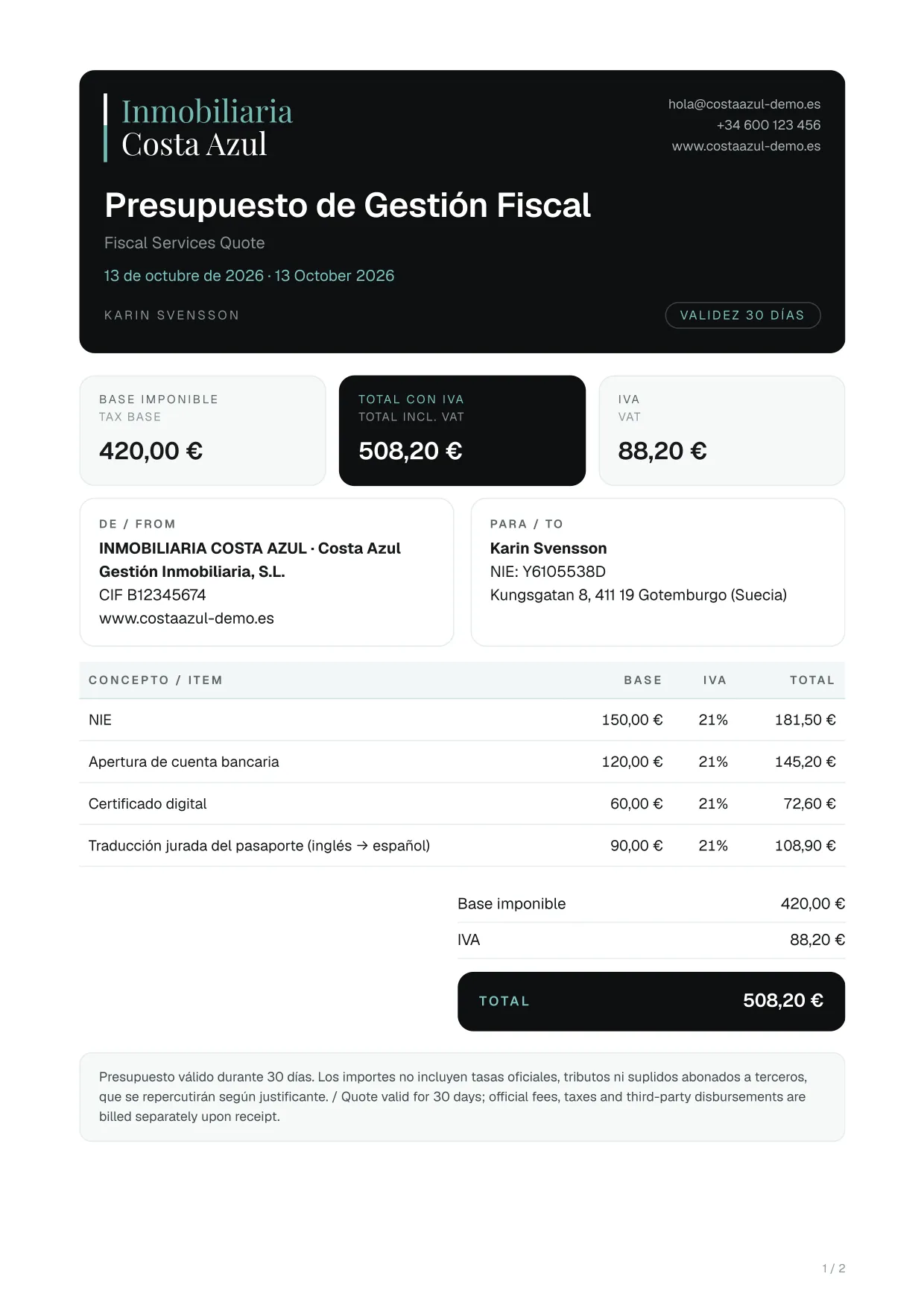
Tax services quote

A quote valid for 30 days for clients who hire individual tax procedures.

What it includes

  • Items such as NIE, bank account, digital certificate, Forms 210, 211, 600 and 720, plusvalía or local registration
  • Extra items written by hand
  • Base, VAT (21%, included or exempt) and total
  • A note that official fees and disbursements are not included
Who it is for
Clients who hire individual tax procedures
Languages
Headings and notes in Spanish and English; the items are in Spanish
Format
Opens ready to print or save as PDF
Where to find it (menus in Spanish)
Gestión Fiscal (tax services)Ficha del cliente (client file)Ver presupuesto (view quote)

Example pages

Tax services quote: page 1 of 2, example made with a fictitious sale
Page 1 of 2

Showing page 1 of 2, from a fictitious sale. Click a page to see it full size.

Tax services, Separate from the sale

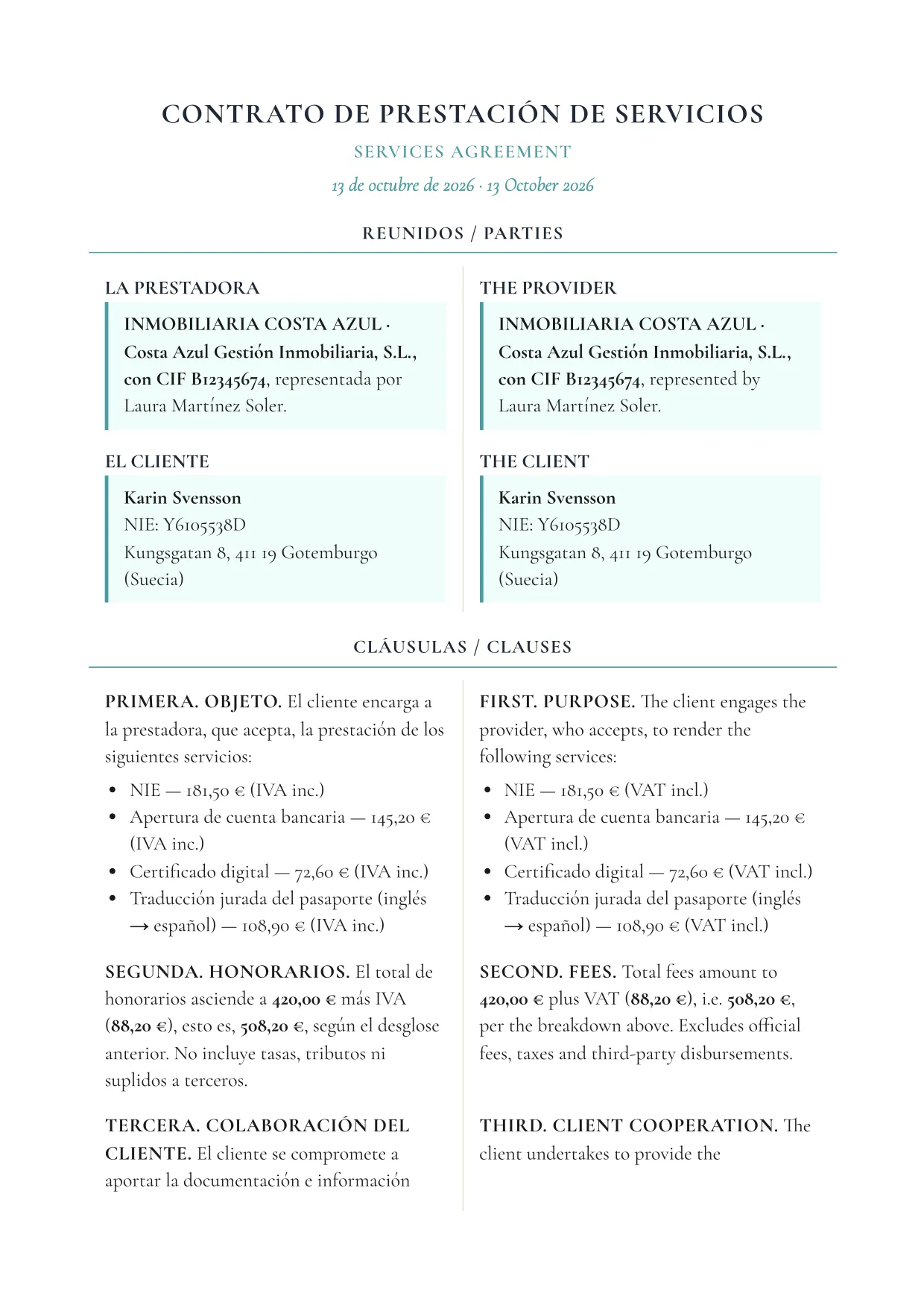
Tax services agreement

A short services agreement, with the list of procedures and their amounts.

What it includes

  • Purpose: each procedure with its amount
  • Total fees with VAT
  • Client cooperation, data protection and jurisdiction
  • Signatures of the firm and the client
Who it is for
Clients who hire individual tax procedures
Languages
Spanish and English in two columns; the list of procedures is in Spanish
Format
Opens ready to print or save as PDF
Where to find it (menus in Spanish)
Gestión Fiscal (tax services)Ficha del cliente (client file)Ver contrato de servicios (view services agreement)

Example pages

Tax services agreement: page 1 of 2, example made with a fictitious sale
Page 1 of 2
Tax services agreement: page 2 of 2, example made with a fictitious sale
Page 2 of 2

Showing pages 1 and 2 of 2, from a fictitious sale. Click a page to see it full size.

Tax services, Separate from the sale

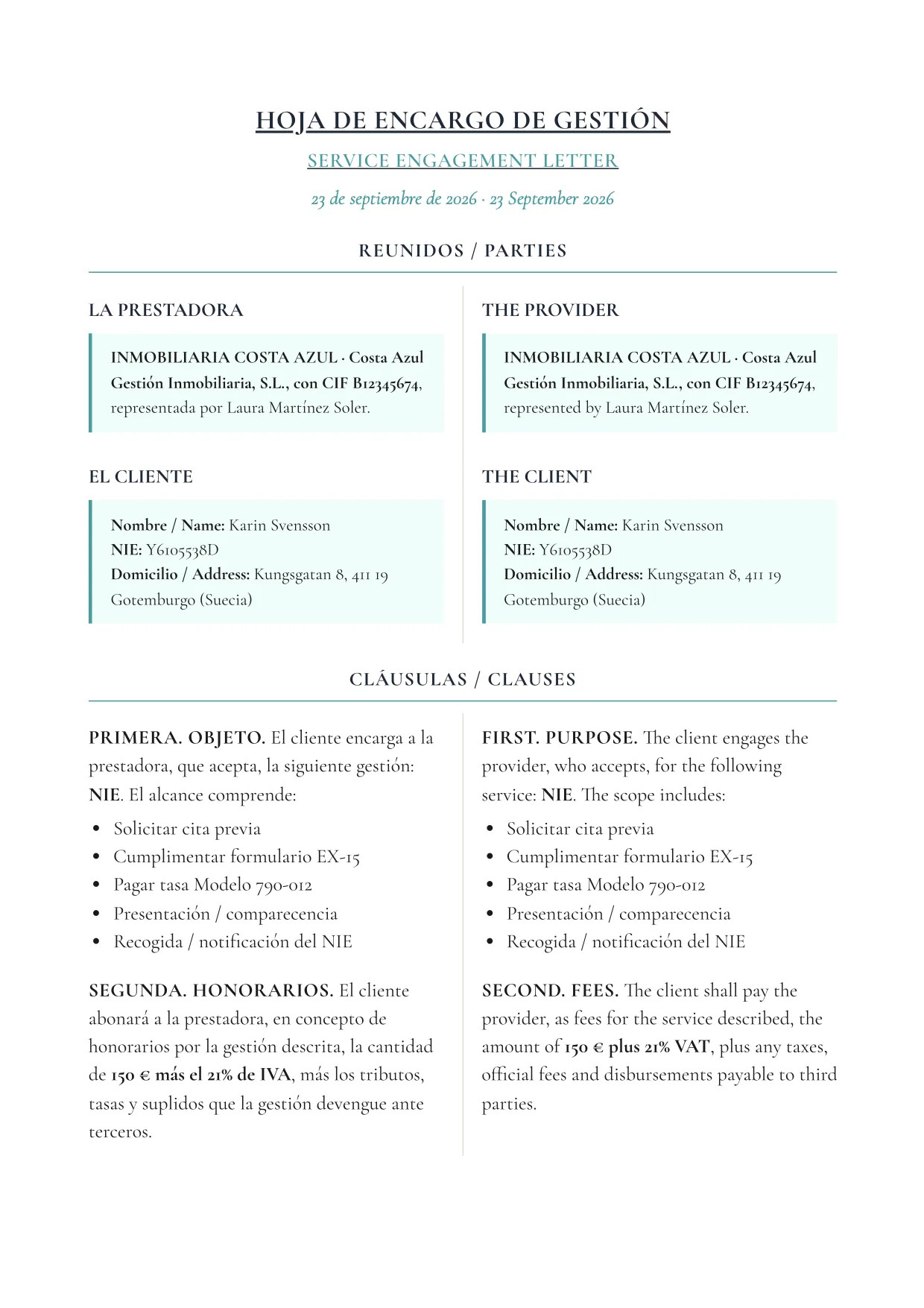
Engagement letter

The signed engagement for one specific procedure, such as an NIE or a Form 210.
What it includes

  • Purpose and scope, with the steps of that procedure
  • Fees and estimated timeframe
  • Client cooperation
  • Data protection and jurisdiction
Who it is for
Clients who hire individual tax procedures
Languages
Spanish and English in two columns; the steps of the procedure are in Spanish
Format
Opens ready to print or save as PDF
Where to find it (menus in Spanish)
Gestión Fiscal (tax services)Ficha del cliente (client file)Hoja de encargo (engagement letter)One button on each procedure.

Example pages

Engagement letter: page 1 of 2, example made with a fictitious sale
Page 1 of 2
Engagement letter: page 2 of 2, example made with a fictitious sale
Page 2 of 2

Showing pages 1 and 2 of 2, from a fictitious sale. Click a page to see it full size.

See all the documents on their own page

How it works

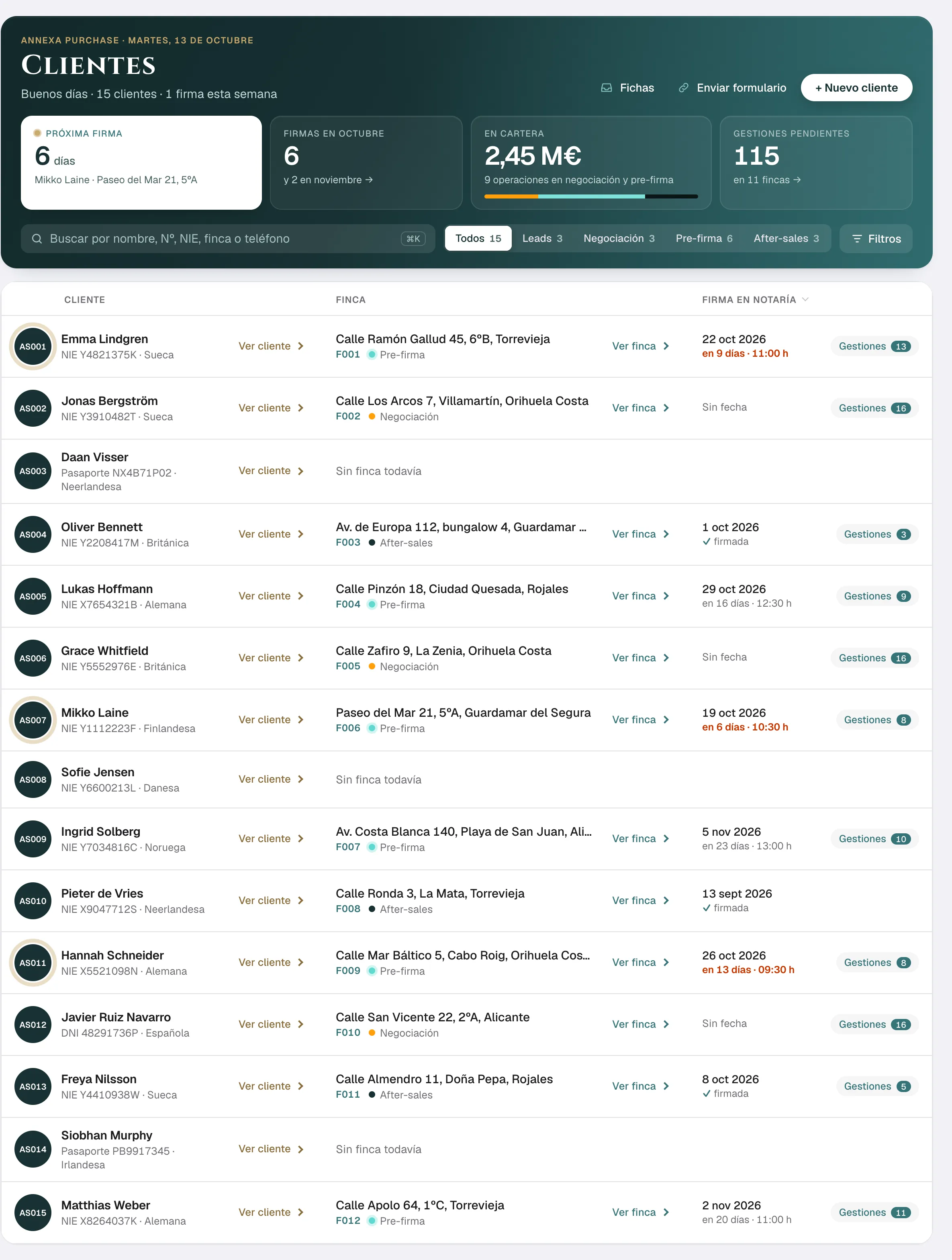
The whole team, all in one place

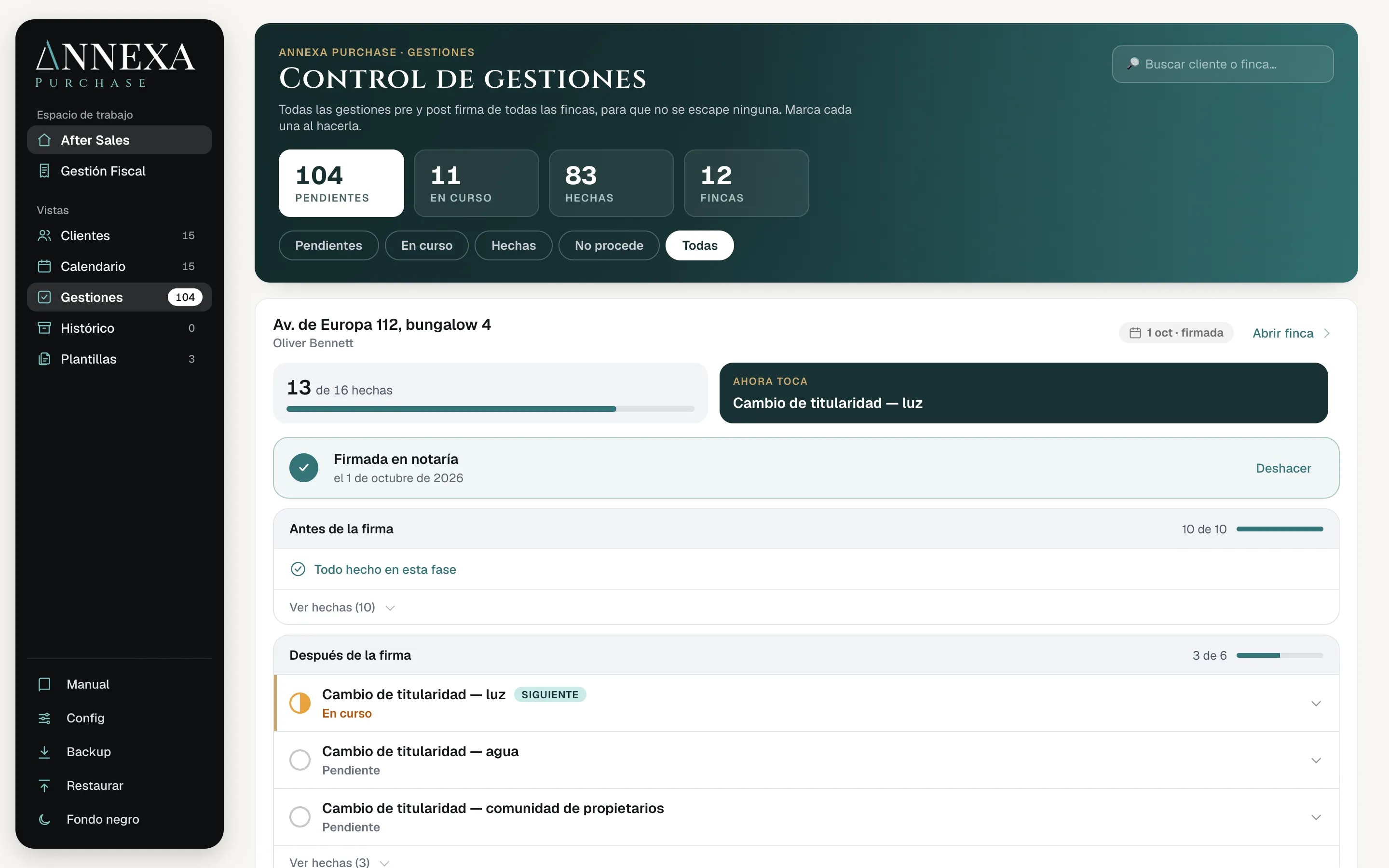
Who signs this week, what is missing and who is handling it. One click on the property and the whole sale is in front of you: documents, deposit, withholdings and tasks.

  • Search by name, NIE, property or phone
  • Filter by stage: leads, negotiation, pre-signing and after-sales
  • Signings coming up are flagged in red
Real screen from the software, with made-up clients.

Guided demo

See it from the inside, without giving your details

Six steps through real screens from the software, with a made-up sale. Choose how you work.

Client list with properties, stage and signing date

The signing-day cheque

Every euro, balanced before signing

Enter a sale and see how the money is split on signing day: the seller’s cheque, the cancellation of their mortgage, the 3% non-resident withholding and what the buyer puts in. Change a figure and everything is recalculated.

Sale details

Your sale, as a guide

On signing day

Handed over at signing

Cheque to the seller’s bankCancels their mortgage at the same signing
3% withholding (Form 211)Paid to the Tax Agency within a month of signing
Cheque to the sellerWhat they collect at the notary

From the mortgage

Buyer pays at signing

Purchase costs

Buyer’s own money

The seller receives in total

See it with a real sale
How it is calculated and what it leaves out

On signing day the price minus what has already been paid changes hands. Out of it come the 3% if the seller is not resident (price × 3%), the cheque that cancels the seller’s mortgage and, whatever is left, the cheque to the seller. Costs are the regional transfer tax (standard rate) or, on new builds, VAT and stamp duty (AJD), plus an estimate for notary, land registry and agency; if the bank withholds them, they come out of the mortgage and the buyer puts in more at signing.

It is a guide: it leaves out municipal capital-gains tax, IBI, community fees, professional fees, other withholdings and reduced transfer-tax rates. Each sale in Annexa includes all of that.

Sarah Kastlunger in her office in Torrevieja

Who is behind it

I built it for my own firm

Every sale was the same: the data in three places, the cheque recalculated by hand the night before signing and the feeling that something was slipping through.

Annexa is what I needed and could not find: one file per sale that knows about deposit contracts, the 3% non-resident withholding, the bank’s funds provision and what is still left to do after the keys are handed over.

Now I want people who work like us to use it.

Sarah KastlungerReal estate investment and tax consultant in Torrevieja

Plans and pricing

Two plans, no set-up fee

Each plan is per company and includes 3 users. If you also handle your client’s tax paperwork, whether you are an estate agency, an advisory firm or a law firm, choose Annexa + Tax. We do the set-up with you, and you have a 30-day guarantee from your first payment.

Annexa

For whoever runs the sale, from reservation to keys

€99/month + VAT

3 users included

Extra user: €15 a month + VAT

Or €990 a year + VAT (2 months free)

  • Unlimited sales
  • Deposit contract, cost summary and power of attorney in Spanish and English
  • 3% non-resident withholding, plusvalía and signing-day cheques
  • Bank and notary reports
  • Tasks before and after signing, with the team calendar
  • Document checklist for every property, showing what is missing
Choose Annexa

Annexa + Tax

With tax area

For estate agencies, advisory firms and law firms that also handle the client’s tax paperwork

€199/month + VAT

3 users included

Extra user: €20 a month + VAT

Or €1,990 a year + VAT (2 months free)

  • Everything in Annexa
  • Tax area: NIE, digital certificate, tax representation and Forms 210, 211, 600 and 720
  • Each task with its steps, deadlines and fees
  • Tax quote, contract and engagement letter in Spanish and English
Choose Annexa + Tax

You contract in 2 steps: your details and payment on Stripe. Contract languages: Spanish and English. The contract is stored and emailed to you. You can correct mistakes before paying by going back. Prices exclude VAT. Prefer to see it first? Book a demo or write to us at info@annexa.es.

See the full plan comparison

More than 10 users? We will prepare a proposal for you.

How you pay, in detail

Prices exclude VAT; applicable VAT is added (21% in mainland Spain and the Balearic Islands; no Spanish VAT if your company is in another EU country and gives us a valid VAT number). You choose monthly or yearly payment in advance; the yearly plan equals 2 months free. The subscription renews automatically and you can cancel at any time. 30-day guarantee from your first payment with a full refund. Your price stays the same for the first 12 months; after that it changes at most once a year, never above Spanish CPI, with two months’ notice. The software is in Spanish; documents come out in Spanish and English.

FAQ

What people ask us before the demo

Something else? Write to us and we will answer.

Write to us
Does Annexa replace my CRM?

No. Your CRM is for prospecting: listings, viewings and offers. Annexa starts when the buyer says yes and handles the reservation, the deposit contract, the signing and after-sales. They work together.

Is it only for international clients?

No. Annexa handles any property sale, with Spanish or international clients. For international ones it adds what usually complicates the closing: the 3% non-resident withholding, documents in English and the power of attorney to sign from abroad.

Does Annexa use Cadastre data?

Yes. Type the cadastral reference and Annexa brings in the public data of the property: address, postcode, use, built area and year of construction. You choose what goes into the file, and you get a link to its page on the official Cadastre website. The owner and the cadastral value are not public, so they still come from the IBI bill. For the land registry extract (nota simple) there is a direct link: it copies the reference and opens the official Land Registry website, where it is requested and paid. The Basque Country and Navarre have their own cadastre and are not included.

What if my buyer has no NIE yet?

Annexa shows that it is missing and tracks the process step by step: appointment, EX-15 form, 790-012 fee and collection. If the buyer lives abroad, they can get it online without travelling to Spain through the NIE service of Sarah’s firm: they sign a power of attorney before a notary online and a team of registered lawyers files it in Spain. See the NIE service (opens in a new tab, on sarahkaterina.com)

Can I try it before paying?

Yes. First we show it to you in a 30-minute demo with a sample sale. If you like what you see, we set it up with you on a video call. And from your first payment you have a 30-day guarantee: if it is not for you, we refund what you paid.

How do I pay?

By invoice. You choose monthly payment, or yearly payment in advance.

How is the price updated?

Your price stays the same for the first 12 months. After that it changes at most once a year, never above Spanish CPI, with two months’ notice.

Is there a lock-in?

Not on the monthly plan: tell us before your next payment and it will not renew. The yearly plan covers 12 months.

Does it work outside the Costa Blanca?

It was born in Alicante and Murcia. Transfer tax already adapts to each region; other regional particularities will come later.

Which languages are the documents in?

It depends on the document. Bilingual, with Spanish and English in the same document: deposit contract and its annexes, services agreement, tax representation agreement, seller’s cost summary, and power of attorney with its instructions. In Spanish or in English, as you choose: fee proposal and the notary and bank reports. The buyer’s cost summary comes bilingual or in English only, and client emails in Spanish, in English or in both. The commission invoice and the internal sheets are in Spanish. The software itself is in Spanish for now.

Where is my data?

We explain it in detail in the demo: which providers we use (database, servers, email and artificial intelligence) and where each one operates. We would rather tell you properly than promise what we cannot.

Who is behind Annexa?

Sarah Kastlunger, a real estate investment and tax consultant in Torrevieja. She built Annexa to close the sales of her own firm.

A bright office with a team meeting in a glass-walled room
Annexa

Ready to discover a new way of working?

We will show you in 30 minutes, with a sample sale.

Book a demo

Turn your phone sideways to see it bigger

Pinch with two fingers to zoom in and read it